Choosing the right ergonomic chair can transform your workday from painful to productive, yet most people purchase seating without understanding the critical design elements that make a chair truly supportive. Proper ergonomic chair design basics involve multiple interconnected components working together to support your body during extended sitting periods. Without these fundamental design principles, even expensive chairs can cause discomfort, fatigue, and long-term health issues. This guide breaks down exactly what makes an ergonomic chair function properly, helping you identify chairs that genuinely support your spine, distribute weight effectively, and promote healthy movement throughout your workday.
Poorly designed seating contributes to chronic back pain, reduced circulation, and decreased concentration that accumulates over months of daily use. A chair built with proper ergonomic chair design basics distributes your weight evenly, maintains healthy spinal alignment, and supports natural movement patterns. Whether you’re setting up a home office or outfitting a corporate workspace, understanding these fundamentals ensures you invest in seating that protects your musculoskeletal health and enhances daily productivity.
Seat Pan Design Fundamentals

Your seat pan forms the foundation of ergonomic support, directly influencing weight distribution, circulation, and overall comfort during extended sitting. A properly designed seat pan must balance adequate support surface area with natural leg movement, preventing pressure points that develop within minutes of sitting. When evaluating chairs, prioritize seat pan length as the most critical dimension—improper sizing creates immediate comfort problems regardless of other quality features.
Waterfall Edge Design for Circulation
Ergonomic chairs feature a distinctive waterfall front where the seat edge curves downward gradually rather than maintaining a sharp horizontal edge. This design creates at least a 0.5-inch gap between the seat front and the back of your knees, preventing compression of blood vessels and nerves that causes numbness and discomfort. The contoured surface distributes weight across your entire seating area rather than concentrating pressure on smaller contact points. Without this waterfall edge, the seat front catches behind your knees, restricting circulation and forcing you to sit too far forward on the chair.
High-Density Foam for Long-Term Support
Seat cushioning quality determines whether your chair provides lasting comfort or becomes uncomfortable within months. Low-density foam feels soft initially but compresses permanently under continuous use, losing supportive properties that cause hip and back fatigue throughout your workday. High-density foam alternatives maintain their shape and support for years, even during 60-120 minute sitting sessions. Test chairs for extended periods rather than brief showroom trials to accurately assess how cushioning performs under sustained pressure and body heat.
Height Adjustment Mechanisms That Work
Proper chair height enables correct positioning relative to your desk and monitor, making height adjustability a non-negotiable ergonomic requirement. The adjustment mechanism must allow modifications while you remain seated, enabling convenient real-time adjustments as tasks change throughout your day.
Pneumatic Systems for Instant Adjustments
Pneumatic height adjustment uses compressed gas cylinders to modify seat height smoothly while you stay seated, providing the convenience of spontaneous adjustments without interrupting your workflow. This continuous adjustability proves essential for shared chairs or anyone using height-adjustable desks. When properly adjusted, your knees should sit level with or slightly below hip level, with feet planted firmly flat on the ground—eliminating the need for footrests in most situations.
Achieving Proper Leg Positioning
The height adjustment controls should remain easily reachable and operable while seated, allowing spontaneous adjustments without disrupting your work. More importantly, the mechanism must hold securely at your selected height without gradual sinking, which would degrade your ergonomic positioning throughout the day. If your feet don’t rest flat on the floor with proper height adjustment, you likely need a chair with a greater height range or a footrest solution.
Lumbar Support Systems That Prevent Back Pain

Your lumbar region requires specialized support to maintain the spine’s natural S-shaped curve during seated work. Without adequate lumbar support, fatigue causes slouching that places harmful stress on spinal discs and supporting muscles.
Adjustable Support for Your Unique Spine
Ergonomic chairs must provide lumbar support that fills your lower back curve while maintaining contact throughout your full range of sitting positions. The best chairs offer both vertical positioning to align with your specific lumbar height and forward/backward adjustment for fine-tuning support depth. This adjustability proves essential in multi-user environments where different individuals require different support positioning.
Fixed vs. Adjustable Lumbar Support
Fixed-height lumbar supports work well when properly aligned with your lower back curvature in single-user environments. However, adjustable systems become necessary when multiple users share a chair or your needs vary across different tasks. Research consistently shows that proper lumbar support significantly reduces lower back discomfort and promotes healthier sitting postures during extended work sessions.
Backrest Design for Full Spinal Support
Beyond the lumbar region, your backrest must provide comprehensive support extending upward to shoulder-blade level. This extended coverage distributes spinal support across a larger muscular area, reducing fatigue accumulation in any single region.
Dynamic Reclining for Spinal Health
Chairs enabling reclining movement while maintaining proper back support provide significant advantages over fixed-back designs. Dynamic sitting involving subtle position changes helps maintain spinal health by preventing stiffness associated with static postures. Look for chairs that allow easy reclining, provide consistent support across different angles, and feature backs that track naturally with your movements. Locking your backrest in a single position restricts natural movements that promote circulation and muscle engagement.
Armrest Configuration for Shoulder Relief

Properly designed armrests reduce shoulder and neck strain during computer work but must offer specific adjustability features to accommodate different body sizes and work requirements.
Essential Armrest Adjustability Features
Your armrests must adjust in height to position forearms approximately parallel to the floor with relaxed shoulders. Height adjustment mechanisms should operate easily while seated, enabling spontaneous adjustments as tasks change. Width-adjustable armrests that move closer together or further apart provide additional customization across body sizes. The ability to move armrests completely out of the way for typing or mouse work represents an essential functional requirement often overlooked in cheaper chairs.
Five-Pedestal Base for Stability and Mobility
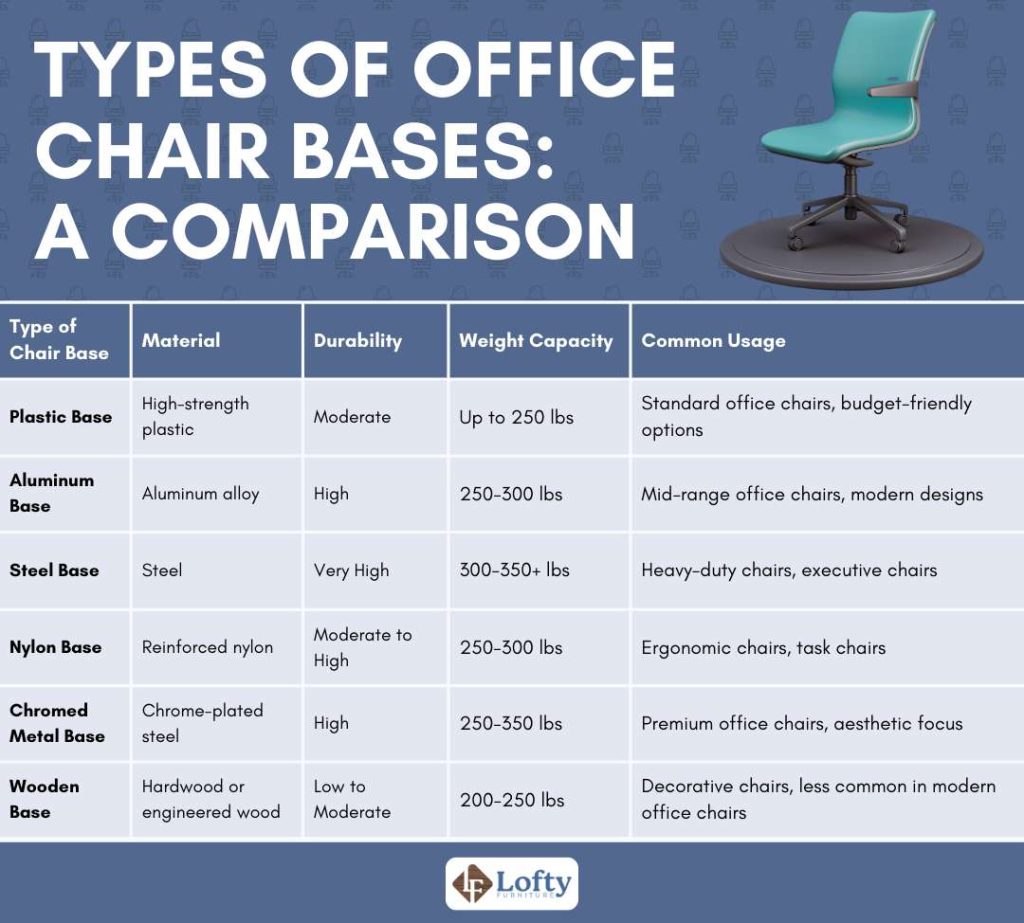
Chair stability depends fundamentally on base design, with five-pedestal bases providing superior stability compared to alternatives with fewer support points. The base connects directly to your sense of safety and confidence in the chair.
Floor-Specific Caster Selection
Caster selection must match your floor surface to ensure smooth rolling and appropriate floor protection. Carpeted floors require different caster types than hard surfaces—using the wrong type results in difficult rolling or floor damage. The caster wheels should glide freely without requiring excessive force while holding position securely when working. Regular maintenance including debris cleaning extends caster life and maintains optimal performance.
Upholstery Material Selection for Comfort
Chair coverings offer distinct advantages depending on your environment and personal preferences, directly affecting temperature regulation and long-term comfort.
Breathable Cloth vs. Easy-Clean Vinyl
Cloth upholstery provides natural breathability that reduces heat accumulation during extended sitting, offering comfortable tactile experience preferred by most users. However, cloth absorbs liquids and can retain stains. Vinyl coverings provide excellent spill resistance for healthcare or food service environments but lack breathability, causing heat and moisture buildup against your thighs. Consider your specific environment and usage patterns when selecting materials—high-traffic areas benefit from synthetic materials while private offices often accommodate cloth comfort advantages.
Space and Compatibility Requirements
Ergonomic chairs must function within your actual workspace, requiring consideration of interaction between chair features and typical workspace configurations.
Adequate Hip Room for Proper Positioning
Insufficient hip room forces you to sit too far forward on the seat pan, reducing thigh support and preventing proper contact with lumbar support. The seat pan should measure at least one inch wider than your hips on either side, providing comfortable clearance without compromising stability. Chairs for multi-user environments should accommodate the largest expected user while remaining comfortable for smaller individuals, typically requiring 20-24 inch seat widths with appropriate contouring.
Extended Testing Before Purchase
Proper evaluation of ergonomic chair comfort requires extended testing periods revealing how chairs perform under real-world conditions.
Real-World Testing Protocols
Brief showroom tests cannot reveal discomfort developing after 60-120 minutes of continuous sitting. Arrange extended trial periods spanning several days of actual work use to accurately assess long-term comfort. Testing should occur in your actual work environment, as temperature, humidity, and desk configuration affect comfort perception. When chairs will serve multiple users, evaluation should include representatives across the expected size range to confirm adjustment ranges accommodate everyone adequately.
Key Takeaways for Smart Chair Selection
Mastering ergonomic chair design basics transforms selection from overwhelming to informed. Prioritize properly sized seat pan with waterfall edge, effective lumbar support, appropriate height adjustability, and stable five-point base. Test chairs extensively in your actual work environment before purchasing—this investment prevents costly mistakes and ensures years of supportive service. Remember that the cheapest option often proves most expensive when replacement becomes necessary within a few years, while quality chairs from reputable manufacturers typically provide years of comfortable, health-protecting service.