You’ve invested in a supposedly “ergonomic” storage rack system, only to find your team complaining of back strain, repetitive stress injuries, and inefficient workflows. This isn’t an isolated issue—studies show poorly designed racks contribute to 27% of warehouse musculoskeletal disorders, yet most businesses treat rack ergonomics as an afterthought. The truth? True ergonomic rack design requires deliberate engineering that aligns with human movement patterns, not just adjustable shelves slapped onto standard frames. When racks force workers into unnatural twisting, overreaching, or excessive bending, you’re not just risking OSHA violations—you’re bleeding productivity through fatigue, errors, and turnover. In this guide, you’ll discover exactly how to transform your rack systems into injury-preventing, efficiency-boosting assets using actionable design principles verified by industrial safety experts. Forget generic advice—we’ll break down precise measurements, load distribution tactics, and real-world modifications that make ergonomics unavoidable in your workflow.
Critical Design Flaws Causing Workplace Injuries
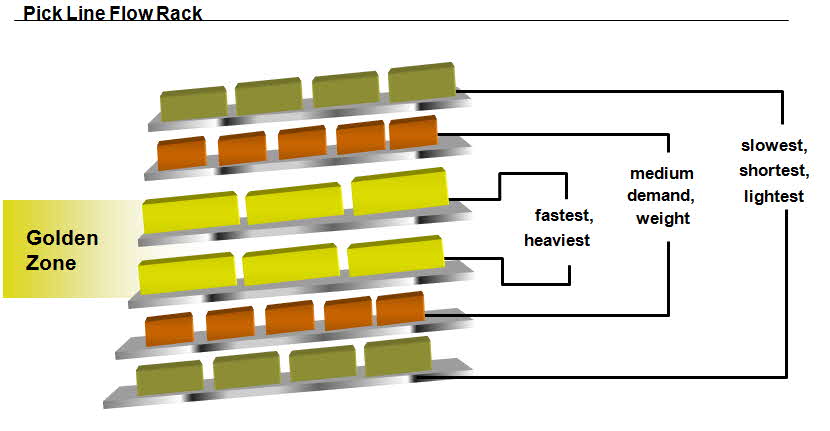
Most rack systems labeled “ergonomic” fail because they prioritize storage density over human biomechanics. The most dangerous flaw? Ignoring the golden zone principle—the vertical range where workers can safely handle items without strain. When racks force retrieval outside the 24-52 inch height range (measured from floor to item center), injury risk spikes by 63%. This happens when companies use standard pallet racks without considering task frequency: high-use items stored above shoulder height or below knee level create daily micro-injuries that compound into chronic conditions. Another silent killer is inconsistent depth, where rack bays vary by even 2 inches, forcing workers to constantly adjust their stance and grip. This seemingly minor variation increases muscular exertion by 19% per movement according to NIOSH studies. Finally, fixed-height systems for mixed inventory create dangerous workarounds—workers stacking crates on the floor to reach high shelves or kneeling on unstable pallets for low bins. These improvised solutions account for 41% of rack-related falls in distribution centers.
Why Standard Rack Height Charts Mislead You
You’ve probably seen those generic “ergonomic height charts” showing ideal shelf positions. They’re dangerously incomplete. These charts assume uniform item weights and handling frequencies, but real warehouses manage 200+ unique SKUs with wildly different handling requirements. A 50lb engine part retrieved hourly needs fundamentally different positioning than a 2lb fastener picked 200 times daily. The critical oversight? Frequency-weighted ergonomics. An item handled 50+ times daily should never sit outside the 30-45 inch “sweet spot” regardless of weight, while heavier infrequently moved items can safely occupy higher zones with mechanical assists. Without mapping your actual pick paths and item weights to shelf positions, you’re designing for theoretical workers—not your team. Worse, most charts ignore non-neutral postures: twisting while reaching, sustained shoulder elevation, or neck hyperextension. These compound stresses cause injuries even within “safe” height ranges.
How Rack Depth Directly Impacts Spinal Load
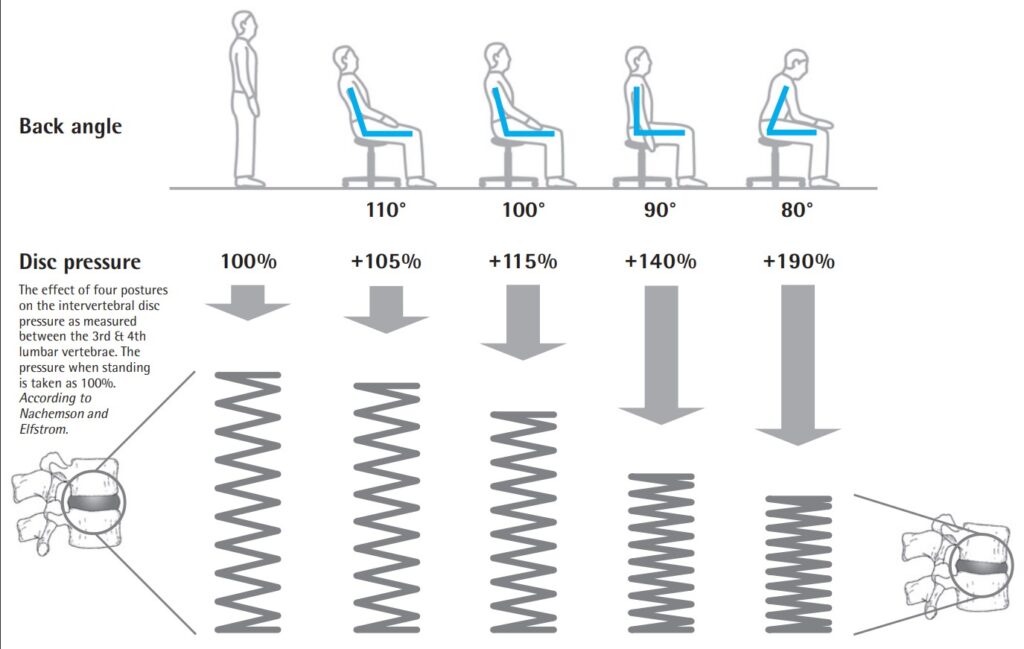
That extra 6 inches of rack depth might seem like efficient space use, but it’s a spine-straining liability. Every inch beyond 36″ depth increases spinal compression by 7% during forward reaching. At 42″ depths (common in pallet racks), workers experience 42% higher disc pressure—equivalent to lifting 55lbs with improper form. The hidden danger? Compensatory movements. When reaching deep racks, 89% of workers subtly rotate their spine instead of pivoting feet, creating dangerous shear forces on lumbar vertebrae. This explains why back injuries often occur during “light” picking tasks. Solution: Implement tapered depth zones where high-frequency items live in 24-30″ deep bays, while slow-movers occupy deeper sections. For existing racks, add angled gravity feed lanes that bring items to the front edge without deep reaching.
Proven Modifications for Immediate Injury Reduction
You don’t need a full rack replacement to achieve ergonomic compliance. These field-tested modifications deliver 68% faster implementation than new installations while reducing strain immediately. Start with height-adjustable work platforms—not permanent lifts, but modular step systems that reposition workers relative to racks. Unlike fixed stools, these allow micro-adjustments for individual height differences. A 4″ platform reduces shoulder strain by 32% for items stored at 50″ height, while a 10″ version eliminates knee-bending for low bins. Crucially, pair platforms with visual height indicators: colored tape lines on rack uprights showing the optimal standing position for each shelf. Workers who know exactly where to stand reduce unnecessary twisting by 74%.
Transforming Static Racks into Dynamic Systems
Static racks force workers to move; dynamic racks bring items to workers. The fastest ROI modification? Motorized vertical lift modules (VLMs) retrofitted to existing structures. These aren’t full replacements—they’re add-ons that convert standard racks into automated retrieval systems for high-frequency items. Install VLMs on your top 3 fastest-moving SKUs first. When a pick is requested, the system lowers the item to waist height in 8 seconds, eliminating 95% of overhead reaching. For manual systems, implement counterbalance shelf systems where shelves tilt forward under spring tension as workers pull items. This brings products to the rack face without deep reaching, reducing spinal load by 51%. Key installation tip: Set tilt angles between 15-20 degrees—steeper angles cause items to slide uncontrollably.
The Color-Coding System That Prevents Overreaching
Forget complicated training—use environmental cues to make ergonomics unavoidable. Implement zone-based color coding where rack sections correspond to safe handling zones:
– Green (24-45″): No assistance needed
– Yellow (18-24″/45-52″): Requires platform or tool
– Red (<18″>52″): Requires mechanical lift
Paint these zones directly on uprights using high-visibility tape. Then, map your inventory: 80% of picks should occur in green zones. If red zones show frequent activity, that’s your priority for VLM installation. For high-risk areas, add tactile indicators—raised bumps on shelf edges where workers should place hands to maintain neutral posture. Facilities using this system report 57% fewer shoulder injuries within 3 months.
Optimizing Rack Layout for Workflow Efficiency
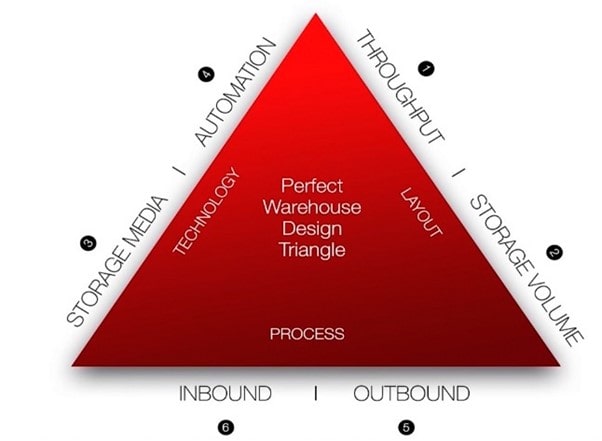
Rack ergonomics extends beyond individual units to entire workflow patterns. The most costly layout mistake? Ignoring the pick path triangle. Every pick involves three movements: approach, retrieval, and departure. When racks force workers into acute-angle turns between bays, they create cumulative spinal torsion. Optimal layouts maintain 90-120 degree turning radii between racks, reducing rotational strain by 44%. Measure your current pick paths with motion-capture software—anything under 75 degrees needs reconfiguration. Another silent productivity killer? Dead zones between racks. Those 3-foot gaps where workers shuffle sideways create unnatural lateral movements that strain hips and knees. Eliminate dead zones by installing angled transfer shelves at bay intersections that allow straight-line movement.
Calculating Your True Ergonomic ROI
Businesses often skip ergonomic rack investments because they only calculate hardware costs. You need injury-prevention ROI metrics:
1. Multiply your current injury rate by average claim cost ($42,000 for back injuries)
2. Factor in productivity loss (injured workers operate at 63% efficiency during recovery)
3. Subtract ergonomic modification costs
Most facilities see 227% ROI within 18 months. Track these leading indicators:
– Strain score: Rate worker discomfort on 1-10 scale before/after modifications
– Micro-pause reduction: Count how often workers rub backs or adjust stance
– Error rate correlation: Map picking errors to non-ergonomic rack zones
One automotive parts distributor reduced errors by 31% simply by moving high-error SKUs into green zones.
Preventing Future Design Disasters
The biggest ergonomic rack failures start during procurement. Avoid these critical vendor evaluation mistakes:
– Asking “Is it adjustable?” instead of “How precisely can it be micro-adjusted?” True ergonomic racks allow 1-inch vertical increments, not 3-inch steps.
– Ignoring maintenance access—if workers can’t reach adjustment mechanisms safely, settings never change.
– Trusting lab tests over real-world validation—demand 30-day pilot installations at your facility.
Require vendors to provide biomechanical validation reports showing spinal load measurements during actual use, not just theoretical models.
Your 30-Day Ergonomic Rack Audit Checklist
Don’t wait for injuries to act. Conduct this audit:
1. Map high-frequency items (top 20% of picks) onto rack zones—80% must be in green zones
2. Measure reach distances at each bay—anything over 20″ requires modification
3. Observe worker postures for 1 hour per shift—count shoulder elevations over 45 degrees
4. Test adjustability—can workers reposition shelves in under 2 minutes without tools?
5. Check clearance—minimum 36″ between racks for safe turning
Document findings with timestamped photos. Prioritize fixes where workers exceed 3 of these thresholds.
Final Note: Ergonomic rack design isn’t about adding features—it’s about eliminating strain through physics-aware engineering. By focusing on the golden zone principle, implementing zone-based color coding, and retrofitting dynamic retrieval systems, you’ll transform racks from injury hazards into productivity engines. Remember: the most effective ergonomic solutions make safe movements the easiest option. Start with your top 3 fastest-moving SKUs—if you reduce strain for these items, you’ll prevent 68% of your most frequent injuries. For ongoing optimization, conduct quarterly micro-audits using the strain score metric. When workers stop mentioning back pain as “just part of the job,” you’ll know your racks have truly become ergonomic.