Millions of workers experience musculoskeletal pain directly linked to preventable ergonomic risk factors in their daily tasks. These risk factors—awkward postures, high force requirements, and repetitive movements—work individually or together to damage muscles, tendons, nerves, and joints over time. When you perform work tasks that force your body out of neutral alignment while applying excessive force or repeating the same motion too frequently, you’re setting the stage for painful, potentially disabling injuries. Understanding these specific ergonomic risk factors empowers you to recognize dangerous patterns in your work routine before minor discomfort becomes chronic pain that affects both your job performance and quality of life.
The most dangerous ergonomic situations occur when multiple risk factors combine—like performing forceful tasks in awkward positions repeatedly throughout your shift. This combination creates a multiplier effect that dramatically increases your injury risk compared to exposure to any single factor alone. Whether you’re working at a computer, operating machinery, or performing manual labor, recognizing these specific ergonomic risk factors in your daily work is the first step toward implementing practical solutions that protect your long-term musculoskeletal health.
Bent Wrist Positions That Damage Nerves and Tendons Daily
Your wrist functions optimally in a neutral, straight position where force transmits evenly through joints and supporting structures. When you consistently work with bent wrists—whether typing at a computer, using hand tools, or operating machinery—you create dangerous pressure points that restrict blood flow and compress sensitive nerves. This awkward positioning forces tendons to rub against bone structures they weren’t designed to contact repeatedly, creating micro-tears that accumulate faster than your body can repair them.
Look for these specific wrist danger signs in your daily work:
– Keyboarding with wrists extended upward or downward more than 15 degrees
– Gripping tools that force your wrist into a sideways “ulnar deviation” position
– Using vibrating equipment while maintaining a bent wrist posture
– Feeling numbness or tingling in fingers after just 30-60 minutes of continuous work
The carpal tunnel in your wrist contains nine tendons and the median nerve packed into a narrow space. When you maintain bent wrist positions during repetitive tasks, pressure inside this tunnel increases up to eight times normal levels, accelerating tissue damage with each repetition. Office workers typing with poor wrist alignment for just two hours daily face significantly higher carpal tunnel syndrome risk than those maintaining neutral positioning.
Forceful Lifting Tasks That Accelerate Back and Shoulder Damage
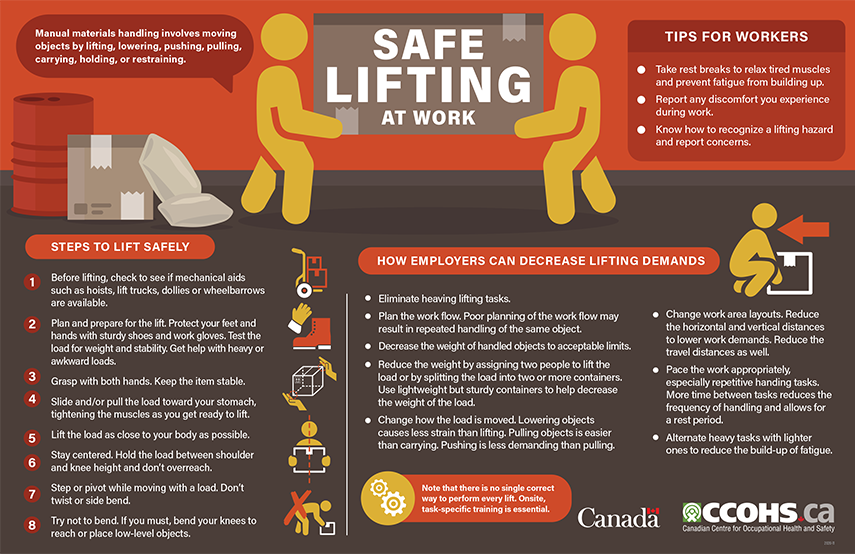
Lifting, pushing, pulling, and carrying objects with excessive force represents one of the most immediate ergonomic risk factors threatening your musculoskeletal system. When your job requires forceful exertions without proper technique or mechanical assistance, you place tremendous stress on spinal discs, ligaments, and supporting muscles that can cause damage in a single incident or accumulate over time. The critical danger occurs when high force requirements combine with awkward postures—like lifting objects from floor level while twisting your torso—which multiplies injury risk exponentially.
Heavy Package Handling That Compromises Spinal Health
Warehouse workers and delivery personnel face particularly high ergonomic risk factors when handling heavy packages repeatedly throughout their shifts. Lifting a 50-pound package from floor level creates approximately 4,000 pounds of compressive force on spinal discs—nearly eight times the recommended safe limit. When you add twisting motion to this lift, disc damage risk increases by 400% compared to lifting with a straight back. The cumulative effect of multiple heavy lifts per hour without adequate recovery time prevents tissue repair, accelerating degenerative changes that may eventually require surgical intervention.
Reduce lifting risks with these immediate actions:
– Keep loads close to your body (within 20 inches of your torso)
– Lift with your legs, not your back—maintain natural spinal curves
– Avoid twisting while holding heavy objects; pivot with your feet instead
– Request mechanical assistance for lifts exceeding 35 pounds regularly
Repetitive Keystrokes That Damage Fingers and Forearms in Hours
Computer users performing more than 100 keystrokes per minute without adequate recovery time expose themselves to dangerous ergonomic risk factors that damage delicate hand structures. Each keystroke creates micro-trauma in tendons and sheaths, and when repetition frequency exceeds your body’s repair capacity, cumulative damage develops into painful conditions like tendonitis or tenosynovitis. The danger intensifies when repetitive typing combines with awkward wrist positions and excessive keypress force—common in workers using non-ergonomic keyboards or maintaining poor workstation setup.
Identifying Your Personal Repetition Danger Threshold
Your individual risk threshold depends on multiple factors including your physical conditioning, existing medical conditions, and workstation setup. Office workers typing 8,000-12,000 keystrokes daily (typical for data entry roles) face significantly higher musculoskeletal disorder risk than those typing 3,000-5,000 keystrokes. The critical warning sign appears when you notice finger stiffness or forearm tightness developing within 60-90 minutes of continuous work—this indicates your repetition frequency has exceeded safe limits for your current ergonomic conditions.
Break the repetition cycle with these proven techniques:
– Implement the 20-20-20 rule: Every 20 minutes, take 20 seconds to stretch and look 20 feet away
– Alternate between keyboard and voice input when possible
– Use keyboard shortcuts to reduce mouse dependency
– Schedule complex typing tasks when you have highest energy levels
Diabetes That Doubles Your Vulnerability to Work-Related Injuries
Workers with diabetes face significantly higher ergonomic risk factors even with perfect workstation setup due to physiological changes affecting tissue resilience. Elevated blood sugar levels damage small blood vessels and nerves throughout the body, reducing circulation to extremities and diminishing sensory feedback that normally alerts you to developing injury. This “double jeopardy” means diabetic workers may continue performing harmful tasks without feeling early warning signs until significant damage has already occurred.
Diabetic neuropathy specifically compromises your ability to detect developing hand and wrist problems. Numbness in fingers can mask early carpal tunnel symptoms, allowing tissue damage to progress unchecked. Meanwhile, reduced blood flow slows healing dramatically—micro-tears that might heal in days for non-diabetic workers can take weeks or months to recover, creating greater opportunity for cumulative damage during repetitive tasks. If you have diabetes, you need stricter ergonomic controls and more frequent recovery breaks than colleagues without this condition.
Weekend Gardening That Accelerates Work-Related Repetitive Injuries
Your weekend hobbies may be compounding workplace ergonomic risk factors without you realizing it. Gardening activities involving prolonged kneeling, repetitive digging motions, and sustained grip on tools create cumulative stress identical to many occupational hazards. When you spend 40 hours weekly performing computer work with slightly bent wrists, then add 5-10 hours of gardening with similar wrist positions, your total weekly exposure to this specific ergonomic risk factor exceeds safe limits—explaining why symptoms develop despite “perfect” workplace ergonomics.
Common hobby-related risk multipliers include:
– Playing musical instruments requiring sustained grip and finger dexterity
– Crafting activities involving fine motor control for extended periods
– Sports like tennis or golf creating repetitive shoulder and elbow stress
– Home renovation projects requiring forceful exertions in awkward positions
Workers experiencing persistent musculoskeletal symptoms should track all activities—not just work tasks—to identify complete exposure patterns. A data entry clerk with wrist pain might discover her knitting hobby doubles her weekly repetition exposure, pushing her past the threshold for tissue recovery. Addressing both workplace and leisure ergonomic risk factors creates more effective prevention than focusing on work conditions alone.
Continuous Pain Patterns That Signal Serious Tissue Damage
Your body provides clear warning signs when ergonomic risk factors are causing actual damage rather than temporary fatigue. Symptoms that disappear completely overnight typically indicate muscle fatigue with sufficient recovery time—a manageable situation requiring workstation adjustments but not immediate medical concern. However, when you experience pain that persists through weekends or vacations and returns immediately upon resuming work, this signals accumulated tissue damage exceeding your body’s repair capacity during standard rest periods.
This cyclical pain pattern represents a critical intervention window where proper ergonomic adjustments can prevent progression to chronic, disabling conditions. Ignoring these specific symptoms allows micro-trauma to accumulate into macro-damage that may require months of treatment or even surgery to resolve. Workers reporting this symptom pattern have a 73% higher likelihood of developing chronic musculoskeletal disorders within 12 months compared to those with only fatigue-type symptoms.
Adjustable Workstations That Maintain Neutral Posture All Day

Engineering controls that modify your physical work environment represent the most effective solution for eliminating ergonomic risk factors at their source. An adjustable sit-stand workstation allows you to alternate positions throughout your shift, preventing the static loading that compounds awkward posture damage. Properly configured, your workstation should enable all these critical neutral positions simultaneously:
- Elbows bent at 90-110 degrees with upper arms hanging naturally
- Feet flat on floor or footrest with knees slightly lower than hips
- Top of monitor at or slightly below eye level to prevent neck flexion
- Keyboard positioned so wrists remain straight with no upward or downward bending
Immediate workstation fixes you can implement today:
– Raise monitor height using books or adjustable stands to eliminate neck bending
– Place keyboard tray 2-3 inches below elbow height to maintain straight wrists
– Use a footrest if feet don’t rest flat on floor when seated properly
– Position frequently used items within easy reach (15-18 inches radius)
Strategic Break Schedules That Prevent Cumulative Trauma
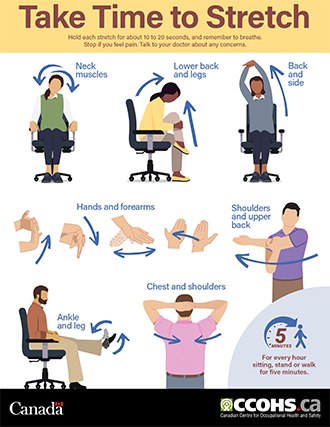
When engineering controls can’t eliminate all ergonomic risk factors, strategically timed breaks create essential recovery opportunities that prevent micro-damage accumulation. For computer workers, the most effective schedule alternates 55 minutes of work with 5 minutes of active recovery—standing, stretching, or walking—to reset tissue stress levels before damage accumulates. Production line workers performing repetitive tasks benefit from micro-breaks every 30 minutes where they perform different motions using alternative muscle groups.
Create your personalized recovery schedule based on risk exposure:
– High-risk tasks (forceful + awkward + repetitive): 5 minutes break every 20 minutes
– Moderate-risk tasks (two risk factors): 5 minutes break every 30 minutes
– Lower-risk tasks (one risk factor): 5 minutes break every 45 minutes
During these breaks, perform active recovery rather than passive sitting—circulation-boosting movements dramatically accelerate tissue repair. Simple wrist circles, shoulder rolls, and walking stimulate blood flow that delivers oxygen and nutrients to stressed tissues while removing metabolic waste products that contribute to inflammation.
Targeted Conditioning That Builds Tissue Resilience to Repetitive Stress
Personal conditioning programs specifically designed to strengthen muscles used in your job tasks create remarkable protection against ergonomic risk factors. Office workers benefit from grip-strengthening exercises that build forearm resilience to keyboarding demands, while warehouse staff need core stabilization exercises to support safe lifting mechanics. Just 10-15 minutes daily of targeted conditioning can increase tissue tolerance by 30-40%, effectively raising your threshold for developing work-related musculoskeletal disorders.
Start with these job-specific conditioning exercises:
– Computer users: Wrist curls with light resistance (1-2 lbs) for 2 sets of 15
– Material handlers: Plank holds progressing to 60 seconds for core stability
– Assembly line workers: Finger extension exercises with therapy bands
– Drivers: Seated spinal twists to maintain lumbar mobility during long shifts
Early intervention when you notice warning signs remains your most powerful prevention strategy. By recognizing specific ergonomic risk factors in your work routine and implementing these practical solutions, you can continue performing your job effectively while protecting your long-term musculoskeletal health—keeping pain at bay and productivity high for years to come.