Do you experience aching or sharp pain in your elbow after hours at your desk? You’re not alone. Millions of office workers struggle with elbow discomfort directly tied to poor workstation setup. When your mouse position forces your elbow into unnatural angles or your chair height creates excessive strain, the result is often persistent elbow pain that affects both work performance and daily life. This article reveals specific ergonomic adjustments you can make today to alleviate and prevent elbow pain without expensive equipment or drastic changes to your routine.
Unlike generic advice about “taking breaks,” we’ll focus on precise, measurable adjustments you can implement immediately. By the end of this guide, you’ll understand exactly how to position your keyboard, adjust your chair height, and modify your mouse technique to eliminate the root causes of your elbow discomfort. These science-backed strategies address the specific biomechanical stresses that lead to common conditions like tennis elbow and cubital tunnel syndrome in office environments.
Why Your Standard Office Chair Causes Elbow Strain
Most standard office chairs force your elbows into positions that create cumulative stress on tendons and nerves. When your chair is too high, you compensate by lowering your shoulders and bending your elbows beyond the optimal 90-110 degree range, straining the medial epicondyle. Too low, and you reach upward, creating tension in the lateral tendons. The precise angle matters more than most realize—just 15 degrees outside the ideal range can double the stress on elbow structures during repetitive tasks.
How to Measure Your Perfect Chair Height for Elbow Relief
Forget guessing—use this foolproof measurement method to determine your exact chair height:
- Sit with your back against the chair backrest, feet flat on the floor
- Place your hands on an imaginary keyboard with fingers relaxed
- Check your elbow angle using a smartphone angle app—aim for 95-105 degrees
- Adjust chair height in 1cm increments until you hit the sweet spot
- Verify that your upper arms hang naturally without shoulder shrugging
This precise measurement prevents the subtle misalignments that cause chronic pain. Many workers unknowingly sit with elbows at 80 degrees (too bent) or 120 degrees (too straight), both of which dramatically increase tendon stress during typing.
Why Armrests Often Make Elbow Pain Worse
Contrary to popular belief, standard chair armrests frequently contribute to elbow problems rather than solving them. When armrests are too high, they force your shoulders into elevation, creating tension that travels down to the elbow tendons. Too low, and you lean to one side, creating uneven loading. The worst offender? Fixed-width armrests that don’t accommodate individual shoulder widths, forcing unnatural elbow positioning.
Keyboard and Mouse Positioning That Eliminates Elbow Stress

The position of your input devices creates more elbow strain than your chair in many cases. Most workers position their mouse too far to the side, forcing constant shoulder rotation that transfers stress to the elbow joint. Similarly, keyboard height that requires wrist extension creates a chain reaction of compensatory movements that ultimately strain elbow tendons.
The 3-Finger Test for Proper Mouse Position
This simple assessment reveals whether your mouse placement is causing elbow strain:
- Rest your hand in a relaxed position over your mouse
- Place three fingers vertically along your forearm from elbow to wrist
- Your mouse should sit directly under where your middle finger lands
- If your hand must stretch horizontally to reach the mouse, you’re straining tendons
Move your mouse closer to your body—ideally within 5-7cm of your keyboard’s edge. This simple adjustment reduces the shoulder rotation that contributes to lateral elbow pain by up to 40% according to ergonomic studies.
Vertical Mouse vs. Traditional: Which Actually Helps Elbow Pain?
Many workers switch to vertical mice hoping for elbow pain relief, but improper implementation can worsen the problem. The key difference lies in forearm rotation: traditional mice force your forearm into pronation (palm down), straining the common extensor tendon, while vertical mice maintain a neutral “handshake” position that reduces this stress.
However, vertical mice require specific setup:
– Keep your elbow at 100-110 degrees (slightly more open than typing position)
– Position the mouse so your thumb points toward your monitor
– Avoid gripping tightly—use a light touch with finger movement only
– Start with 30-minute intervals, gradually increasing as your muscles adapt
Workers who make this transition correctly report 60-70% reduction in lateral elbow pain within 4-6 weeks, while those who skip the adaptation period often experience new discomfort.
Desk Height Problems That Trigger Cubital Tunnel Syndrome

Cubital tunnel syndrome—numbness and tingling in the ring and pinky fingers—often stems from desk height issues rather than elbow problems alone. When your desk is too high, you compensate by bending your elbow beyond 90 degrees to reach the keyboard, compressing the ulnar nerve. Too low, and you rest your elbow on the desk edge, creating direct pressure on the nerve.
The Notebook Trick for Immediate Cubital Nerve Relief
When you feel that familiar tingling in your ring and pinky fingers, implement this quick fix:
- Place a standard spiral notebook horizontally under your forearms
- Position it so your elbows rest on the notebook’s spine
- Adjust until your elbows form a 100-degree angle
- Type with forearms supported but wrists floating freely
This creates a padded surface that prevents direct pressure on the ulnar nerve while maintaining proper alignment. The notebook’s thickness (typically 2-3cm) provides just enough elevation to relieve nerve compression without forcing your shoulders upward.
How to Identify Dangerous Desk Edge Pressure Points
Examine your desk edge for these warning signs of cubital nerve compression:
- Visible indentations on your forearm skin after working
- Redness or warmth along the inner elbow after sitting
- Numbness that appears within 20 minutes of starting work
- A “funny bone” sensation when leaning on the desk
If you notice any of these, add padding immediately using a rolled towel or specialized elbow guard. The padding should be firm enough to distribute pressure but soft enough to compress slightly under your weight—memory foam works best.
Monitor Position’s Hidden Impact on Elbow Health
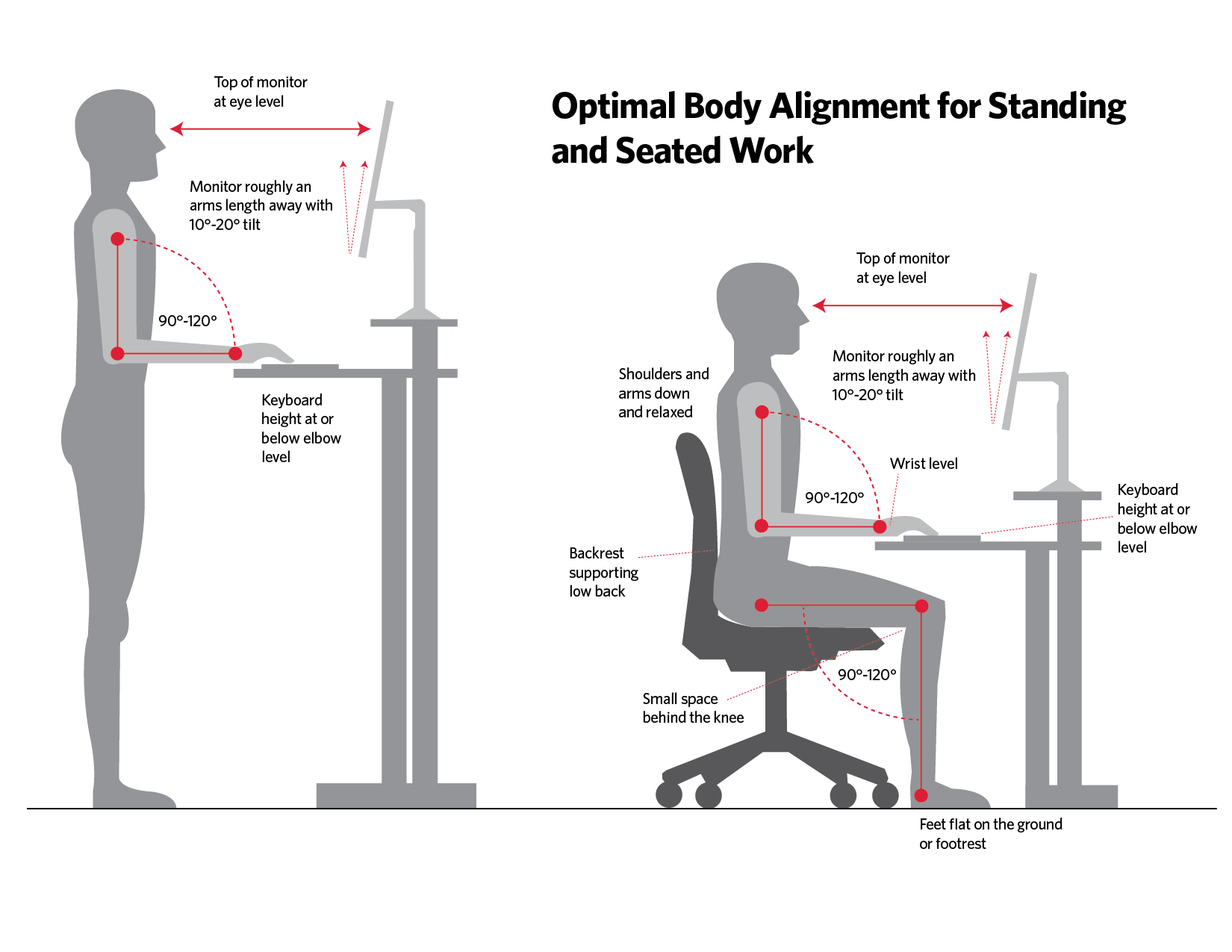
Most workers don’t realize that monitor height affects elbow strain. When your screen sits too low, you hunch forward, which forces your arms forward to reach the keyboard, overloading the elbow extensors. Too high, and you raise your shoulders to see the screen, creating tension that travels down to your elbow tendons.
The Eye-Level Rule for Reducing Elbow Strain
Adjust your monitor using this precise method:
- Sit with perfect posture (ears over shoulders, shoulders over hips)
- Position the top of your screen at or slightly below eye level
- Measure the distance from your eyes to the screen—it should be 50-70cm
- Verify that your elbows remain at 95-105 degrees with shoulders relaxed
This positioning prevents the forward lean that forces your arms into extension, reducing strain on the lateral elbow tendons by approximately 35%. For dual monitor setups, place your primary monitor directly in front of you and angle the secondary monitor toward your line of sight to avoid excessive reaching.
Why Wrist Rests Cause More Elbow Problems Than They Solve
Contrary to popular belief, most wrist rests actually increase elbow strain by encouraging improper positioning. When you rest your wrists while typing, you create a downward angle that forces your fingers to work harder, transferring stress up the kinetic chain to your elbow tendons. The constant pressure on the wrist also restricts blood flow, reducing oxygen to the muscles that control fine finger movements.
The Floating Hand Technique for Elbow Pain Prevention
Adopt this typing method to eliminate unnecessary elbow stress:
- Keep your hands floating 1-2cm above the keyboard
- Type with a light touch (key activation requires only 45g of pressure)
- Move your entire hand as a unit for distant keys, not just fingers
- Rest your hands on the “home row” when not actively typing
- Take 10-second micro-breaks every 15 minutes to shake out your arms
This technique reduces the repetitive strain on elbow tendons by allowing natural hand movement rather than fixed positioning. Office workers who master this method typically see significant reduction in elbow pain within 2-3 weeks.
Nighttime Elbow Protection Strategies
Elbow pain often worsens overnight due to sleeping positions that compress nerves or strain tendons. Many people unconsciously sleep with their elbows bent beyond 90 degrees or with direct pressure on the affected area, undoing daytime ergonomic improvements.
The Pillow Sandwich Method for Pain-Free Sleep
Create this simple nighttime support system:
- Place a standard pillow lengthwise along your bed
- Add a rolled towel on top where your elbow would rest
- Sleep on your back with your affected arm resting on the setup
- If you’re a side sleeper, hug a body pillow with your top arm
This arrangement maintains your elbow in a neutral 135-degree position, preventing the extreme flexion that aggravates cubital tunnel syndrome. The rolled towel provides targeted support without direct pressure on sensitive areas.
When to Seek Professional Help for Workstation-Related Elbow Pain
While ergonomic adjustments resolve most cases, certain warning signs indicate you need professional evaluation:
- Pain that wakes you from sleep regularly
- Numbness or tingling that persists for more than 2 hours after stopping work
- Visible swelling or redness around the elbow joint
- Weakness when gripping objects (dropping items unexpectedly)
- Pain that continues despite 4-6 weeks of consistent ergonomic adjustments
Don’t wait months hoping the pain will resolve—early intervention prevents chronic conditions that take significantly longer to treat. A qualified physical therapist specializing in workplace injuries can provide targeted exercises and confirm whether your ergonomic setup needs further refinement.
Daily 5-Minute Elbow Maintenance Routine
Prevent recurrence with this science-backed maintenance sequence:
- Nerve glides (2 minutes): Gently straighten and bend your elbow while rotating your hand palm up/palm down to keep the ulnar nerve mobile
- Tendon massage (1 minute): Use a tennis ball against a wall to apply gentle pressure along the painful tendon area
- Isometric holds (1 minute): Press your hands together in front of your chest, resisting with equal force for 5-second intervals
- Posture reset (1 minute): Stand against a wall with head, shoulders, and heels touching to retrain proper alignment
Perform this routine twice daily—once before work and once after—to maintain the benefits of your ergonomic adjustments and prevent pain from returning.
Final Note: Consistent ergonomic adjustments combined with targeted maintenance can resolve most workstation-induced elbow pain within 4-8 weeks. The key is precision—small, measurable changes to your setup make the biggest difference. Start with chair height and mouse position today, then systematically address other factors. Your elbows will thank you for the investment in proper alignment.