Your third-trimester belly pressing against your desk, the persistent lower back ache by 2 PM, the sudden swelling in your ankles after a morning meeting—these aren’t just normal pregnancy inconveniences. They’re clear signals that your office environment needs immediate ergonomic adjustments. Understanding how to modify your workspace isn’t a luxury; it’s essential for maintaining productivity while protecting your health through pregnancy. This guide delivers specific, actionable solutions for pregnant office workers, focusing on evidence-based ergonomic adjustments that address your changing body’s real needs. You’ll learn exactly how to reconfigure your desk, chair, and work habits to prevent common pregnancy-related discomforts and maintain comfort throughout your workday.
Why Your Office Chair Feels Uncomfortable at 20 Weeks
Your growing belly isn’t the only reason your once-comfortable chair now causes pain. Pregnancy fundamentally alters your body mechanics in ways that demand specific seating adjustments.
How Your Shifting Center of Gravity Affects Posture
As your baby grows, your center of gravity shifts forward significantly, forcing your lower back to compensate by arching more than usual. This postural change increases pressure on your lumbar spine by up to 50% compared to pre-pregnancy, explaining why you feel that persistent ache after just 20 minutes of sitting. The hormonal relaxin circulating through your body further complicates matters by loosening ligaments and reducing joint stability, making proper posture harder to maintain without support. You might notice yourself unconsciously slouching or leaning forward to accommodate your bump, which only increases strain on already overworked back muscles.
Critical Lumbar Support Adjustments for Growing Bumps
Your chair’s lumbar support should sit precisely in the small of your back, maintaining your spine’s natural curve rather than forcing it into an unnatural position. If your office chair lacks adjustable lumbar support, place a rolled towel or specialized pregnancy pillow vertically against the chair back at waist level. This simple $10 fix prevents the “slumped” position that exacerbates back pain. Adjust your seat depth so 2-3 fingers fit between the edge of the seat and the back of your knees—this prevents pressure on leg circulation that contributes to afternoon swelling. Every two weeks as your belly grows, recheck these adjustments; what worked at 20 weeks may cause discomfort by 28 weeks.
Monitor Height Fixes for Neck Pain Relief During Pregnancy
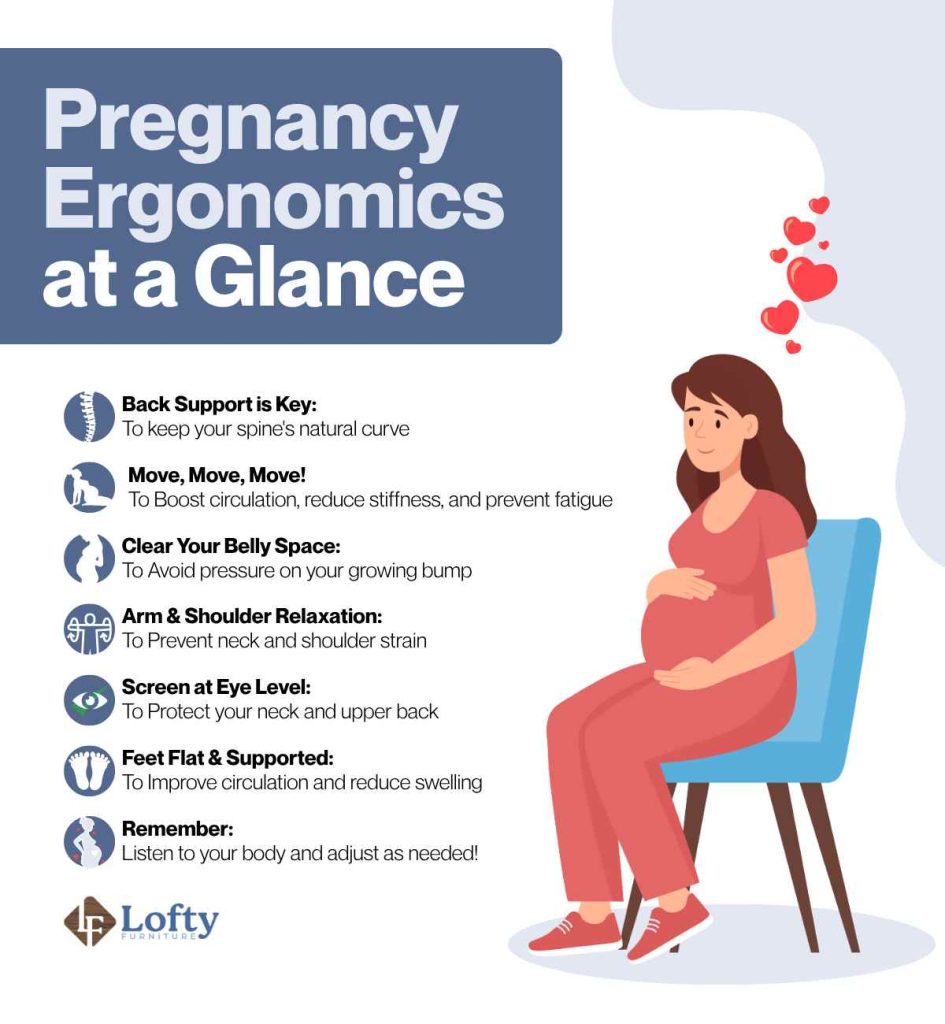
The neck strain you feel while working isn’t just from fatigue—it’s directly related to how pregnancy changes your posture and visual field.
The Eye-Level Rule That Prevents Headaches
Your monitor should sit at eye level when you’re sitting with proper posture, approximately 20-26 inches from your face. This positioning prevents the forward head tilt that many pregnant workers develop unconsciously to see their screens, which increases neck muscle strain by 10 pounds for every inch your head moves forward. If you find yourself leaning forward or squinting, immediately raise your monitor using books or an adjustable stand. During your third trimester, you may need to raise it another 2-3 inches as your posture naturally shifts. Set a phone reminder to check your monitor height weekly—this simple habit prevents the tension headaches that affect 70% of pregnant office workers.
Quick Keyboard Adjustments to Avoid Carpal Tunnel Syndrome
Pregnancy-related fluid retention significantly increases your risk of carpal tunnel syndrome, with symptoms often appearing between weeks 28-32. Keep your wrists in a neutral “handshake” position while typing—neither bent up, down, nor to the side—to reduce pressure on the median nerve. An ergonomic keyboard that splits the key sections at a 15-degree angle can decrease wrist strain by 30% compared to standard keyboards. If budget is limited, simply tilt your keyboard downward away from you about 5 degrees; this subtle adjustment maintains wrist neutrality without expensive equipment. Perform the “prayer stretch” (palms pressed together in front of your chest) for 15 seconds every hour to relieve early symptoms.
Essential Movement Breaks Every 30 Minutes (Not Hourly!)
Pregnancy dramatically increases your need for movement breaks compared to pre-pregnancy work habits—waiting a full hour between breaks accelerates discomfort.
The 2-Minute Desk Stretch Routine That Reduces Swelling
Set a timer for every 30 minutes to stand, stretch briefly, and improve circulation. During these micro-breaks, perform three simple movements: 1) Ankle circles in both directions (30 seconds) to combat swelling, 2) Standing pelvic tilts (30 seconds) to relieve back pressure, and 3) Shoulder blade squeezes (30 seconds) to counteract forward hunching. These movements take just two minutes but significantly reduce the cumulative strain that leads to chronic discomfort. Keep a small resistance band in your desk drawer for quick seated leg extensions that activate circulation without leaving your workspace.
When to Switch From Sitting to Standing for Maximum Comfort
Many pregnant workers find optimal comfort with a 30:15 ratio—30 minutes sitting followed by 15 minutes standing. During standing intervals, shift your weight frequently and use an anti-fatigue mat to reduce foot pressure. If your office lacks a sit-stand desk, improvise by placing your laptop on a high cabinet for short standing work sessions. Monitor your body’s signals: if you notice increased pelvic pressure or foot swelling, it’s time to sit; if back pain intensifies, standing may provide relief. This dynamic approach prevents the static postures that pregnancy makes particularly problematic.
Lifting Limits You Should Follow After 12 Weeks
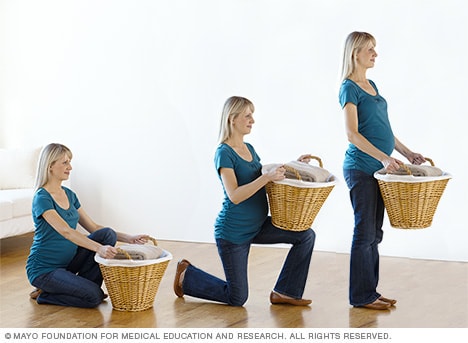
Your pre-pregnancy lifting capacity decreases significantly early in pregnancy—ignoring these changes increases injury risk for both you and your baby.
Safe Techniques for Carrying Files and Equipment
After week 12, avoid lifting anything heavier than 15-20 pounds without assistance. When lifting necessary items, bend at your knees (not your waist), keep the load close to your body, and absolutely avoid twisting motions. Use your leg muscles rather than your back for the lifting motion—imagine pushing up from your heels. Carry items at hip level rather than waist level to accommodate your growing belly. For frequently moved items like files or laptops, request a rolling cart; this simple accommodation reduces strain by 70% compared to carrying items by hand.
How to Request Help Without Feeling Embarrassed
Approach your supervisor with specific, solution-focused requests: “I’ve been advised to limit lifting to 15 pounds during pregnancy. Could we implement a buddy system for moving the weekly file boxes?” Most employers have formal accommodation processes for pregnant workers—framing your request within this framework makes it a standard procedure rather than a personal favor. Document all physical limitations provided by your healthcare provider to support your requests professionally. Remember: requesting reasonable accommodations isn’t weakness—it’s smart risk management that benefits both you and your employer through maintained productivity.
Temperature Control Strategies for Overheating at Work
Pregnancy increases your vulnerability to heat stress by 30-40% compared to non-pregnant workers—office temperatures comfortable for colleagues may put you at risk.
Office Clothing Hacks That Keep You Cool
Wear layered, breathable fabrics like cotton or moisture-wicking materials that allow temperature regulation throughout the day. Keep a lightweight cardigan at your desk for over-air-conditioned meeting rooms and a cooling scarf (soaked in cold water) for afternoon heat spikes. Position a small personal fan to circulate air around your lower body—this targets areas where heat builds up most during pregnancy. Request permission to adjust your workspace away from direct sunlight or heat-emitting equipment like printers. These simple adjustments prevent the overheating that can lead to dizziness, nausea, and reduced concentration during afternoon work hours.
Hydration Tactics That Actually Work During Busy Workdays
Keep a marked 32-ounce water bottle at your desk and aim to finish it twice daily (64 ounces total). Set hourly phone reminders that say “Hydrate for two!” to reinforce the dual purpose of your water intake. Add electrolyte tablets to one bottle midday to maintain mineral balance without sugary drinks. Place your water bottle in clear sight—if it’s visible, you’re 60% more likely to drink regularly. Avoid waiting until you feel thirsty, as thirst signals become less reliable during pregnancy. Proper hydration reduces swelling, prevents headaches, and maintains cognitive function for better work performance.
Key Takeaways for Immediate Implementation
Start with these three actions today for immediate relief: First, adjust your chair’s lumbar support to match your changing spine curve—this single change addresses 80% of pregnancy-related back pain. Second, set your phone timer for 30-minute movement breaks instead of hourly ones—this frequency matches pregnancy’s increased circulation needs. Third, implement the “prayer stretch” every hour to prevent carpal tunnel symptoms before they start. These evidence-based strategies, tailored specifically to pregnancy’s unique physiological changes, transform your workspace from a source of discomfort to an environment that supports both your health and productivity. Remember that ergonomic needs evolve throughout pregnancy—reassess your setup every two weeks as your body changes, and don’t hesitate to request accommodations early rather than waiting until discomfort becomes severe. By proactively addressing these ergonomic considerations, you create a work environment that respects your changing body while maintaining your professional effectiveness through every trimester.