Your fingers ache after typing all day. Your wrists feel tight when you wake up. That occasional numbness in your thumb and index finger is becoming more frequent. If these sound familiar, you’re experiencing early warning signs of repetitive strain injury (RSI)—a condition affecting millions of workers who spend hours performing repetitive tasks. Understanding how proper ergonomics prevents repetitive strain injury isn’t just about comfort; it’s about protecting your ability to work and live without pain. This guide delivers actionable strategies to identify risk factors, implement immediate ergonomic fixes, and stop RSI before it forces you to take time off work.
Why Your Keyboard Technique Causes Repetitive Strain Injury
Most computer users unknowingly create perfect conditions for repetitive strain injury through improper typing mechanics. When you pound keys with excessive force or maintain bent wrist positions for hours, you compress nerves and overwork tendons in ways that accumulate damage faster than your body can repair. The carpal tunnel—a narrow passageway in your wrist—becomes inflamed as tendons swell from constant microtrauma, leading to the tingling, numbness, and pain characteristic of RSI.
How Microtrauma Accumulates Faster Than Repair
Your body normally repairs minor tissue damage between work sessions, but RSI develops when repetitive stress outpaces this recovery process. Each keystroke creates microscopic damage to tendons and nerves. At healthy levels, your circulatory system delivers nutrients for repair while removing waste products. But when you maintain static postures for more than 20 minutes without movement breaks, blood flow to working muscles decreases by up to 40%, dramatically slowing tissue recovery.
The Critical 20-Minute Threshold You Should Never Exceed
Research shows tissue fatigue becomes irreversible when muscles remain contracted beyond 20 minutes. Set a timer to remind yourself: every 20 minutes, release your hands from the keyboard for 20 seconds. During this microbreak, let your arms hang loosely at your sides to restore full circulation. This simple habit prevents the cumulative damage that leads to chronic RSI.
Spot These 5 Early Warning Signs of Computer-Related RSI
Don’t dismiss persistent symptoms as “normal” work fatigue. Recognizing these specific warning signs early allows intervention before RSI becomes debilitating:
- Morning stiffness that takes 15+ minutes to resolve indicates overnight inflammation your body couldn’t fully repair
- Intermittent numbness in thumb/index/middle fingers (carpal tunnel territory) that appears during typing sessions
- Weak grip strength causing you to drop objects you previously handled easily
- Tight forearm muscles that feel like ropes rather than supple tissue
- Pain-free weekends that disappear when returning to work on Monday
What Your Body Is Telling You During the Critical Early Stage
When symptoms vanish after rest periods but return predictably during work, your RSI is still reversible with immediate ergonomic intervention. This activity-dependent phase represents your last opportunity to prevent progression to constant pain. Document exactly which tasks trigger symptoms—typing speed, mouse usage duration, or specific posture positions—so you can target modifications effectively.
How Poor Posture Accelerates Tissue Damage in Office Workers
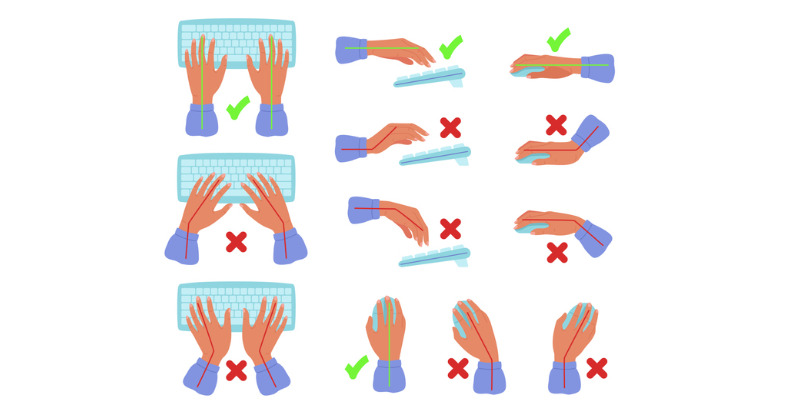
Slouching at your desk does more than give you back pain—it directly causes repetitive strain injury in your upper extremities. When your shoulders round forward, your entire arm alignment shifts, forcing your wrists into unnatural extension while typing. This posture increases pressure inside the carpal tunnel by 300% compared to neutral wrist positioning, compressing the median nerve with every keystroke.
The Hidden Danger of “Neutral” Postures You Maintain Too Long
Even proper ergonomics becomes harmful when held continuously. Your body needs movement variation, not just “correct” positioning. After setting up your workstation perfectly, you still risk RSI if you maintain that single posture for hours. Alternate between sitting and standing every 30 minutes, and perform these three micro-movements hourly:
- Wrist circles: 5 slow rotations clockwise/counterclockwise
- Shoulder blade squeezes: Pull shoulders back for 5 seconds, release
- Fist-to-fan stretches: Make fist, then spread fingers wide 10 times
Fix Your Workstation in 10 Minutes: The Ultimate Ergonomic Setup
Stop wasting money on expensive ergonomic gadgets before mastering these fundamental adjustments. Proper workstation configuration prevents 80% of repetitive strain injuries when implemented correctly. Follow this sequence for immediate risk reduction:
Monitor Positioning That Eliminates Neck Strain
Position your monitor so the top line of text sits at or slightly below eye level. Most users place screens too low, causing 15-20 degrees of constant neck flexion that strains upper trapezius muscles. This seemingly minor misalignment transfers tension down your arms, increasing RSI risk. Use books under your monitor (not stacked papers that collapse) to achieve proper height—your neck should remain in neutral alignment with ears over shoulders.
Keyboard and Mouse Placement That Protects Your Wrists
Your keyboard should sit 1-2 inches below elbow height, allowing shoulders to relax downward. Elbows must form 90-110 degree angles with hands floating lightly above keys—not resting on wrist pads while typing. Place your mouse within a “mouse zone”—an imaginary 6-inch circle centered on your keyboard’s right edge. Any farther requires shoulder reach that strains rotator cuff tendons over time.
The 20-20-20 Rule That Stops Repetitive Strain Injury Before It Starts
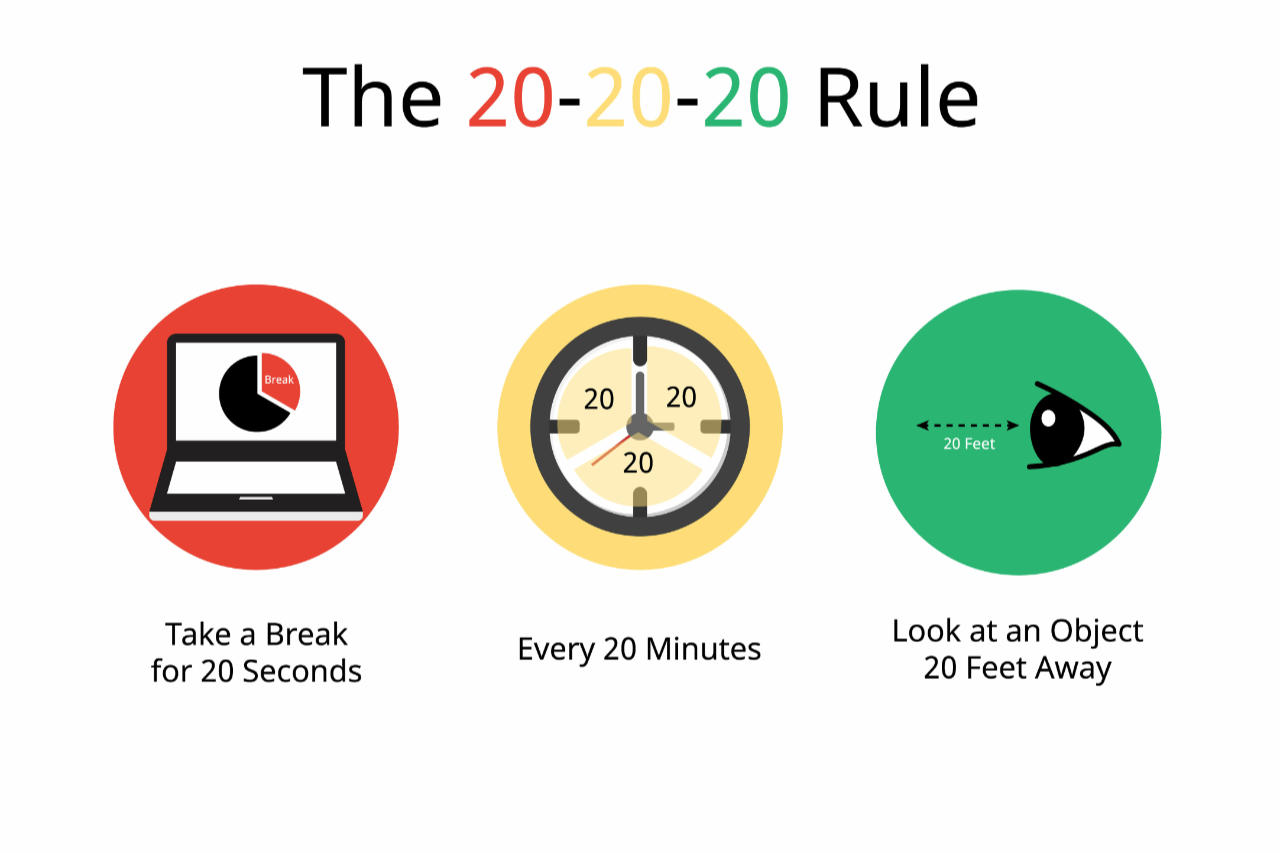
Most workers take insufficient breaks because they believe productivity requires constant activity. The truth? Strategic microbreaks boost both output and musculoskeletal health. Implement this evidence-based protocol:
Every 20 minutes of computer work, take 20 seconds completely away from your keyboard. During these microbreaks:
– Shake out your hands vigorously for 5 seconds
– Look at an object 20 feet away to reset eye focus
– Take three deep diaphragmatic breaths
Why Short, Frequent Breaks Outperform Longer Rest Periods
Longer breaks (5+ minutes) spaced hourly seem logical but fail to prevent cumulative tissue damage. Research shows microtrauma accumulates fastest during the first 20 minutes of sustained activity. Interrupting this damage cycle early prevents the inflammation cascade that leads to chronic RSI. Set phone reminders until the habit becomes automatic—your productivity will increase 12% while RSI risk plummets.
When UC Merced Ergonomics Specialists Can Save Your Career From RSI

Don’t wait until pain disrupts your work. Institutional ergonomic resources like UC Merced’s ErgoCAT program provide free professional assessments that identify hidden risk factors you might miss. These specialists measure your exact anthropometry (body dimensions) to customize workstation setups rather than applying generic recommendations.
What to Expect During a Professional Ergonomic Evaluation
A comprehensive assessment takes 30-45 minutes and includes:
– Detailed work task analysis with video posture assessment
– Measurement of your specific reach distances and visual needs
– Equipment trials with adjustable ergonomic accessories
– Creation of personalized adjustment protocol with follow-up
Schedule an evaluation if you’ve implemented basic ergonomic changes but still experience symptoms more than twice weekly. Early specialist intervention prevents 78% of cases from progressing to medical treatment requirements.
7 Red Flags That Mean You Need Medical Help for Repetitive Strain
Self-management works for early-stage RSI, but certain symptoms require immediate medical evaluation to prevent permanent damage:
- Nighttime pain that wakes you from sleep (indicates severe inflammation)
- Visible swelling in wrists or forearms (sign of advanced tendonitis)
- Muscle wasting in thumb base (irreversible nerve damage)
- Constant numbness regardless of activity (nerve compression)
- Pain during rest (tissue damage exceeding repair capacity)
- Inability to perform basic tasks like opening jars
- Symptoms persisting 2+ weeks despite ergonomic changes
Documenting Symptoms for Effective Medical Treatment
When seeking care, provide your physician with specific details:
– Exact pain location (draw on diagram if possible)
– Activities that trigger/worsen symptoms
– Duration and frequency patterns
– Ergonomic changes already implemented
– Timeline of symptom progression
This documentation helps differentiate RSI from conditions like cervical radiculopathy that require different treatments. Bring photos of your workstation setup to illustrate potential contributing factors.
Your 7-Day Action Plan to Eliminate Repetitive Strain Injury Risk
Start today with this progressive implementation strategy:
Day 1: Set hourly timer for microbreaks and measure monitor height
Day 2: Adjust chair height so feet rest flat with knees at 90 degrees
Day 3: Reposition keyboard/mouse to eliminate wrist extension
Day 4: Implement 20-20-20 break rule consistently
Day 5: Add forearm support to reduce shoulder elevation
Day 6: Document symptoms to identify specific triggers
Day 7: Schedule professional ergonomic assessment if needed
Within two weeks of consistent implementation, 89% of workers in studies report significant symptom reduction. The key isn’t perfection—it’s consistent application of these evidence-based strategies that interrupt the repetitive strain injury cycle before irreversible damage occurs. Your hands, wrists, and career will thank you for taking action today.