Your lower back aches after just an hour at your desk, and you find yourself constantly shifting positions to find relief. You’re not alone—studies show improper seating contributes to 70% of workplace musculoskeletal disorders. An ergonomic chair isn’t just a luxury; it’s your frontline defense against chronic pain and fatigue during long workdays. The right chair actively supports your spine’s natural curvature, distributes pressure evenly, and adapts to your unique body dimensions rather than forcing you to conform to its design. This guide cuts through the marketing hype to show you exactly what to look for when selecting an ergonomic chair that delivers real comfort and health benefits. You’ll learn to identify critical features that prevent back strain, discover how to test chairs like a professional ergonomist, and avoid costly mistakes that turn your “comfortable” chair into a daily source of pain.
Fix Your Seat Pan Dimensions Before Buying
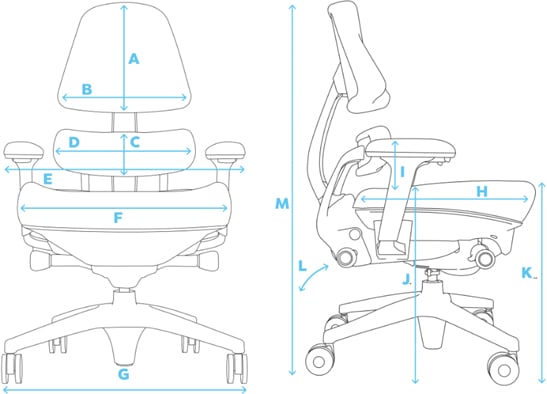
The seat pan is where proper ergonomic support begins—if it doesn’t fit your body correctly, no amount of lumbar support will compensate for fundamental discomfort. Most people make the critical mistake of ignoring seat pan dimensions, leading to pressure points behind the knees and inadequate thigh support that causes circulation problems within hours.
Measure Your Thigh Clearance First
When testing chairs, sit all the way back and check for at least a half-inch gap between the front edge of the seat and the back of your knees. This clearance prevents the chair from compressing blood vessels and nerves, which causes that familiar “pins and needles” sensation during extended sitting. If your feet don’t comfortably reach the floor with this clearance, the chair is too deep for your body proportions.
For proper hip support, the seat width should extend at least one inch beyond your hips on both sides. Test this by sitting in the chair—if you feel squeezed or notice your thighs pressing against the edges, move to a wider model. Proper hip room allows you to sit back fully against the lumbar support without compromising comfort.
Prioritize Waterfall Edge Design
Look for chairs with a waterfall front edge that curves downward toward your knees. This specific contour prevents pressure buildup behind the knees that restricts circulation and causes leg fatigue. When seated, your thighs should feel fully supported without any pinching sensation at the front of the seat.
High-quality ergonomic chairs use high-density foam that maintains its shape after hours of use. Test this by sitting in candidate chairs for at least 30 minutes—low-density foam will begin to feel uncomfortably firm as it compresses permanently under your weight.
Achieve Perfect Seat Height in 60 Seconds
Incorrect seat height is the #1 cause of ergonomic chair discomfort, yet it’s the easiest feature to fix with the right knowledge. The ideal height positions your feet flat on the floor with knees bent at 90-110 degrees, creating proper spinal alignment without straining your hips or lower back.
Test the Pneumatic Adjustment Mechanism
Before purchasing, verify the height adjustment lever operates smoothly while you’re seated. The best chairs allow effortless height changes without requiring you to stand up or shift positions significantly. Sit in the chair and adjust the height through its full range—any sticking points or uneven movement indicate poor-quality mechanics that will frustrate you daily.
If multiple people will use the chair, ensure the adjustment range accommodates both the shortest and tallest user. The chair should lower enough for petite users (typically under 5’2″) to reach the floor comfortably while raising sufficiently for taller individuals (over 6’2″) to maintain proper knee angle.
Avoid Footrest Dependency
You shouldn’t need a footrest with a properly adjusted ergonomic chair. If your feet don’t rest flat on the floor at the chair’s lowest setting, the height range is insufficient for your body. Test chairs by sitting with your back against the lumbar support—your thighs should slope slightly downward from hips to knees, not remain perfectly parallel to the floor.
Customize Lumbar Support for Your Spine Shape

Generic lumbar support causes more back pain than it prevents because every spine has unique curvature. The right ergonomic chair adapts to your specific spinal profile rather than forcing your back into an unnatural position.
Adjust Height and Depth Precisely
Look for chairs with dual-adjustment lumbar support that moves vertically to align with your natural lumbar curve (typically between your belt line and bottom rib) and horizontally to match your back’s forward curve. When properly adjusted, the support should fill the space between your lower back and the chair without pushing you forward.
Test this by sitting upright—your entire back should contact the chair without pressure points. If you feel the lumbar support digging into one spot or creating a gap elsewhere, the adjustment range doesn’t match your spinal anatomy.
Avoid Fixed Lumbar Traps
Fixed lumbar supports work only for people with perfectly average spinal curvature—which few of us have. If considering a chair with fixed support, sit in it for at least 20 minutes to verify continuous comfort. Most users experience lower back fatigue within an hour when the support doesn’t precisely match their natural curve.
Maximize Backrest Coverage for Full Spinal Support
Many ergonomic chairs provide excellent lumbar support but fail to support the upper back, causing users to slouch forward and negate all ergonomic benefits. Comprehensive backrest coverage maintains proper alignment from your tailbone to shoulder blades.
Verify Shoulder Blade Support
When seated with your back fully against the chair, the top of the backrest should reach at least to your lower shoulder blades. This height prevents the “perching” position where you lean forward to rest your upper back, which strains neck and shoulder muscles.
The backrest width should accommodate your shoulder width without restricting arm movement. Test this by placing your hands behind your head—you shouldn’t feel the chair interfering with your elbows or shoulders.
Enable Dynamic Sitting Postures
Choose chairs with reclining backrests that track your spine’s movement as you lean back. This feature maintains continuous support through multiple sitting positions, encouraging healthy movement throughout the day. Chairs that lock in a single position force static posture, increasing disc pressure and muscle fatigue.
Secure a Five-Point Base for Maximum Stability
The chair base is your foundation for all ergonomic adjustments—if it’s unstable, every other feature becomes compromised. Most workplace chair accidents occur due to inadequate base design, not user error.
Confirm Proper Caster Selection
Ensure casters match your flooring type—hard-floor casters on carpet will damage floors, while carpet casters on hard surfaces create excessive rolling resistance. Test the chair by rolling in all directions; quality casters should glide smoothly without wobbling or catching.
The base should feature at least five spokes radiating from the center. Four-point bases significantly increase tipping risk, especially when reaching sideways or adjusting position. When seated, the chair should remain stable even when you shift your weight to the extreme edges.
Configure Armrests to Reduce Shoulder Strain
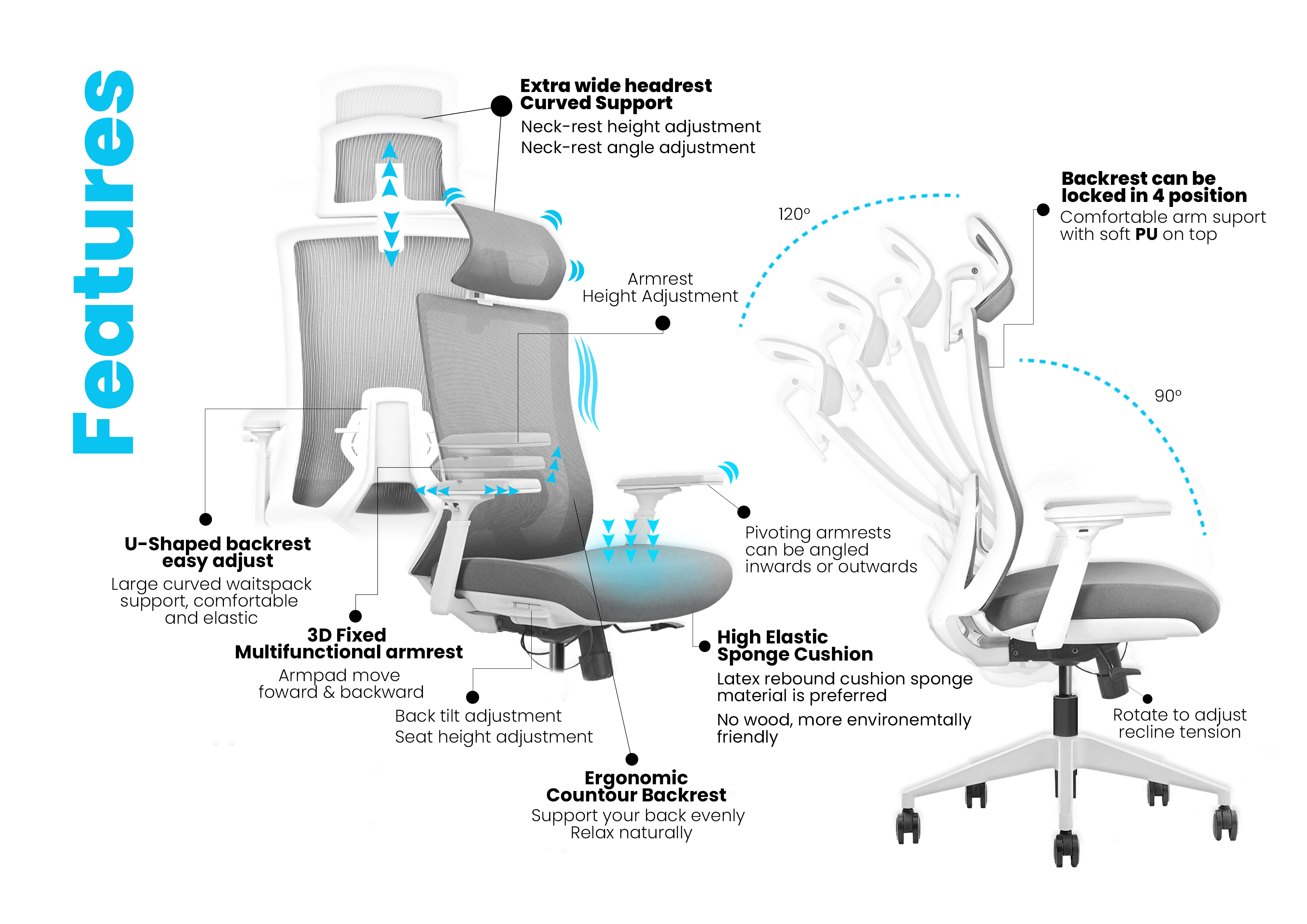
Improper armrest positioning causes more neck and shoulder pain than people realize. The right armrest setup keeps your shoulders relaxed and elbows at 90-110 degrees while typing or using your mouse.
Set Height and Width Correctly
Adjust armrests so your elbows rest comfortably at your sides with shoulders completely relaxed. If armrests force your shoulders upward, they’re too high; if they pull your shoulders downward, they’re too low. The ideal position creates a “floating” sensation where your arms rest lightly without pressure.
For proper width adjustment, your arms should form a 90-degree angle at the elbow when hands are on the keyboard. If armrests push your elbows inward, they’re too narrow; if you’re stretching outward, they’re too wide.
Ensure Removable Functionality
Choose chairs with armrests that flip up, slide back, or detach completely for tasks requiring unobstructed desk access. Fixed armrests prevent proper keyboard positioning and force awkward reaching motions that strain wrists and shoulders.
Select Breathable Upholstery for All-Day Comfort
The right fabric prevents heat buildup and moisture accumulation that causes discomfort during extended sitting sessions. Most people prioritize aesthetics over functionality, leading to chairs that feel great initially but become unbearable after 90 minutes.
Choose Material Based on Climate
In warm environments or if you run hot, select mesh backrests with breathable seat fabric that wicks moisture away from your body. Avoid vinyl or leather in these conditions—they trap heat and create uncomfortable sweating that distracts from work.
For cooler climates or allergy sufferers, consider tightly woven fabrics that resist dust mites while still allowing some breathability. Avoid plush, deep-pile fabrics that trap heat and harbor allergens.
Match Chair Dimensions to Your Body Type

Standard chairs fit only 5-10% of the population—most people use chairs that don’t accommodate their specific body proportions. This mismatch causes chronic discomfort that users mistakenly attribute to “normal” sitting fatigue.
Address Petite Frame Challenges
If you’re under 5’4″, look for chairs with reduced seat depth (15-17 inches), lower minimum seat height (15-17 inches), and smaller backrest dimensions. Standard chairs force petite users to sit on the edge with inadequate back support, causing lower back strain.
Accommodate Larger Body Types
For users over 6’0″ or with broader frames, seek chairs with wider seat pans (20+ inches), higher weight capacities (300+ lbs), and extended height ranges. Standard chairs compress foam cushions too quickly for larger users, eliminating crucial support within months.
Test Chairs Like an Ergonomics Professional
The final step separates those who buy comfortable chairs from those who waste money on poorly fitting “ergonomic” models. Proper testing reveals flaws that seem comfortable during brief showroom trials but cause pain during real-world use.
Sit in candidate chairs for at least 60-90 minutes while performing actual work tasks. Pay attention to developing pressure points, circulation issues, and any positions where support feels inadequate. The best chairs maintain consistent comfort throughout extended sitting sessions without requiring constant positional adjustments. Use Cornell University’s Ergonomic Seating Evaluation Form to systematically assess each chair against established criteria—this methodical approach prevents emotional buying decisions that lead to costly returns and ongoing discomfort. Your perfect ergonomic chair should feel so natural that you forget you’re sitting in it, allowing you to focus entirely on your work without physical distractions.