Spending hours glued to your desk chair while staring at a screen might be the modern work reality, but it’s a recipe for physical strain and mental exhaustion. Micro breaks ergonomics provides the scientifically backed solution that transforms draining work marathons into sustainable productivity sessions. These strategic pauses—lasting just 30 seconds to five minutes—counteract the harmful effects of prolonged sitting and continuous screen focus before they accumulate into serious discomfort. Understanding how to implement micro breaks effectively isn’t just another wellness fad; it’s an essential practice that prevents musculoskeletal disorders, reduces eye strain, and maintains cognitive performance throughout your workday. Whether you’re working in a corporate office, from home, or in a hybrid setup, mastering micro breaks ergonomics delivers immediate comfort and long-term health benefits that directly impact your work quality and overall well-being.
The true power of micro breaks ergonomics lies in how these brief interruptions work with your body’s natural rhythms rather than against them. When implemented correctly, they prevent the gradual degradation of posture, circulation, and mental focus that occurs during extended work sessions. Research consistently shows workers who incorporate regular micro breaks report less discomfort, higher job satisfaction, and better quality output compared to those who power through without pause. This guide reveals exactly how to integrate micro breaks into your work routine for maximum ergonomic benefit—without disrupting your productivity or workflow.
Why Your Body Needs Micro Breaks During Desk Work
Your musculoskeletal system maintains optimal function through movement and variation, yet desk work forces your body into near-static positions for hours. This mismatch triggers fatigue in supporting muscles, stiffness in joints, and reduced circulation—problems that compound with each passing minute. Micro breaks ergonomics interrupts this damaging cycle by providing regular opportunities for muscles to reset, joints to regain mobility, and blood flow to return to underutilized areas. Without these strategic pauses, your body compensates with poor posture that feels momentarily comfortable but causes long-term damage.
The cervical spine, shoulders, lower back, and wrists bear the brunt of continuous desk work. As fatigue sets in, supporting muscles weaken, causing your posture to deteriorate without you even noticing. Micro breaks counteract this by allowing you to consciously reset your alignment before poor positioning becomes habitual. During these brief pauses, you can adjust your chair height, reposition your monitor, and consciously relax tense muscles—simple actions that prevent the cumulative damage leading to chronic pain conditions. These interventions work best when implemented proactively rather than waiting for discomfort to signal a problem.
How Micro Breaks Prevent Digital Eye Strain
Staring at screens for extended periods reduces your blink rate by up to 66%, causing dry eyes, blurred vision, and headaches. Micro breaks ergonomics specifically addresses this issue through the 20-20-20 rule: every 20 minutes, look at something 20 feet away for 20 seconds. This simple practice allows your eye muscles to relax and refocus, preventing the strain that builds during continuous screen work. During these visual breaks, consciously blink several times to rewet your eyes and reduce dryness. These brief eye rest periods significantly decrease the cumulative strain that leads to chronic vision problems among desk workers.
Cognitive Benefits of Strategic Work Pauses
Your brain’s attention systems naturally cycle through peaks and valleys of focus—not designed for nonstop concentration. Micro breaks ergonomics leverages this biological reality by providing timed pauses that allow neural resources to replenish. Workers who take regular micro breaks maintain higher quality focus during work intervals compared to those who push through fatigue. These brief mental resets improve information processing, enhance creativity, and prevent decision fatigue that leads to errors later in the workday. The cognitive restoration from micro breaks ultimately boosts both productivity and work quality.
Optimal Micro Break Timing and Duration
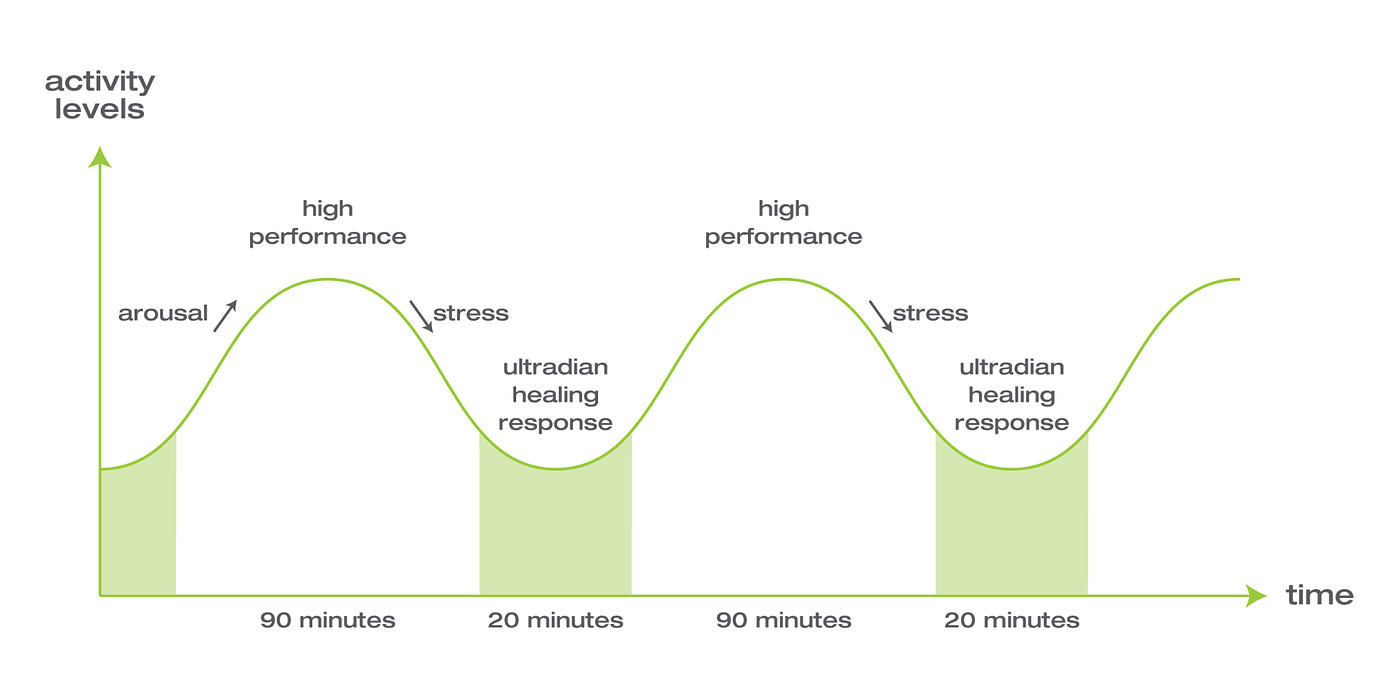
Research indicates the ideal micro break interval falls between 25 and 90 minutes of focused work, with the precise timing depending on individual differences and task complexity. Waiting beyond this window allows fatigue to accumulate to levels where subsequent recovery becomes less effective. Aligning micro breaks with your body’s natural ultradian rhythms—approximately 90-120 minute cycles of high focus followed by lower alertness—produces better results than rigid time-based schedules. Most workers benefit from three to five micro breaks per hour, distributed naturally within their work rhythm rather than forced at arbitrary intervals.
The Critical Difference Between Break Duration and Quality
Micro breaks lasting 30 seconds to 2 minutes effectively maintain alertness during routine tasks, while more complex cognitive work may require slightly longer pauses of 3 to 5 minutes. However, the quality of the break matters more than its duration—simply switching from email to social media doesn’t provide the same benefits as genuine disengagement. Effective micro breaks require both physical change (moving, stretching, changing position) and cognitive transition (mentally stepping away from work). Standing up, taking deep breaths, and looking out a window delivers far greater ergonomic benefit than remaining seated while checking messages.
Recognizing Natural Break Points in Your Workflow
The most sustainable micro break routines work with your natural work patterns rather than against them. Identify natural transition points in your workflow—between completing one task and starting another, after sending an email, or when waiting for a file to process. These organic moments make ideal micro break opportunities that feel less disruptive than arbitrary timer-based interruptions. Train yourself to notice early signs of fatigue like neck stiffness, eye strain, or wandering attention as signals that a micro break is needed immediately rather than waiting for a predetermined time.
Quick, Effective Stretches for Desk Workers
Neck and Shoulder Relief in Under 60 Seconds
Neck rolls and shoulder shrugs target the tension that builds during screen work. Slowly tilt your head toward one shoulder and hold for 15-20 seconds, then repeat on the other side. Follow this with five slow shoulder rolls—lifting shoulders toward ears, rolling them back and down. These simple movements release tension in the upper trapezius muscles that often leads to chronic neck pain. Perform these seated stretches at your desk without drawing attention in shared workspaces.
Wrist and Hand Exercises to Prevent Repetitive Strain
Extend your arm with palm facing down, then use your other hand to gently press fingers back toward your body, feeling a stretch in your forearm. Flip your hand so palm faces up and repeat to stretch the opposing muscle group. Make fists and spread fingers wide, repeating five to ten times to promote circulation. These brief exercises take less than a minute but significantly reduce cumulative strain from typing and mouse use—critical prevention for carpal tunnel syndrome and tendonitis.
Lower Body Mobility for Desk-Bound Workers
Stand up during your micro break and step one foot back into a lunge position while keeping hips forward to stretch tight hip flexors. For hamstrings, either place one foot on a stable surface and gently reach toward your toes or perform a standing toe touch. Even simply walking to get water for 30-60 seconds resets your posture and promotes blood flow through your lower body. These movements counteract the hip and hamstring shortening that occurs during prolonged sitting.
Making Micro Breaks Stick: Practical Implementation Strategies

Setting Up Effective Reminder Systems
Relying on memory alone typically fails because absorbed work makes you lose track of time. Desktop reminder applications provide visual prompts at set intervals, with some even suggesting specific stretches. The Pomodoro Technique timer (25 minutes work, 5 minutes break) offers a structured approach that many find sustainable. For those finding technological reminders disruptive, environmental cues work well—place a rubber band around your monitor bezel or use bathroom breaks as triggers for additional micro break exercises.
Integrating Micro Breaks with Your Workspace Setup
Your ergonomic workspace should facilitate, not hinder, micro break movements. During breaks, quickly assess your monitor positioning—ensure it’s at eye level, approximately an arm’s length away, and centered. Check that your keyboard and mouse allow shoulders to remain relaxed. Standing desk users should use micro breaks as natural transition points between sitting and standing positions. Clear space around your desk for quick standing stretches to remove friction from the process.
Avoiding Common Micro Break Mistakes
The most significant mistake is taking mental work to your break rather than genuinely disengaging. Checking emails or scrolling through news during breaks prevents the cognitive reset that makes them valuable. Another common error is insufficient frequency—taking one long break after hours of work doesn’t provide the same benefits as regular brief interruptions. Finally, neglecting movement in favor of pure rest misses half the ergonomic benefit; effective micro breaks combine mental disengagement with physical movement.
Long-Term Health Benefits of Consistent Practice

Workers who maintain regular micro break routines show significantly lower rates of chronic neck, shoulder, and back pain compared to those who work continuously. The brief movements and posture resets prevent cumulative damage that leads to degenerative conditions and chronic pain syndromes. Cardiovascular and metabolic health also benefit from the movement micro breaks provide, even though this isn’t their primary purpose. The stress reduction from regular mental breaks contributes to overall psychological well-being, with workers showing lower rates of burnout and job dissatisfaction.
Start with realistic goals—begin with one or two micro breaks per hour and gradually increase frequency. Track your consistency using apps or simple checkmarks, as accountability significantly improves habit formation. Design your environment to reduce friction—clear space for movement, schedule demanding tasks around natural break rhythms, and prepare in advance with appropriate footwear for standing breaks. Over time, these practices become automatic, eventually feeling strange to skip rather than burdensome to implement.
Implement micro breaks ergonomics today by assessing your current work patterns, designing a personalized routine based on your specific needs, and committing to consistent practice for at least three weeks. The investment in these brief, strategic pauses pays continuous dividends in comfort, health, and productivity throughout your working life—transforming how you experience work from draining obligation to sustainable practice.