You’ve likely experienced that nagging neck pain after hours at your desk or felt exhausted from repetitive tasks that shouldn’t be so draining. These common workplace struggles often stem from overlooking critical aspects of ergonomics in your environment. Derived from Greek words érgon (work) and nomos (laws), ergonomics represents the science of designing workspaces that align with human capabilities rather than forcing adaptation to poorly designed conditions. Understanding the comprehensive aspects of ergonomics isn’t just about comfort—it’s a strategic approach to preventing injuries, reducing fatigue, and significantly boosting workplace efficiency.
When implemented correctly, ergonomic principles transform how employees interact with their work environment, leading to fewer musculoskeletal disorders, higher job satisfaction, and measurable productivity gains. The true power of ergonomics lies in its multifaceted approach—addressing not just physical setup but cognitive demands and organizational structures. By exploring the essential aspects of ergonomics, you’ll gain actionable insights to evaluate your current workspace and implement targeted improvements that serve both individual well-being and organizational success.
Safety: Preventing Workplace Injuries Before They Happen
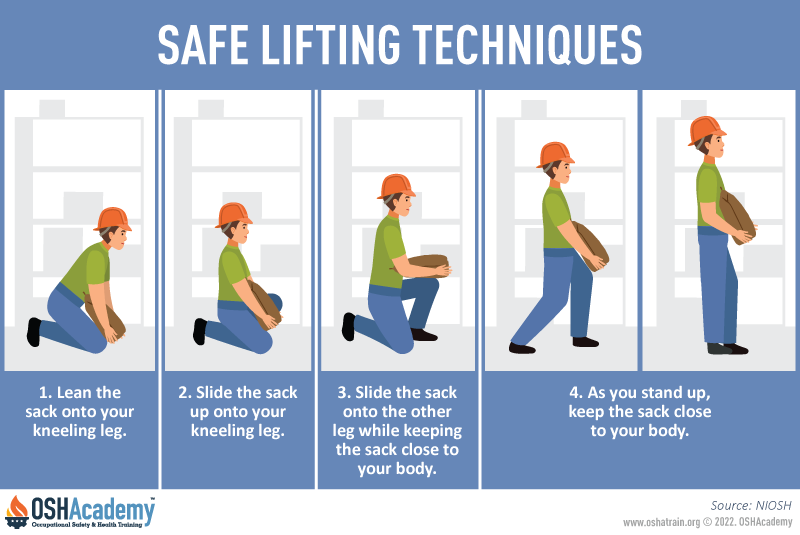
Safety forms the non-negotiable foundation of effective ergonomic design, directly addressing how workspaces, tools, and equipment impact physical stress levels. This critical aspect focuses on preventing both immediate injuries and long-term conditions by ensuring physical demands stay within reasonable thresholds. When safety principles guide your ergonomic decisions, you’ll automatically prioritize injury prevention over productivity shortcuts or cost savings.
Your workspace should never force you to choose between performing your job and protecting your body. Key safety considerations include evaluating lifting requirements against established safe limits, identifying repetitive motions that create cumulative strain, and correcting workstation configurations that push joints and muscles beyond their natural range. Many workplace injuries develop gradually from tasks that seem manageable in isolation but become damaging through repetition—what feels like a minor inconvenience today could lead to chronic pain months later.
Common Safety Oversights to Address Immediately
- Work surfaces positioned too high or too low, causing shoulder elevation or wrist deviation
- Chairs lacking adequate lumbar support, forcing unnatural spinal curvature
- Tools requiring excessive grip force or awkward hand positioning
- Flooring that creates instability or lacks proper shock absorption
- Inadequate lighting that causes neck strain from squinting or leaning
Comfort: Eliminating Cumulative Strain from Daily Tasks
Comfort in ergonomics extends far beyond cushioned chairs—it’s a strategic approach to reducing physical strain during repetitive movements and object handling. This aspect recognizes that sustained physical demands require specific supportive interventions to prevent cumulative trauma injuries that develop over weeks or months of seemingly manageable work. Environmental factors like temperature control play a crucial role, as extremes cause distress that leads to compensatory movements creating additional strain.
Your body wasn’t designed for static positions or repetitive motions without proper support. Effective comfort solutions include specialized footwear that reduces foot and leg fatigue during standing work, anti-fatigue mats for hard flooring surfaces, lifting belts that promote proper technique, and task-specific gloves that protect hands during repetitive gripping. These interventions aren’t luxuries—they’re essential components that allow your body to maintain natural alignment and reduce the micro-trauma that accumulates into serious injuries.
Ease of Use: Designing Workflows That Match Natural Movement
Ease of use focuses specifically on eliminating awkward movements that stress neck, back, knees, and eyes through thoughtful workspace organization and tool placement. This aspect goes beyond simple accessibility to consider how movement patterns throughout your workday create gradual wear on your body. The goal is creating conditions where efficient, natural movement becomes your default pattern rather than something you must consciously maintain.
Implementing this aspect requires rethinking your entire workflow. Position frequently used tools within easy reach to eliminate excessive reaching, bending, or twisting. Adjust chair height so your feet rest flat while your knees form a 90-degree angle. Organize storage to minimize unnecessary movement during common tasks. When properly implemented, these changes reduce the thousands of micro-movements that accumulate into significant strain over time—what seems like a minor adjustment in a single instance becomes transformative when repeated throughout your workday.
Performance: Boosting Output Through Smart Workspace Design
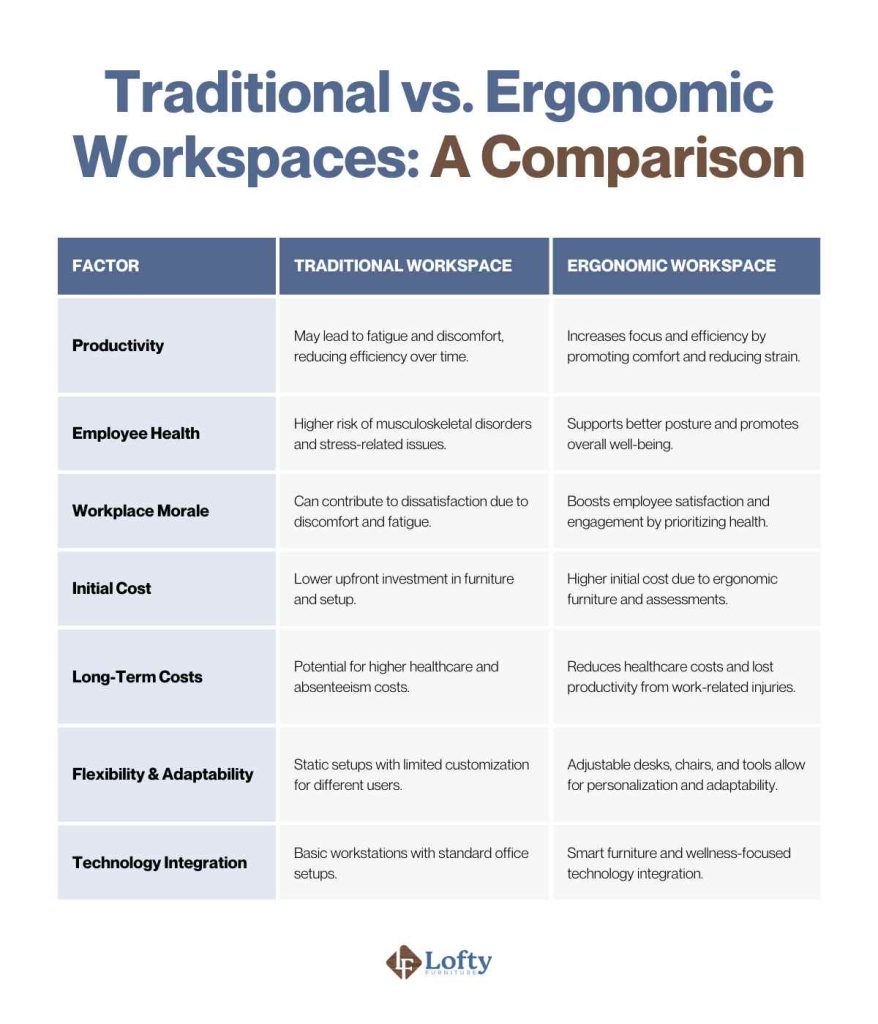
Performance improvement represents the productivity dimension of ergonomic design, directly linking workspace optimization to measurable output gains. When you eliminate physical barriers to efficient work execution, productivity naturally increases as you spend less energy overcoming environmental obstacles and more energy on productive tasks. This aspect targets unnecessary standing, sitting, reaching, lifting, or resupplying actions that slow workflow without adding value.
Your physical fatigue directly impacts work quality—strained workers make more mistakes, experience attention lapses, and require longer recovery between tasks. By implementing performance-focused ergonomic improvements, you’ll notice faster task completion, fewer errors, and sustained energy throughout your workday. Key performance indicators to track after ergonomic changes include reduced task completion times, lower error rates, decreased break frequency, and improved output consistency.
Aesthetics: How Clear Design Prevents Workplace Errors
Ergonomic aesthetics focuses on how easily you can understand and interpret protective gear, tools, equipment, and workstations—not traditional beauty standards. This aspect addresses clarity of use, function, operating procedures, and warnings. Poorly designed or incorrectly labeled items create confusion that leads to fatigue, stress, and ultimately injury, making aesthetic clarity an essential safety consideration.
When design communicates clearly through intuitive controls, accurate labeling, and logical interfaces, you require less cognitive effort to interpret your environment. This mental efficiency translates directly to physical benefits, as reduced cognitive load prevents the tension and strain that accompany mental confusion. Pay attention to warning labels that are easily visible, control panels with logical layouts, and equipment that behaves predictably—these seemingly small details significantly impact both your immediate comfort and long-term health.
Physical Ergonomics: Optimizing Your Body’s Workspace Relationship

Physical ergonomics addresses how your body responds to the physical demands of your specific workspace or profession. This aspect directly targets overexertion, repetitive movements, and poor posture—the primary causes of musculoskeletal disorders that lead to extended leaves of absence. Implementing physical ergonomics requires creating workstations with appropriate furniture and tools that support natural body positioning throughout your workday.
Your personalized physical ergonomic setup should include:
– An adjustable chair with proper lumbar support that maintains your spine’s natural curve
– A sit-stand desk allowing position changes to reduce static loading on any single body part
– A footrest if your feet don’t comfortably reach the floor while seated
– An ergonomic keyboard and mouse that minimize wrist stress during computer work
– Task lighting positioned to eliminate glare without causing neck strain
Cognitive Ergonomics: Aligning Work Demands with Mental Processing
Cognitive ergonomics examines how work systems interact with your attention, memory, decision-making, and problem-solving capabilities. This aspect ensures interfaces and systems match human cognitive processing rather than overwhelming your mental capacity. When cognitive demands exceed your capabilities, errors increase, stress accumulates, and physical strain often follows as you contort yourself to compensate for mental overload.
Your work environment should support—not hinder—your cognitive processes. Effective cognitive ergonomics means clear instructions that match how you learn, intuitive software interfaces requiring minimal mental translation, and warning systems that capture attention without causing alarm fatigue. Pay attention to how much mental effort you spend just interpreting your work environment—that cognitive load directly impacts both your immediate performance and long-term physical well-being.
Organizational Ergonomics: Fixing Workplace Systems, Not Just Desks
Organizational ergonomics focuses on how workplace structures, policies, and social dynamics impact your well-being and performance. This aspect recognizes that even perfectly designed individual workstations cannot compensate for organizational dysfunction. Key implementation strategies include work schedules that respect natural circadian rhythms, clear communication channels that reduce uncertainty, and decision-making processes that incorporate worker input.
Your organization’s structure significantly influences ergonomic effectiveness. Work schedules ignoring biological needs, management practices discouraging worker input, and stressful social dynamics all undermine even the best physical ergonomic interventions. When addressing organizational ergonomics, look for opportunities to implement reasonable break schedules, create feedback loops for workspace improvements, and foster team environments where ergonomic concerns are taken seriously.
Implementing Continuous Ergonomic Improvement in Your Workspace
Workplaces constantly evolve as new employees arrive, methods change, and equipment ages—making one-time ergonomic assessments quickly outdated. Effective implementation requires ongoing systems rather than periodic interventions. Establish quarterly ergonomic refreshers, regular wellness checks, and rapid response protocols for emerging issues before they become serious problems.
Your Ergonomic Maintenance Checklist:
– Monthly: Adjust chair height and monitor position as needed
– Quarterly: Evaluate tool placement for optimal reach zones
– Biannually: Assess lighting conditions and noise levels
– Annually: Review work processes for unnecessary movements
– Immediately: Address any new discomfort or pain signals
Sustaining Long-Term Ergonomic Success Through Worker Involvement
Maintaining ergonomic quality requires viewing it as an ongoing process rather than a completed project. The most effective programs combine the five-aspect framework for detailed assessment with the three-area model for comprehensive coverage. Crucially, involve workers in assessment and intervention design—their experiential knowledge identifies problems external assessors often miss and increases buy-in for resulting changes.
Your investment in understanding and implementing the aspects of ergonomics pays dividends through reduced injury risk, improved productivity, and enhanced job satisfaction. By addressing safety, comfort, ease of use, performance, and aesthetics across physical, cognitive, and organizational dimensions, you create workplaces where employees can perform their duties with greater ease and organizations benefit from sustained operational excellence. Start with one aspect today—your body and productivity will thank you tomorrow.