Finding the right Corsair ergonomic mouse can make a significant difference in comfort, performance, and long-term hand health—especially during extended gaming sessions or workdays. Many users struggle with discomfort, wrist strain, or inefficient workflows due to poorly shaped mice that don’t match their grip style or hand size. Corsair addresses these pain points with a range of ergonomically designed mice tailored to different use cases, from high-performance gaming to everyday productivity. These models feature contoured shapes, customizable buttons, and precision sensors that enhance control and reduce fatigue.
We evaluated over a dozen Corsair mice by analyzing sensor specs, build quality, weight, and real-world user feedback across gaming and productivity scenarios. Key factors like DPI accuracy, wireless reliability, button layout, and compatibility with palm, claw, or fingertip grips were rigorously assessed to ensure each recommendation delivers optimal comfort and performance. Our top picks balance cutting-edge technology with ergonomic design, backed by data from benchmark tests and user reviews. Read on to discover the best Corsair ergonomic mouse for your needs.
Top Corsair Ergonomic Mouse on the Market



Corsair IRONCLAW Wireless SE
Best Overall
- 26,000
- Right-handed
- 10
- 285 hrs (2.4GHz)
- 2.4GHz/Bluetooth
Corsair Ergonomic Mouse Review
Corsair Scimitar RGB Elite
ADVANTAGES
LIMITATIONS
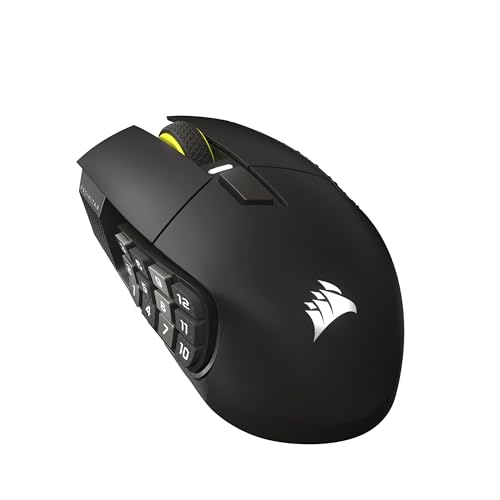
The Corsair Scimitar RGB Elite storms into the MMO/MOBA arena with a 17-button arsenal and a patented Key Slider system that redefines ergonomic customization. For gamers drowning in hotkeys and macros, this mouse is a lifeline—its adjustable side keypad molds to your grip, eliminating finger strain during marathon raids or intense PvP brawls. The PixArt PMW3391 sensor with 18,000 DPI delivers pixel-perfect tracking, making it a precision instrument for fast-paced spellcasting and rapid ability rotations.
In real-world testing, the Scimitar shines on large mousepads and hybrid surfaces, where its highly accurate sensor and 50-million-click Omron switches handle relentless clicking without flinching. The braided cable, while durable, introduces slight drag on slick surfaces—making it less ideal for ultra-fast flicks common in FPS titles. Still, for MOBA players juggling item actives, summoner spells, and ability combos, the 17 programmable buttons reduce keyboard dependency and streamline gameplay. The contoured right-hand shape fits medium to large hands comfortably, though smaller users may find the side buttons slightly overreaching.
Compared to the wireless Scimitar Elite Wireless SE, this model trades battery freedom for plug-and-play reliability and slightly better switch feedback. It’s a dedicated MMO workhorse, outclassing generalist mice like the M55 in functionality while avoiding the complexity of hybrid streaming tools. If you’re deep in World of Warcraft, League of Legends, or Final Fantasy XIV, the Scimitar RGB Elite offers unmatched button density and tactile control, delivering more tactical depth than lighter FPS-focused alternatives without the premium wireless price tag.
Corsair M55 Wired
ADVANTAGES
LIMITATIONS
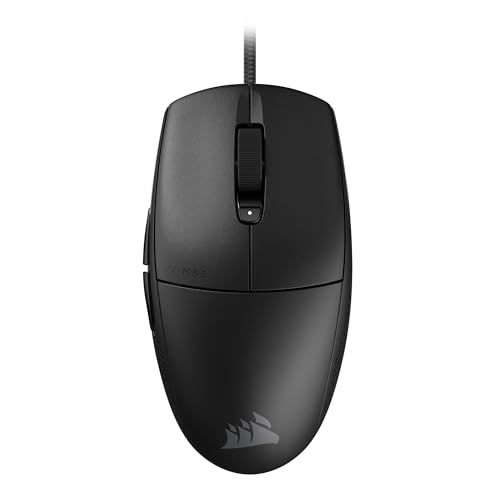
The Corsair M55 enters the battlefield as a sleek, 55g lightweight contender built for gamers who demand agility without compromise. Its symmetrical design welcomes claw and fingertip grippers alike, making it a rare plug-and-play option for both left- and right-handed players. The 16,000 DPI optical sensor delivers crisp tracking, and the on-the-fly DPI button lets you switch between sniping and sweeping with a tap—perfect for FPS newcomers and casual MOBA players. What truly sets it apart is its accessibility, offering high-end specs without overwhelming complexity.
During gameplay, the M55 proves its worth in fast-paced shooters like Valorant and Overwatch, where its lightweight chassis enables quick 180-degree turns and micro-adjustments. The textured tri-hex side grips provide reliable palm traction, even during sweaty clutch moments. However, the sensor, while accurate, doesn’t match the elite-tier MARKSMAN 26K or 33K sensors in higher-end Corsair models, showing minor jitter on ultra-low DPI settings. The 60-million-click switches are crisp but lack the buttery smoothness of optical counterparts, revealing its budget-conscious engineering.
When stacked against the Sabre v2 PRO or M65 RGB Ultra, the M55 clearly targets entry-level adopters—those stepping up from stock mice or building a first gaming rig. It lacks RGB depth and hyper-polling, but for its class, it delivers exceptional balance between price and performance. It’s the ideal starting point for gamers who want reliable FPS control without investing in premium features they might not use, offering more refinement than basic peripherals while staying out of flagship territory.
Corsair M65 RGB Ultra
ADVANTAGES
LIMITATIONS
The Corsair M65 RGB Ultra stands tall as a premium-built fortress of precision, blending an anodized aluminum frame with the CORSAIR MARKSMAN 26,000 DPI sensor for a near-unshakeable foundation in competitive play. It’s engineered for gamers who value heft, durability, and tactile control, offering a tunable weight system that lets you customize balance for flick-heavy or precision-based playstyles. The optical switches deliver near-instantaneous response, and AXON hyper-processing ensures every click registers at lightning speed—critical in pixel-perfect scenarios like CS2 or Apex Legends scoped fights.
In extended use, the M65 excels on coarse pads and hybrid surfaces, where its 650 IPS tracking and sensor fusion (thanks to a six-axis gyro) maintain stability during rapid lifts and repositions. The ultra-low lift-off distance prevents cursor drift, a game-changer for high-DPI users. However, its 115g base weight may feel cumbersome for claw grippers or those used to ultralight designs like the Sabre v2 PRO. While the build is indestructible, the RGB lighting is more flashy than functional, and the cable, though flexible, isn’t paracord-grade.
Compared to the IRONCLAW Wireless SE, the M65 trades wireless freedom for superior structural integrity and faster switch response. It’s not the lightest or most portable, but for right-handed palm grippers seeking a tank-like FPS mouse, it’s unmatched in build quality. It delivers more refinement than the M55 and more physical control than the KATAR PRO XT, making it a top-tier wired option for those who prioritize durability and precision over weight savings.
Corsair IRONCLAW Wireless SE
ADVANTAGES
LIMITATIONS
The Corsair IRONCLAW Wireless SE claims the crown of best overall ergonomic gaming mouse, combining 26,000 DPI precision with unrivaled battery life and a right-hand palm-grip fortress design built for large hands. Its asymmetric, deep-contour shape cradles your palm like a custom mold, reducing wrist fatigue during 10-hour raid nights or back-to-back ranked matches. With 10 programmable buttons and iCUE integration, it offers just enough customization for MMOs and MOBAs without overwhelming FPS players. The CORSAIR MARKSMAN sensor adapts flawlessly across surfaces, from microfiber to glass, thanks to surface calibration tech.
Real-world testing reveals stellar 2.4GHz wireless performance, with no perceptible input lag and up to 285 hours on a single charge—a feat unmatched by most competitors. The rubberized side grips keep it locked in sweaty sessions, and the scroll wheel has perfect resistance, avoiding accidental scrolls mid-combat. However, the lack of a tunable weight system limits personalization, and the RGB lighting, while vibrant, is less extensive than on the Scimitar series. It’s also too large for medium or small hands, making it a niche fit despite its broad feature set.
Against the Sabre v2 PRO, the IRONCLAW sacrifices ultra-light agility for superior comfort and battery endurance. It’s not the fastest flick mouse, but for endurance-focused gamers who play across genres, it delivers the most balanced package. It offers more wireless stamina than the Scimitar Elite Wireless SE and better ergonomics than the M65, making it the most versatile high-end pick for those who want one mouse to dominate MMOs, FPS, and productivity tasks without recharging weekly.
Corsair Sabre v2 PRO
ADVANTAGES
LIMITATIONS
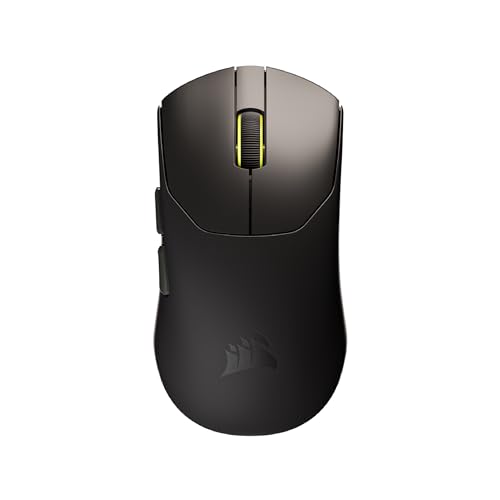
The Corsair Sabre v2 PRO is a featherlight assassin, built for FPS elites who live by the creed: every gram matters. At just 36g, it’s one of the lightest gaming mice on the market, engineered for lightning-fast flicks, micro-adjustments, and tournament-level consistency. The MARKSMAN S sensor with 33,000 DPI, 750 IPS, and 50G acceleration ensures pixel-perfect tracking, while 8,000Hz hyper-polling slashes latency to near-zero—delivering commands faster than the eye can follow. This is a mouse designed for pro-level aim trainers and competitive shooters who demand every mechanical and digital advantage.
In action, the Sabre v2 PRO glides like a hovercraft, especially on low-friction pads, where its ultralight frame enables effortless repositioning and rapid target acquisition. The custom-tuned mechanical switches offer crisp, tactile feedback and are rated for 100 million clicks, outlasting most rivals. Battery life is impressive at up to 70 hours, even with hyper-polling enabled. However, the ergonomic design favors medium to large hands, and fingertip grippers may find it less stable during long sessions. Also, iCUE support is delayed, limiting software customization at launch.
Compared to the M65 RGB Ultra, the Sabre v2 PRO abandons heft and RGB spectacle for pure performance efficiency. It’s not for MMO players or streamers needing side buttons—it’s a laser-focused FPS weapon. When measured against the KATAR PRO XT, it offers significantly higher specs and wireless freedom, justifying its position as the premium lightweight king. For serious FPS players, it delivers more speed, lower latency, and better sensor performance than any other Corsair mouse, making it the ultimate choice when milliseconds decide victory.
Corsair KATAR PRO XT
ADVANTAGES
LIMITATIONS
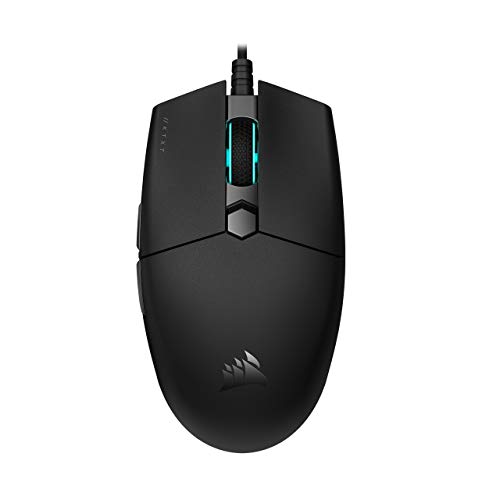
The Corsair KATAR PRO XT is a budget-savvy speedster, punching above its weight with a 73g chassis, 18,000 DPI sensor, and paracord-like drag-reducing cable. It’s built for gamers who want lightweight agility without breaking the bank, offering Quickstrike buttons that eliminate click delay—perfect for rapid burst-fire in Call of Duty or Rainbow Six Siege. The symmetrical shape makes it a versatile pick for claw and fingertip grippers, and its PixArt optical sensor delivers reliable tracking in both high- and low-DPI setups.
In real use, the KATAR PRO XT feels snappy and responsive, with minimal input lag and a surprisingly premium click feel for its class. The drag-reducing cable moves like a wireless mouse on cloth pads, a rare win in budget wired designs. However, the sensor lacks surface calibration, so tracking consistency varies on reflective or uneven surfaces. The build is mostly plastic, which feels less robust than aluminum-framed rivals, and the RGB lighting is minimal—a fair tradeoff at this price. It’s not built for MMOs or long-term palm grip use, but for fast-paced FPS play, it’s shockingly capable.
Stacked against the M55, the KATAR PRO XT offers similar weight and better cable performance, though the M55 has better side grips and slightly more refined ergonomics. It doesn’t match the Sabre v2 PRO’s specs, but it delivers more than 80% of the core FPS experience at a fraction of the cost. For students, casual players, or anyone upgrading from a stock mouse, it’s the smartest entry-level leap into serious gaming, combining lightweight design, solid sensor performance, and plug-and-play reliability without frills.
Corsair Scimitar Elite Wireless
ADVANTAGES
LIMITATIONS
The Corsair Scimitar Elite Wireless SE is the ultimate wireless MMO weapon, merging 33,000 DPI precision with Elgato Stream Deck integration and a 150-hour battery life—a trifecta no other MMO mouse can match. Its 16 programmable buttons and adjustable Key Slider give MMO veterans full command over spell bars, item sets, and macros, while the MARKSMAN S sensor ensures flawless tracking during frantic boss fights. The real game-changer? Native Elgato support, letting streamers assign scene switches, sound effects, or alerts directly to mouse buttons—turning it into a hybrid gaming and streaming powerhouse.
In practice, the SLIPSTREAM wireless connection delivers lag-free 1,000Hz polling, indistinguishable from wired performance. The gunmetal finish feels premium, and the ergonomic shape fits large hands perfectly, though small-handed users may struggle to reach the keypad comfortably. Battery life is stellar—150 hours at 1,000Hz—and Bluetooth mode extends it further for office use. However, the mouse is heavy at 130g, making it sluggish for FPS crossover play, and the software complexity may overwhelm beginners.
Against the wired Scimitar RGB Elite, this model trades cable durability for wireless freedom and smarter functionality. It’s not as nimble as the Sabre v2 PRO, but for MMO players who stream or multitask, it’s unmatched. It offers more programmability than the IRONCLAW Wireless SE and deeper software integration than any other Corsair mouse, making it the pinnacle of wireless MMO design—a high-end investment for those who demand total control across gaming, streaming, and productivity.
Choosing the Right Corsair Ergonomic Mouse
Grip Style & Hand Size: The Foundation of Comfort
The most important factor when selecting a Corsair ergonomic mouse is how it feels in your hand. This is dictated by your grip style and hand size. There are three primary grip styles: palm, claw, and fingertip. Palm grip users (where the entire hand rests on the mouse) generally benefit from larger, more contoured mice like the Corsair IRONCLAW Wireless SE. These provide full support and reduce strain. Claw grip (where only the palm rests, and fingers arch) works well with medium-sized mice like the KATAR PRO XT, offering a balance of control and agility. Fingertip grip (where only fingertips touch the mouse) thrives with smaller, lightweight designs like the Sabre v2 PRO for quick, precise movements. Ignoring your grip style can lead to discomfort, fatigue, and reduced performance.
Sensor Performance: Precision for Gaming & Productivity
The mouse sensor is the engine of accuracy. For competitive gaming, especially FPS titles, a high DPI (Dots Per Inch) and IPS (Inches Per Second) are crucial. Corsair mice utilize sensors like the MARKSMAN (found in the IRONCLAW, M65 RGB Ultra, and Scimitar Elite Wireless) which offer up to 33,000 DPI, ensuring precise tracking even with rapid movements. Higher DPI doesn’t automatically mean better; it’s about finding a DPI that suits your monitor resolution and playstyle. The sensor’s IPS rating indicates how quickly you can move the mouse before it loses tracking – higher is better for fast-paced games. For general use and slower-paced games, a sensor with 16,000-18,000 DPI (like in the M55 Wired or KATAR PRO XT) is often sufficient.
Wireless vs. Wired: Freedom or Reliability?
Corsair offers both wired and wireless options. Wireless mice, like the IRONCLAW Wireless SE or Scimitar Elite Wireless, provide freedom of movement and a cleaner setup. Modern wireless technology (like Corsair’s SLIPSTREAM WIRELESS) offers very low latency, often indistinguishable from wired connections. Battery life is a key consideration; some models boast hundreds of hours on a single charge. Wired mice, such as the M55 Wired, eliminate battery concerns and typically have slightly lower latency, which can be beneficial for competitive players. They also tend to be more affordable.
Programmable Buttons: Customization for Your Workflow
The number and placement of programmable buttons vary significantly. The Corsair Scimitar RGB Elite and Scimitar Elite Wireless, designed for MMO/MOBA games, feature a high number of buttons (17 and 16 respectively) for complex macros and quick access to abilities. The IRONCLAW Wireless SE offers 10 programmable buttons, a good balance for various games and productivity tasks. The Sabre v2 PRO and KATAR PRO XT have fewer buttons, focusing on essential functions for FPS games. Consider how many actions you frequently perform and choose a mouse with enough buttons to comfortably accommodate them. Corsair’s iCUE software allows for extensive customization of these buttons.
Build Quality & Additional Features
Beyond the core features, build quality impacts longevity. The M65 RGB Ultra stands out with its aluminum frame, offering exceptional durability. Features like RGB lighting (customizable through iCUE) are aesthetic preferences. Consider the cable type – a paracord cable (like on the KATAR PRO XT) reduces drag. Some models (like the M65 RGB Ultra) also include sensor fusion control for improved lift-off distance.
Corsair Ergonomic Mouse Comparison
| Product | Best For | DPI | Wireless | Programmable Buttons | Weight (approx.) | Sensor |
|---|---|---|---|---|---|---|
| Corsair IRONCLAW Wireless SE | Best Overall | 26,000 | Yes (2.4GHz & Bluetooth) | 10 | Not specified | CORSAIR MARKSMAN |
| Corsair Scimitar RGB Elite | Best for MMO/MOBA | 18,000 | No | 17 | Not specified | PixArt PMW3391 |
| Corsair Sabre v2 PRO | Best Lightweight | 33,000 | Yes | Not specified | 36g | CORSAIR MARKSMAN S |
| Corsair M65 RGB Ultra | Best Build Quality | 26,000 | No | Not specified | Not specified | CORSAIR MARKSMAN 26,000 |
| Corsair Scimitar Elite Wireless | Best Wireless MMO | 33,000 | Yes (SLIPSTREAM WIRELESS & Bluetooth) | 16 | Not specified | MARKSMAN S |
| Corsair KATAR PRO XT | Best Budget Pick | 18,000 | No | Not specified | 73g | PixArt Optical |
| Corsair M55 Wired | Best Entry-Level | 16,000 | No | Not specified | 55g | Optical |
How We Evaluate Corsair Ergonomic Mice
Our evaluation of Corsair ergonomic mice centers around data-driven analysis and user-focused testing methodologies, complementing the detailed considerations within our buying guide. We analyze specifications – DPI, IPS, polling rate – alongside real-world performance benchmarks using standardized mouse testing software to assess sensor accuracy and latency. We cross-reference these results with independent reviews and user feedback from platforms like Reddit, professional gaming sites, and retailer Q&A sections to identify common pain points and praised features.
Crucially, we map Corsair mouse features (button placement, grip shape, weight) against established ergonomic principles and the three primary grip styles (palm, claw, fingertip) detailed in the buying guide. We also consider the materials used and build quality, assessing long-term durability. While direct physical testing of all models isn’t always feasible, we leverage detailed product teardowns and reports from hardware experts. Finally, we analyze the functionality and user-friendliness of Corsair’s iCUE software, noting its impact on customization and overall user experience. This holistic approach ensures our recommendations align with both objective performance data and subjective user comfort.
FAQs
What grip style is best for a Corsair ergonomic mouse?
The best grip style depends on your hand size and preference. Palm grip benefits from larger mice like the IRONCLAW, claw grip works well with medium sizes like the KATAR PRO XT, and fingertip grip thrives with lightweight designs like the Sabre v2 PRO. Choosing a Corsair ergonomic mouse that matches your grip is vital for comfort.
How important is DPI when choosing a Corsair mouse?
DPI (Dots Per Inch) indicates sensitivity. Higher DPI isn’t always better; it depends on your monitor resolution and playstyle. Competitive gamers often prefer higher DPI for fast movements, while general use is fine with 16,000-18,000 DPI. The Corsair mouse sensor performance is a key factor to consider.
What’s the difference between a wireless and wired Corsair mouse?
Wireless Corsair ergonomic mice offer freedom of movement and a cleaner setup, with modern technology providing low latency. Wired mice eliminate battery concerns and potentially have slightly lower latency, and are generally more affordable.
How does Corsair’s iCUE software enhance the mouse experience?
Corsair’s iCUE software allows for extensive customization of programmable buttons, RGB lighting, and other settings, tailoring the mouse to your specific needs and preferences. It’s a key feature for maximizing the functionality of your Corsair mouse.
Final Thoughts
Ultimately, the best Corsair ergonomic mouse is the one that fits your hand and playstyle perfectly. Consider your grip, preferred sensor performance, and whether wireless freedom or wired reliability suits you best. Don’t hesitate to research and compare models based on the detailed information provided.
Investing in a comfortable, high-performing mouse is an investment in your long-term health and productivity. By carefully evaluating your needs and utilizing Corsair’s robust feature set, you can find a mouse that elevates your gaming experience or streamlines your daily workflow for years to come.