You’ve likely experienced that nagging neck pain or lower back ache after a long work session—signs your workspace isn’t supporting your body properly. Creating an effective corner desk ergonomic setup transforms an ordinary workspace into a health-promoting environment where productivity thrives and physical discomfort fades. With the average person sitting nearly nine hours daily, your workspace configuration directly impacts long-term spinal health, circulation, and sustained focus. Corner desks maximize available floor space while providing extensive surface area, but their unique geometry requires thoughtful ergonomic consideration to unlock their full potential. Without proper setup, even the most expensive corner desk can contribute to neck strain, lower back pain, and reduced productivity. This guide walks you through every essential element of corner desk ergonomic setup to create a workspace that supports your body through demanding work sessions.
Why Your Corner Desk Choice Affects Spinal Health
Corner desks reduce spinal strain by positioning monitors and keyboards at ergonomically favorable angles, unlike traditional straight desks that force constant reaching across a single plane. Research shows 85% of office workers report discomfort from poorly planned workspaces, while thoughtfully designed environments significantly boost productivity and reduce physical complaints. The L-shaped configuration creates two distinct working zones, allowing you to dedicate separate areas for computer work, paperwork, creative projects, or video calls without twisting your body unnaturally.
These desks maximize available space by turning underutilized corners into functional workstations—especially valuable for small or home offices where square footage is limited. Because they’re tucked away, corner desks offer semi-private workspaces ideal for deep focus tasks with fewer distractions. The generous under-desk space accommodates filing cabinets, scanners, or printers while keeping everything within arm’s reach. When properly configured, your corner desk ergonomic setup becomes more than furniture—it transforms into a comprehensive workstation designed to support your body throughout demanding work sessions.
Choose Between Triangular and L-Shaped Configurations

Understanding the differences between corner desk types ensures you select a setup that supports both your work requirements and physical needs. Each configuration offers distinct advantages that directly impact your ergonomic experience throughout the workday.
Triangular Desks: Space-Saving but Limited
Triangular corner desks fit snugly into room corners with a single-piece desktop typically made from wood, melamine, or particle board. These desks offer the most space-efficient solution if you have a small office or minimal desk space requirements. Budget-friendly due to simpler construction, triangular desks sacrifice under-desk storage capacity and legroom compared to L-shaped configurations. If you need room to stretch your legs, store equipment, or use an advanced ergonomic chair, the triangular design may feel constraining during extended work sessions.
L-Shaped Desks: Maximum Functionality for Serious Work
L-shaped desks consist of two rectangular sections joined at a right angle, providing substantially more desktop space and under-desk storage than triangular configurations. This makes them ideal for users requiring ample surface area for multiple monitors, documents, and work materials. The L-shaped configuration allows one section to serve as your dedicated computer workstation while the other handles phone calls, note-taking, document organization, or storage. The generous under-desk space accommodates rolling filing cabinets or printers—particularly valuable for home offices with limited storage options.
Position Your Chair for Spinal Support
Your office chair represents the second most critical element in your corner desk ergonomic setup, as an uncomfortable chair transforms productive hours into frustrating sessions where discomfort undermines focus.
Adjust Seat Height for Proper Alignment
Set your chair height so your feet rest flat on the floor (or a footrest) with knees at a 90-degree angle. Your thighs should be parallel to the floor, and elbows should form roughly 90 degrees when hands rest on the keyboard. Position armrests to support forearms comfortably while typing, ensuring sufficient clearance between chair and desk underside prevents constriction during movement. The lumbar support should maintain your lower spine’s natural curve, preventing slouching and reducing back strain during prolonged sitting.
Fix Monitor Placement to Eliminate Neck Strain
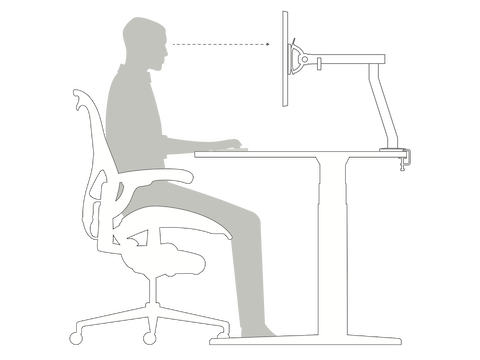
Proper monitor placement determines whether you slouch, hunch shoulders, or strain your neck—all precursors to chronic pain that develops gradually over months of improper positioning.
Achieve Perfect Eye-Level Positioning
Position your monitor directly in front of your primary sitting position at arm’s length away (20-40 inches). Use a monitor riser or adjustable arm to ensure the top of the screen sits at or slightly below eye level. With an L-shaped desk, resist placing your monitor in the corner—this forces constant head turning that leads to neck pain. For dual monitor setups, arrange screens side by side at the same height and distance to maintain ergonomic alignment and prevent uneven muscle strain.
Configure Desk Height for Natural Arm Position
Desk height significantly impacts ergonomic comfort, as improper height causes bad posture, back pain, or neck strain during extended work sessions.
Find Your Ideal Desk Height
Adjust your desk so forearms remain parallel to the floor when hands rest on the keyboard, with elbows at 90 degrees and wrists straight. If your desk is too low, raise it slightly with blocks or invest in an adjustable-height model. If too high, elevate your chair and use a footrest to achieve proper positioning. Standing desks represent the healthiest configuration, allowing position changes throughout the day to reduce sedentary behavior and associated health risks.
Position Keyboard and Mouse to Prevent Repetitive Strain
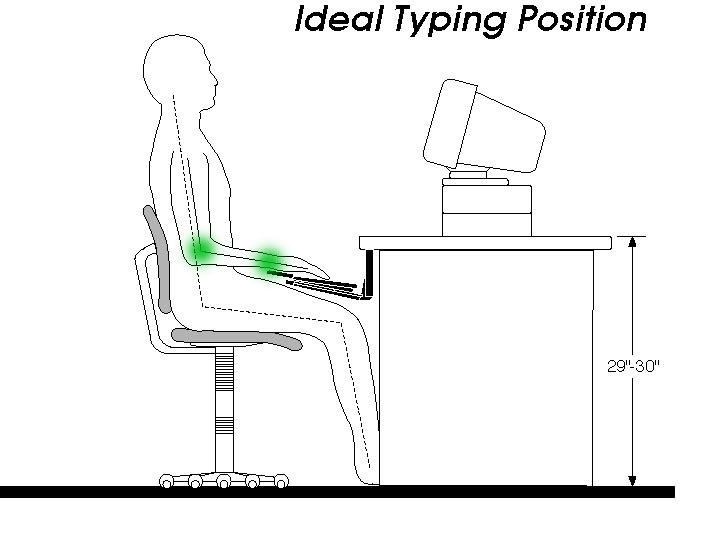
Input device placement directly impacts shoulders, arms, and wrists—critical considerations in your corner desk ergonomic setup to avoid chronic pain conditions.
Optimize Keyboard and Mouse Placement
Position the keyboard directly in front of you with keys at elbow height and wrists in neutral position. Use a keyboard tray to adjust height and angle, reducing strain during intensive typing. Keep the keyboard close to prevent shoulder tension from reaching. Place the mouse next to the keyboard at the same height, requiring minimal effort to reach. Consider a mouse pad with wrist support to maintain proper alignment and reduce carpal tunnel risk.
Create Dedicated Work Zones on Your L-Shape
The L-shaped desk offers generous surface area, but treating it as one undifferentiated space leads to clutter and reduced focus—defeating the ergonomic benefits.
Implement the Left-to-Right Workflow Method
Dedicate one leg of the L to your primary computer workstation. Use the other leg as your creative zone, paperwork hub, or meeting space depending on your work requirements. Keep the right side clear while placing incoming projects on the left, moving completed work to the right as you finish. Place frequently used items like phones or notepads within easy reach in the corner space, but avoid clutter that disrupts your primary work position.
Eliminate Cable Chaos in Your Corner Workspace
Organized cables prevent tripping hazards while maintaining the clean, professional appearance that supports focused work—especially important in corner configurations where cables traverse multiple pathways.
Implement Effective Cable Management
Route cables along the desk underside using clips, ties, or trays to prevent tangling. Group cables from the same devices together with Velcro ties to avoid “spaghetti syndrome.” Store paperwork and supplies in designated areas rather than letting them accumulate on your workspace. Regular decluttering sessions maintain organizational systems and prevent visual distractions that undermine productivity.
Optimize Lighting to Reduce Eye Fatigue
Position your corner desk to receive ample natural light while minimizing glare on your computer screen—a critical but often overlooked aspect of corner desk ergonomic setup.
Balance Natural and Artificial Light
Place your L-shaped desk where natural light enters without causing screen glare. Add task lighting for focused work areas requiring detailed visual attention. Maintain comfortable room temperature to promote focus throughout the day. Consider positioning your desk in a “command position” with a view of the room entrance to enhance psychological comfort during work sessions.
Avoid These 3 Common Corner Desk Mistakes
Even well-intentioned setups often fall into predictable traps that undermine ergonomic benefits and long-term health.
Mistake #1: Choosing the Wrong Desk Size
People frequently underestimate required space, focusing only on the L-shape while ignoring depth and width measurements. This leads to cramped conditions where you constantly bump into things. Conversely, oversized desks waste space and create emptiness. Measure your room meticulously before purchasing, noting door placements and traffic flow.
Mistake #2: Ignoring Monitor Placement
Placing your monitor in the corner for convenience forces constant head turning that strains neck muscles asymmetrically. Position your primary monitor directly in front of your sitting position even if it means sacrificing some corner workspace.
Mistake #3: Neglecting Chair Adjustments
Failing to configure every adjustable feature of your ergonomic chair leaves your spine unsupported. Take fifteen minutes to adjust lumbar support, armrest height, and seat depth to match your body proportions—this small investment pays dividends in spinal health over years of use.
Maintain Long-Term Comfort with These Habits
Creating the ultimate corner desk ergonomic setup requires ongoing maintenance to ensure lasting benefits for your health and productivity.
Take short movement breaks throughout the day to stretch and reset your posture. Alternate between sitting and standing positions if your desk allows. Schedule quarterly reviews of your ergonomic configuration to ensure everything remains properly adjusted as your work tasks evolve. Prioritize ergonomics in your corner desk setup to create a supportive workspace that enhances both your immediate comfort and long-term health—your future self will thank you for getting it right from the start.