You’ve probably felt it—that nagging wrist pain after hours at your desk, the backache from lifting boxes, or the mental fog from trying to decipher a confusing control panel. These aren’t just minor discomforts; they’re symptoms of poor ergonomic design costing businesses billions annually. The elements of ergonomics represent your most powerful solution to these problems, transforming how workers interact with their environments while protecting your bottom line. When implemented correctly, these principles eliminate the root causes of workplace injuries rather than just treating symptoms after damage occurs.
Understanding the core elements of ergonomics gives safety managers and HR professionals actionable strategies to reduce musculoskeletal disorders, which account for nearly 30% of all workplace injuries requiring time off. These aren’t theoretical concepts—they’re practical interventions that immediately impact absenteeism, turnover rates, and workers’ compensation costs. By the end of this guide, you’ll recognize exactly which ergonomic elements to prioritize in your facility and how to implement them without disrupting productivity. The difference between workplaces that thrive and those that struggle often comes down to how well they’ve integrated these five critical components.
Why Ignoring Ergonomics Costs Companies Thousands Per Employee
Workplaces that neglect ergonomic considerations pay a steep price through preventable injuries, reduced productivity, and high turnover. Consider a manufacturing facility where workers repeatedly lift heavy components from improperly positioned conveyors. Without ergonomic intervention, these employees develop chronic back conditions that lead to extended absences and workers’ compensation claims averaging $20,000 per incident. Meanwhile, the company faces hidden costs from temporary staffing, retraining, and decreased output during recovery periods.
The financial impact compounds when multiple workers experience similar injuries across departments. A single repetitive strain injury might seem minor, but when 15% of your workforce develops carpal tunnel syndrome from poorly designed workstations, the cumulative effect devastates your operational capacity. Organizations that implement comprehensive ergonomic programs typically see a 25-75% reduction in musculoskeletal disorders within two years—translating directly to improved profitability and employee retention. The question isn’t whether you can afford ergonomic improvements, but whether you can afford to ignore them.
Physical Ergonomics: Stop Repetitive Strain Injuries Before They Start

Physical ergonomics addresses the most visible workplace injuries by aligning job demands with human physical capabilities. This element focuses on eliminating awkward postures, excessive force requirements, and repetitive motions that gradually damage the body. When workers perform tasks requiring them to bend, reach, or twist repeatedly, microscopic tissue damage accumulates until pain and dysfunction become unavoidable.
How to Identify High-Risk Physical Tasks
Look for these red flags in your workplace:
– Employees working with arms above shoulder height for more than 2 hours daily
– Tasks requiring forceful gripping exceeding 50% of maximum capacity
– Repetitive motions performed more than 4 times per minute without adequate recovery
– Work surfaces positioned below knee or above elbow height for seated tasks
Practical Physical Ergonomics Solutions
Implement these interventions immediately:
– Adjust workstation heights so workers can maintain elbows at 90 degrees
– Introduce anti-fatigue mats for standing workstations
– Rotate employees through different tasks every 2 hours to vary muscle use
– Install mechanical lifting aids for loads exceeding 35 pounds
The key principle: design tasks so workers can use their bodies naturally without straining. A simple height adjustment on an assembly line reduced shoulder injuries by 60% at one automotive plant—proving that small changes yield significant protection.
Cognitive Ergonomics: Reduce Errors in Complex Work Environments
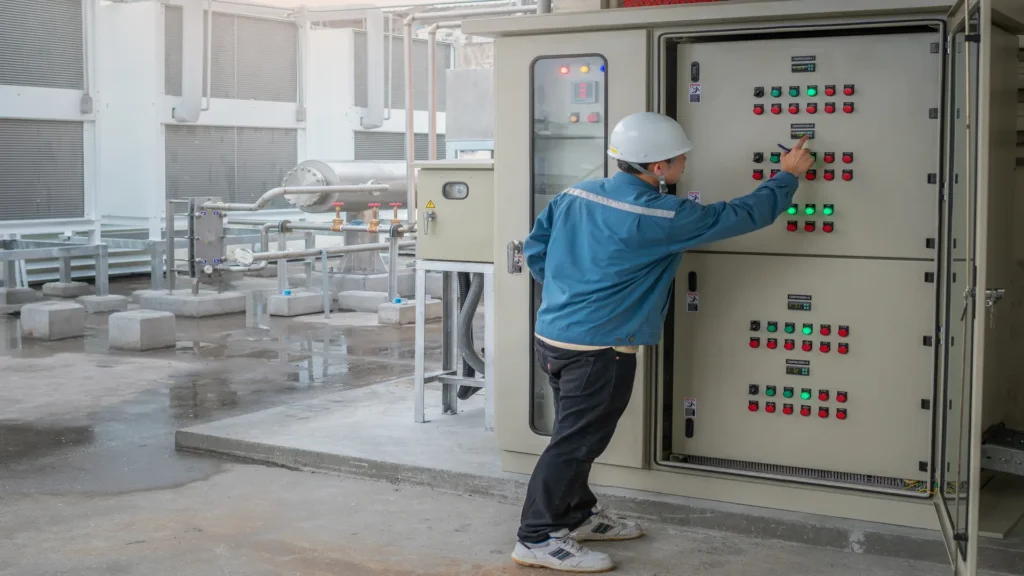
While physical ergonomics addresses the body, cognitive ergonomics optimizes mental workload and information processing. This element prevents costly mistakes by designing interfaces and procedures that match human cognitive capabilities. When workers must monitor multiple displays, interpret confusing alerts, or make rapid decisions with incomplete information, cognitive overload leads to errors that compromise safety and quality.
Fix These Common Cognitive Overload Problems
Your control rooms and workstations likely suffer from these issues:
– Information overload: Too many displays competing for attention
– Poor feedback: Unclear system status leaving workers guessing
– Inconsistent layouts: Different machines with conflicting control arrangements
– High mental workload: Complex procedures requiring excessive memorization
Streamline Mental Workload Today
Apply these cognitive ergonomics principles:
– Group related controls logically using spatial arrangement
– Use color coding consistently across all equipment interfaces
– Implement progressive disclosure—show only essential information first
– Provide immediate visual and auditory feedback for all user actions
A chemical processing plant reduced operator errors by 40% simply by redesigning their control panels to present critical information more intuitively—demonstrating how cognitive ergonomics directly impacts safety outcomes.
Organizational Ergonomics: Optimize Shift Scheduling and Team Structures
Organizational ergonomics examines how work is structured, communicated, and managed across your entire operation. This element recognizes that individual performance depends on broader systems like shift scheduling, communication protocols, and team dynamics. Poorly designed work organization leads to chronic fatigue, communication breakdowns, and safety culture failures that physical interventions alone cannot fix.
Create Sustainable Work Schedules
Implement these organizational improvements:
– Limit consecutive night shifts to no more than 3
– Provide minimum 11-hour rest periods between shifts
– Schedule demanding physical tasks during natural energy peaks
– Rotate high-stress positions regularly to prevent burnout
Foster Effective Communication Systems
- Establish clear reporting channels for safety concerns without fear of retaliation
- Implement regular cross-departmental safety meetings
- Create visual management systems that make workflow issues immediately apparent
- Train supervisors in active listening and psychological safety techniques
Job rotation programs that cycle workers through different tasks reduce both physical strain and mental fatigue while increasing cross-training benefits—proving that organizational structure directly impacts worker well-being.
Environmental Ergonomics: Control Temperature, Noise, and Lighting
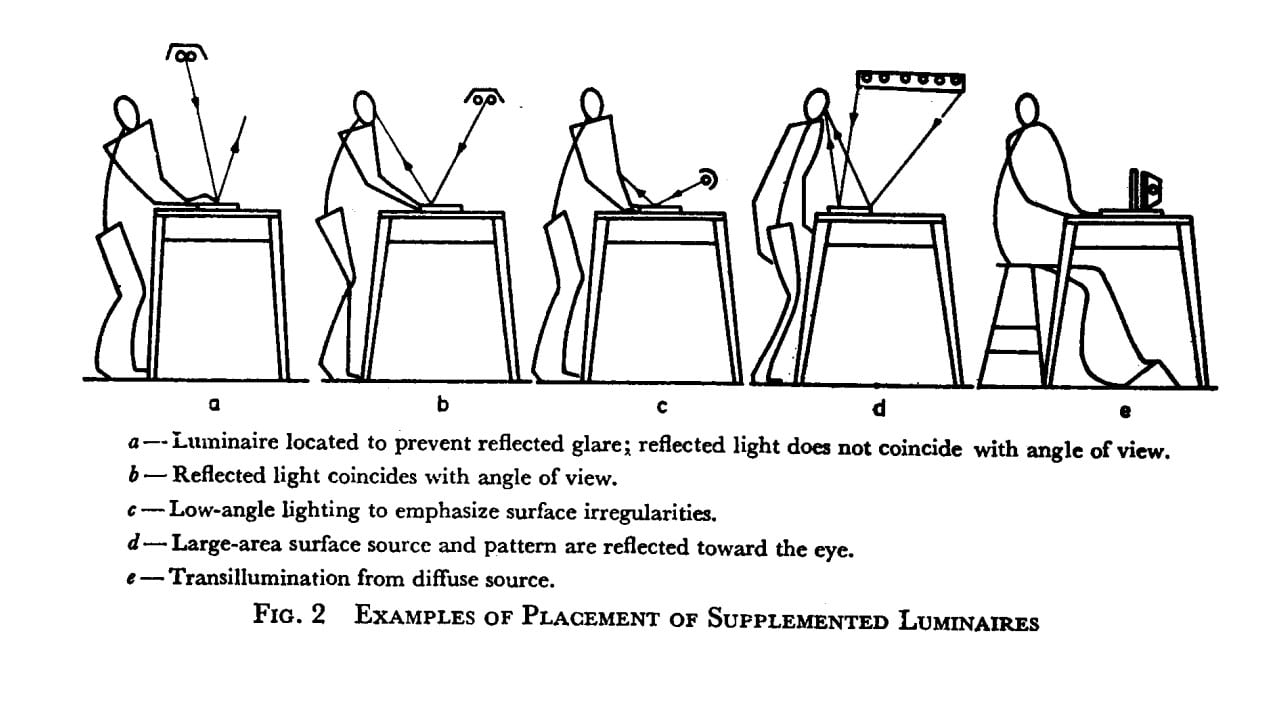
Environmental ergonomics addresses workplace conditions that surround workers throughout their shifts. Temperature extremes, poor lighting, and excessive noise don’t just cause discomfort—they degrade performance and increase injury risk. Workers in environments with improper lighting make 20% more errors, while those exposed to high noise levels experience communication breakdowns that compromise safety.
Lighting Solutions That Reduce Errors
- Install task lighting at 500-1000 lux for detailed visual work
- Eliminate glare on computer screens with anti-reflective surfaces
- Use warmer color temperatures (3000K-4000K) in break areas
- Implement circadian lighting that adjusts throughout the day
Noise Reduction Strategies That Protect Hearing and Focus
- Install acoustic panels in high-noise areas
- Provide noise-canceling headsets for critical communication
- Schedule loud maintenance tasks during low-occupancy periods
- Create designated quiet zones for focused work
Temperature control matters more than you think—productivity drops 2% for every degree above optimal comfort levels. Maintain workspaces between 68-76°F (20-24°C) with proper humidity control to keep workers alert and efficient.
Design Ergonomics: Build Tools That Fit Human Capabilities
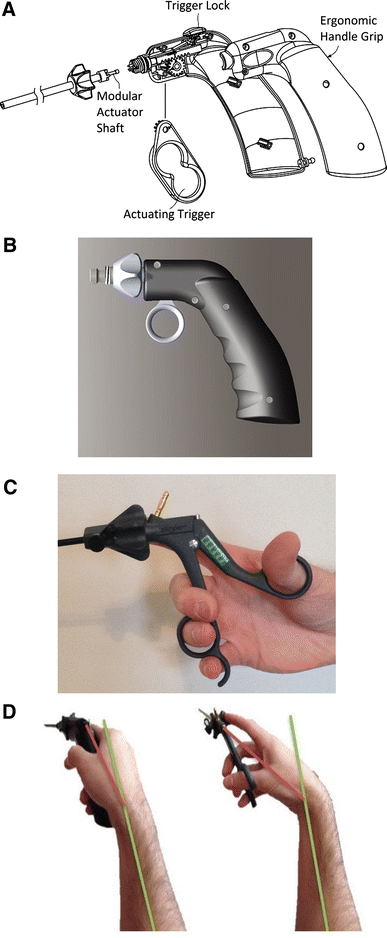
Design ergonomics integrates human factors into product and workspace development from the earliest stages. This proactive approach prevents problems rather than fixing them after injuries occur. Tools designed without ergonomic consideration force workers to adapt to unnatural movements, leading to cumulative trauma injuries that develop slowly but cause permanent damage.
Essential Features of Ergonomic Tools
Your hand tools should incorporate:
– Contoured handles matching natural hand anatomy
– Vibration dampening for power tools
– Weight distribution that minimizes wrist strain
– Operating forces within comfortable ranges (under 5 lbs for precision tasks)
Workspace Design Checklist
Ensure workstations include:
– Adjustable height to accommodate 5th-95th percentile users
– Adequate clearance for leg movement
– Monitor positioned at eye level to prevent neck strain
– Frequently used items within easy reach (15-20 inch radius)
A construction company reduced wrist injuries by 70% simply by switching to power tools with ergonomic grips—proving that thoughtful design pays immediate dividends in worker health and productivity.
Achieving Maximum Usability Without Major Budget Increases
You don’t need massive investments to implement effective ergonomics. Start with these low-cost, high-impact actions:
- Conduct simple workstation assessments using free NIOSH checklists
- Train supervisors to recognize early signs of ergonomic strain
- Implement “ergo champions” program where workers identify improvement opportunities
- Prioritize interventions based on injury data and employee feedback
The most successful ergonomic programs treat workers as active participants rather than passive recipients of solutions. When employees help design their own workstations, compliance and effectiveness increase dramatically. Remember, the elements of ergonomics aren’t about creating perfect conditions—they’re about making continuous, practical improvements that protect your most valuable asset: your people. Organizations that master these elements see not just fewer injuries, but higher engagement, better quality, and sustainable productivity gains that compound over time.
Leave a Reply