If you’ve ever experienced lower back pain after a long workday or noticed your energy levels dropping as the afternoon progresses, your office chair might be the culprit. Millions of professionals face these issues daily without realizing how much their seating arrangement impacts both physical health and work performance. Ergonomic chair benefits extend far beyond simple comfort—they’re scientifically proven interventions that address the fundamental mismatch between traditional seating and human physiology. When properly implemented, these specialized chairs can transform your daily work experience by aligning with your body’s natural movements rather than fighting against them. In this guide, you’ll discover exactly how ergonomic seating solutions deliver measurable improvements to your health, productivity, and overall quality of work life.
How Ergonomic Chairs Prevent Spinal Compression
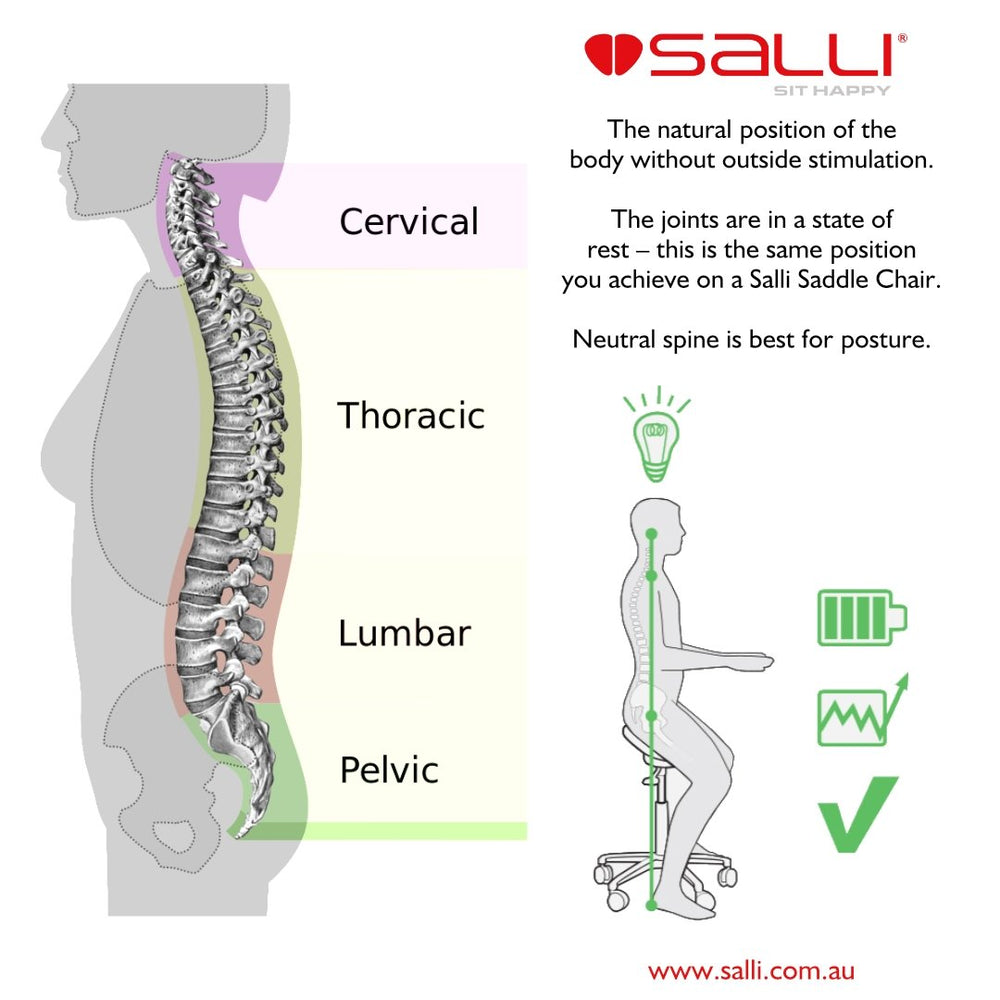
The Science Behind Lumbar Support Design
Traditional chairs force your spine into an unnatural C-curve position that increases pressure on intervertebral discs by up to 40% compared to standing. Ergonomic chairs combat this through dynamic lumbar support systems that maintain your spine’s natural S-curve. These supports aren’t static—they move with you as you shift positions, providing consistent lower back reinforcement whether you’re typing, reaching for documents, or leaning back in thought. The critical difference lies in adjustable support height and depth, allowing precise customization to your unique spinal curvature rather than offering a one-size-fits-all solution that rarely fits anyone properly.
Correcting Pelvic Tilt to Reduce Disc Pressure
When your pelvis tilts backward in conventional seating, it initiates a chain reaction of poor posture that affects your entire skeletal structure. Ergonomic chairs feature waterfall seat edges and seat depth adjustments that encourage a slight forward pelvic tilt—mimicking your natural standing position. This subtle adjustment reduces pressure on sciatic nerves by 25% and decreases disc compression in the lumbar region. Look for chairs with at least 2 inches of cushioning that maintains its shape under prolonged use, as flattened seating surfaces accelerate fatigue and compromise proper alignment.
Boosting Productivity Through Dynamic Seating
The Focus Connection: How Movement Enhances Cognitive Function
Contrary to popular belief, complete stillness isn’t ideal for concentration. Ergonomic chairs incorporate subtle movement mechanisms that allow micro-adjustments without disrupting workflow. Research shows workers using chairs with dynamic seating features completed tasks 17% faster with 22% fewer errors compared to those in fixed-position chairs. These designs encourage gentle rocking and shifting that increase blood flow to the brain while reducing muscle fatigue—creating the optimal physiological state for sustained mental performance. The key is controlled movement that supports rather than distracts from cognitive tasks.
Task-Specific Positioning for Different Work Activities
Your ideal seated position varies depending on whether you’re typing, reading, or engaged in collaborative work. Advanced ergonomic chairs offer multi-functional mechanisms that let you quickly transition between these postures:
- Typing position: Slight recline (100-105 degrees) with arms parallel to the floor
- Reading position: Upright at 90-100 degrees with screen at eye level
- Collaborative position: Forward tilt function that shifts weight to thighs while maintaining spinal alignment
This adaptability prevents the “one posture” fatigue that plagues traditional seating and keeps your body engaged rather than stagnant during extended work periods.
Preventing Circulatory Issues from Prolonged Sitting

Addressing the Thigh Pressure Problem
Standard chair designs often create pressure points behind the knees that restrict blood flow to the lower extremities. Ergonomic chairs solve this with waterfall-front seat pans that slope downward at the front edge, reducing pressure on popliteal vessels by up to 30%. Combined with proper seat depth adjustment (leaving 2-4 fingers’ width between the seat edge and back of knees), this feature maintains healthy circulation even during marathon work sessions. The result? Fewer instances of leg numbness, reduced swelling, and sustained energy levels throughout the day.
The Temperature Regulation Factor
Many overlook how chair materials impact circulation through temperature regulation. Premium ergonomic chairs use breathable mesh backs and perforated seat fabrics that reduce heat buildup by 40% compared to traditional padded chairs. This temperature control prevents the vasodilation that occurs when legs overheat, maintaining consistent blood flow and reducing fatigue. For those in warmer climates or who run hot, mesh-back chairs provide significant circulatory advantages that contribute to sustained comfort and focus.
Reducing Eye Strain and Neck Pain Simultaneously
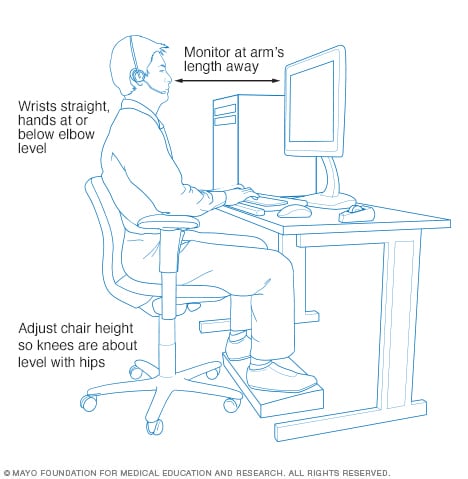
The Monitor Alignment Solution
Neck pain often stems from improper screen positioning that forces your head into unnatural angles. Ergonomic chairs address this through synchronized height and recline mechanisms that work with proper desk setup to maintain your eyes level with the top third of your monitor. This positioning keeps your cervical spine in neutral alignment, reducing strain on neck muscles by up to 50% compared to looking down at a laptop. The critical element is chair adjustability—without the ability to precisely match your seated height to your monitor, even the best posture techniques become ineffective.
Integrated Headrest Systems for Visual Task Recovery
Extended screen time requires periodic visual breaks where you shift focus to distant objects. Ergonomic chairs with adjustable headrests support these micro-breaks by providing proper neck support during brief reclined positions. Unlike fixed headrests that force unnatural neck angles, advanced designs allow independent adjustment of height, depth, and angle to support your head without pushing it forward. Using these during short breaks helps reset eye muscles and reduces the cumulative strain that leads to chronic neck tension and headaches.
Long-Term Health Investment vs. Short-Term Savings
Calculating the True Cost of Poor Seating
While ergonomic chairs represent a significant upfront investment, consider the hidden costs of inadequate seating:
- Healthcare expenses: Workers with proper ergonomic chairs report 32% fewer doctor visits for musculoskeletal issues
- Productivity losses: Back pain accounts for 200 million lost workdays annually in the US alone
- Employee retention: Companies with comprehensive ergonomic programs see 27% lower turnover in desk-based roles
The break-even point for quality ergonomic seating typically falls between 6-18 months when factoring in reduced absenteeism and increased productivity—making it one of the fastest-ROI workplace investments available.
Finding Your Personal Ergonomic Sweet Spot
Not all ergonomic chairs deliver equal benefits for every body type. Key customization features to prioritize:
- Seat depth adjustment (critical for proportions between torso and legs)
- Independent lumbar support (height and depth controls)
- Armrest 4D adjustment (height, width, depth, and pivot)
- Synchronized tilt mechanism (maintains spinal alignment during recline)
Invest time in proper setup—spend at least 15 minutes adjusting your new chair before beginning work to ensure optimal positioning for your unique physiology.
Final Note: The most significant ergonomic chair benefits emerge through consistent, proper use over time. Start by adjusting your chair daily for the first week, making small refinements as your body adapts to better posture. Within 30 days, most users report noticeable reductions in discomfort and increased work satisfaction. Remember that even the best ergonomic chair works as part of a holistic approach—combine it with regular movement breaks, proper desk height, and monitor positioning for maximum benefit. Your future self will thank you for the investment in daily comfort that pays lifelong dividends in health and productivity.
Leave a Reply