You’re hunched over your keyboard, neck craned toward the screen, when a sharp twinge shoots through your cervical spine. By afternoon, that twinge has become a constant ache radiating to your shoulders – the all-too-familiar signature of work-induced neck pain. If you’re reading this while subtly adjusting your posture, you’re not alone. Millions experience this daily battle between productivity and physical comfort, often unaware that simple ergonomic adjustments could break the cycle. This isn’t just about temporary relief; it’s about redesigning your workspace to align with your body’s natural mechanics. In the next few minutes, you’ll discover actionable fixes that address the root causes of neck strain – no expensive equipment or drastic changes required.
The truth is, your neck wasn’t designed for the modern workstation. When we force our cervical spine into sustained forward head positions – whether staring at a laptop or cradling a phone – we create unnatural leverage that multiplies strain on muscles and joints. What feels like minor discomfort today can escalate into chronic pain if ignored. But here’s the empowering part: most neck pain stems from correctable setup errors, not irreversible damage. By implementing evidence-based ergonomic principles immediately, you can transform your workspace from a pain trigger to a support system. Let’s dive into solutions that work with your anatomy, not against it.
Why Your Monitor Height Is Secretly Causing Neck Pain
The 20-Pound Head Physics Problem
Your head weighs approximately 10-12 pounds in neutral alignment. But for every inch your chin drifts forward from your spine’s centerline, that load effectively doubles on supporting muscles. At just 2 inches forward (a common “text neck” position), your neck muscles bear 24+ pounds of continuous strain – like carrying a toddler on your neck all day. This explains why neck pain often starts subtly during work hours but intensifies by evening. You’ll recognize this pattern if you frequently catch yourself propping your head on your hand or rubbing your trapezius muscles while concentrating.
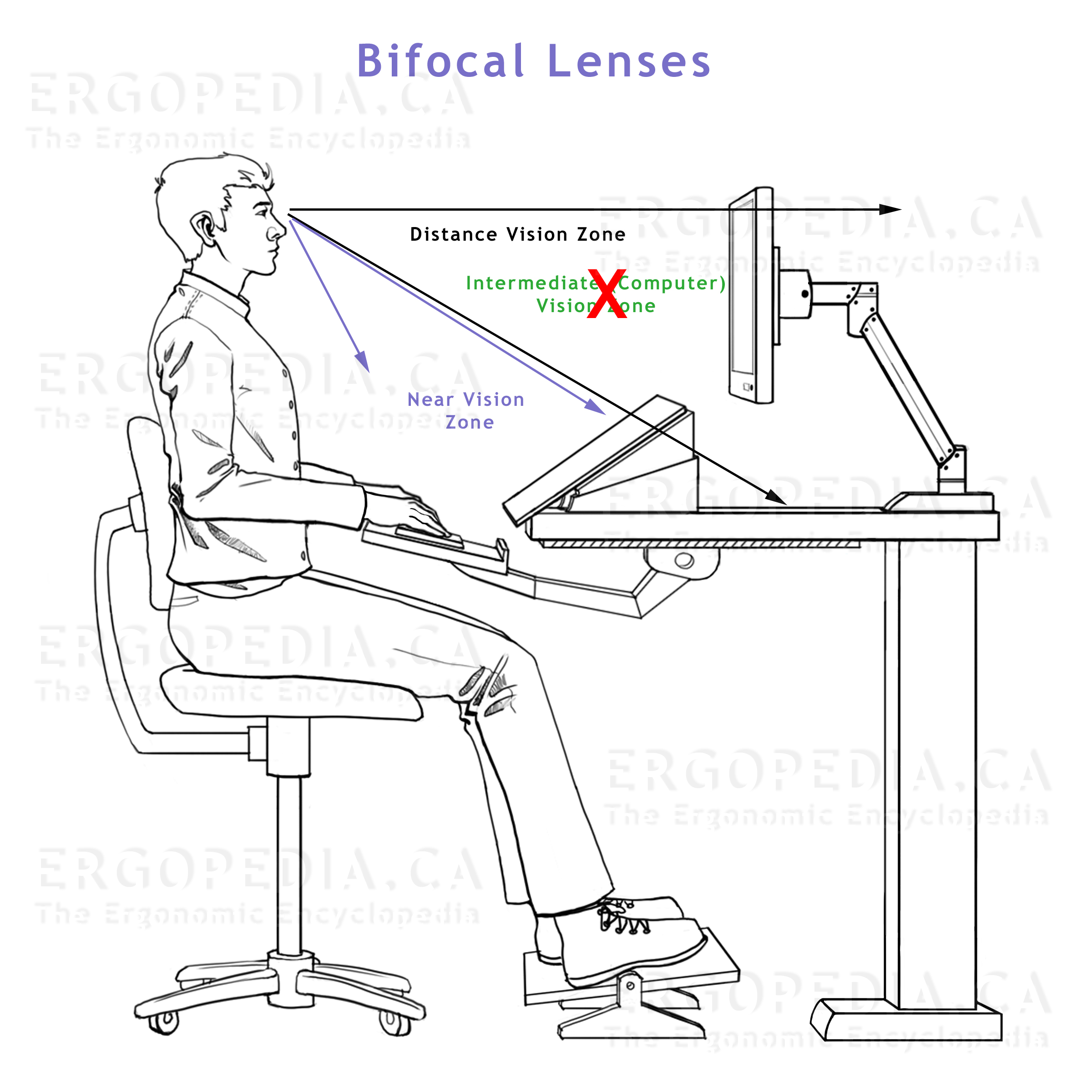
How to Spot Monitor Misalignment Instantly
Stand behind your seated workspace and observe:
– ✅ Correct: Top of screen at or slightly below eye level
– ❌ Pain Trigger: Screen more than 15 degrees below eye level (causing chin tuck)
– ❌ Pain Trigger: Screen requiring 20+ degrees neck rotation (common with dual monitors)
The critical visual cue? Check for horizontal neck wrinkles. Deep creases at your throat indicate sustained forward head posture – your body’s distress signal.
Fix Your Chair Setup in 90 Seconds Flat
The Lumbar Support Myth That Worsens Neck Pain
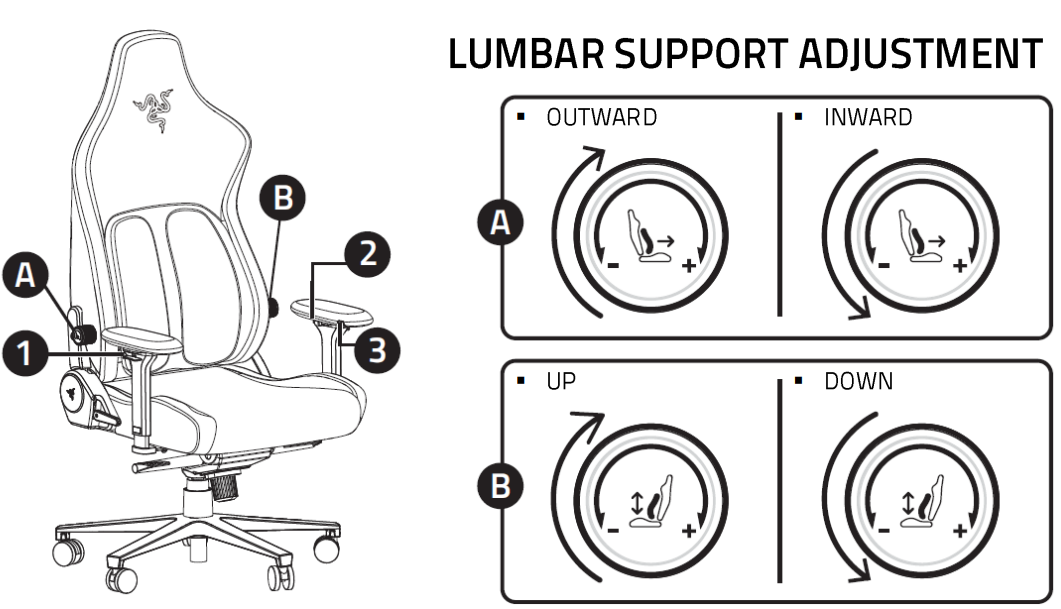
Most people shove lumbar rolls too low, forcing their upper back to compensate. This creates a domino effect: weak lower spine support → rounded mid-back → forward head position → neck strain. The real fix starts at your pelvis. Sit fully back in your chair and place a rolled towel vertically along your lower spine’s natural curve. You should feel gentle pressure just above your belt line, not in your ribcage.
Three Chair Adjustments That Relieve Neck Pressure
- Seat Depth Test: Slide forward until 2-3 fingers fit between knee pit and seat edge. Too deep? Your thighs press against the seat, tilting pelvis backward and straining neck muscles to maintain balance.
- Armrest Alignment: Adjust height so elbows rest at 90-110 degrees with shoulders relaxed. Elevated shoulders = trapezius tension = referred neck pain.
- Tilt Tension Trick: Increase recline resistance until you can lean back 105 degrees without sliding. This reduces cervical disc pressure by 35% compared to upright sitting.
Pro Tip: Set a phone timer for hourly “posture resets.” Stand up, roll shoulders back 5 times, then sit with chin gently tucked. This breaks the muscle memory of forward head posture.
Keyboard and Mouse Positioning Mistakes Amplifying Strain
Why Your Wrist Rest Is Making Neck Pain Worse
That plush wrist rest you love? If it elevates your hands above elbow height, it forces shoulder elevation – a direct path to neck tension. The silent culprit: your levator scapulae muscles (connecting neck to shoulder blade) fire continuously to hold this position. Within 20 minutes, this creates trigger points that refer pain upward into your cervical spine.
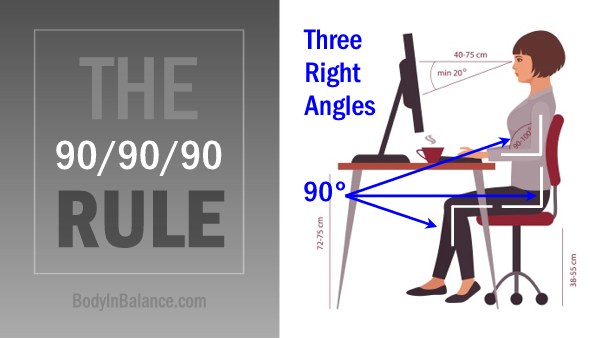
The 90/90/90 Rule for Pain-Free Typing
Position your workstation using this anatomical checkpoint:
– 90 degrees at elbows (arms parallel to floor)
– 90 degrees at hips (thighs horizontal)
– 90 degrees at knees (feet flat)
If your keyboard forces wrist extension beyond 15 degrees, your neck muscles unconsciously tighten to stabilize your upper body. Test this: type with wrists bent upward for 60 seconds, then notice immediate tension in your upper traps.
Your Phone Habits Are Accelerating Neck Degeneration
The 6-Inch Screen, 60-Pound Strain Phenomenon
Holding your phone at waist level while walking creates extreme forward head posture. At 60 degrees flexion (common texting angle), your neck bears 60 pounds of compressive force – equivalent to stacking two car tires on your cervical spine. This isn’t hypothetical: MRI studies show disc compression begins within 30 seconds of sustained poor posture.
Two Phone Holding Techniques That Prevent “Text Neck”
- The Elbow Anchor: Hold phone at eye level with both hands, resting elbows against your ribs. This engages chest muscles to support weight instead of neck tendons.
- Voice Command Hack: For messages over 3 sentences, activate voice typing. Your neck gets a micro-break every time you speak instead of look down.
Warning: Avoid “chin tucks” as quick fixes. Forcing your head backward without strengthening deep neck flexors can pinch nerves. Instead, practice “ear over shoulder” alignment throughout the day.
When Neck Pain Signals Need Professional Intervention
Red Flags Beyond Basic Ergonomic Fixes
While most work-related neck pain responds to setup adjustments, certain symptoms require immediate specialist evaluation:
– Numbness/tingling radiating past your elbow
– Pain worsening when lying flat
– Unexplained dizziness with head movement
– Symptoms persisting >72 hours after workstation correction
These indicate possible nerve compression or disc issues where DIY fixes could worsen injury.
Building Your Pain Relief Team
For persistent discomfort after ergonomic adjustments:
1. Physical Therapists: Specialize in movement pattern correction
2. Occupational Therapists: Focus on workstation adaptation
3. Certified Ergonomists: Conduct comprehensive workspace assessments
Key Question to Ask: “Can you demonstrate exercises that target my specific movement dysfunction, not just generic stretches?”
Essential Ergonomic Upgrades That Deliver Real Relief
Budget-Friendly Solutions Under $50
You don’t need a full office overhaul. Prioritize these high-impact investments:
– Laptop Stand: Elevates screen to eye level (use stacked books if needed)
– Footrest: Eliminates pelvic tilt when feet don’t touch floor
– Document Holder: Positions reference material at screen height
Critical Check: After setup, your gaze should naturally fall on the top third of your screen without moving your head. If you’re constantly adjusting neck position, your height is still wrong.
Standing Desk Protocol for Neck Sufferers
Standing desks help only when used correctly:
– Work standing for 15 minutes every hour
– Keep monitor at true eye level (not just raised from sitting position)
– Always use anti-fatigue mat to prevent pelvic shift
– Never lock knees – slight bend maintains spinal alignment
Standing with improper monitor height strains neck muscles 40% more than seated work.
Preventing Tomorrow’s Pain Today
Consistent micro-adjustments beat occasional overhauls. Each morning, perform the “90-Second Workspace Tune-Up”:
1. Adjust chair height until feet rest flat
2. Position monitor so top line of text hits eye level
3. Place keyboard/mouse within “elbow bubble” (no reaching)
4. Set phone on speaker mode for calls
Within two weeks, track changes using a simple pain scale: 1 (no awareness) to 10 (disabling). Most report 3-5 point reductions by correcting just monitor height and chair depth. Remember – ergonomics isn’t about perfection. It’s about creating a workspace that adapts to your body’s needs, not the other way around. When neck pain stops dictating your workday, you’ll reclaim not just comfort, but focus, energy, and productivity. Start today: that first monitor adjustment takes less time than brewing your next coffee. Your cervical spine will thank you before lunch.
Leave a Reply