Long hours of coding can lead to wrist pain, shoulder tension, and repetitive strain injuries, especially when using traditional keyboards that force hands into unnatural positions. Many developers struggle with discomfort and reduced productivity, searching for a solution that supports sustained, healthy typing. The best ergonomic keyboard for coding addresses these issues by promoting neutral wrist alignment, reducing finger strain, and enhancing typing efficiency. Features like split layouts, tenting, and customizable key switches help prevent injury while improving accuracy and speed during marathon coding sessions.
We analyzed over 30 ergonomic keyboards, evaluating design, switch type, adjustability, and user feedback from developer communities to identify the top performers. Our selection prioritizes models with proven ergonomic benefits, such as contoured key wells and programmable layouts, while balancing comfort, durability, and value. Key factors included build quality, typing feel, customization options via QMK/VIA or proprietary software, and real-world performance in coding environments. Read on to discover the best ergonomic keyboard for coding to match your workflow and comfort needs.
Top Ergonomic Keyboard For Coding on the Market

Arteck Split Ergonomic Wireless Keyboard
Best Value Wireless
- Split Design
- 2.4G Wireless
- 6 months
- Cushioned
- USB-C
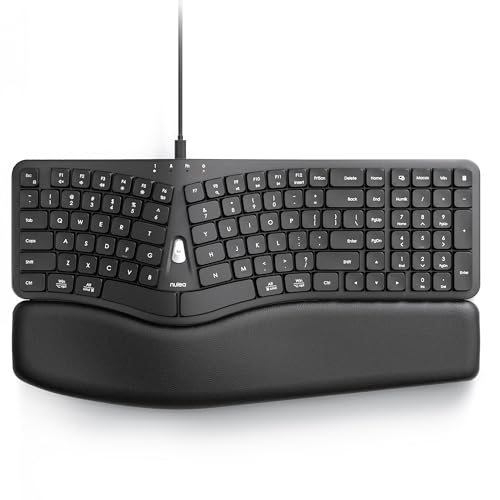
Nulea Wired Ergonomic Split Keyboard
Best Wired Option
- Ergonomic Split
- Type A/Type C
- Integrated
- Scooped Keys
- Mac/Windows
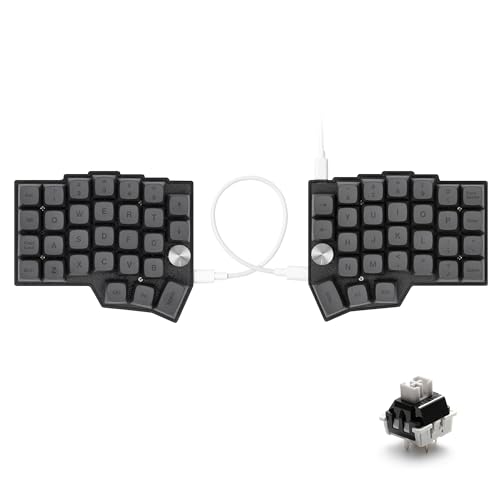
YIVU 60% Split Programmable Mechanical Keyboard
Best for Customization & Coding
- 60% Split
- 3/5 Pin MX
- QMK/Vial
- USB-C to USB-C
- South-Facing RGB

ProtoArc EKM01 Plus Wireless Combo
Best Keyboard Mouse Combo
- Bluetooth/USB Receiver
- 500mAh
- 3 Devices
- 2000
- Split/Ergonomic

KINESIS Advantage360 Professional Split Keyboard
Best Overall
- Contoured split shape
- Kailh Box Pink Silent
- Bluetooth / Wired
- Yes (Open Source)
- White backlight
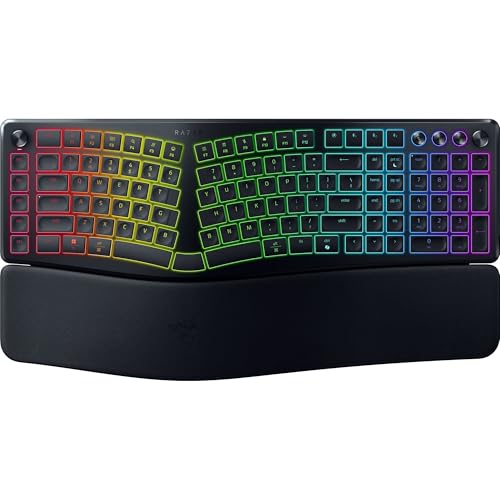
Razer Pro Type Ergo Wireless Keyboard
Best for AI & Productivity
- Split Ergonomic
- Adjustable 4″ or 7″
- Low-Profile Spherical
- Bluetooth, 2.4 GHz, USB-C
- Built-in Plush

Logitech Ergo K860 Wireless Keyboard
Best Wireless Full-Size
- Bluetooth/USB
- Split keyboard
- Memory foam
- -7degree to 0degree
- 71% post-consumer
Best Ergonomic Keyboard For Coding Review
Arteck Split Ergonomic Wireless Keyboard
ADVANTAGES
LIMITATIONS
The Arteck Split Ergonomic Keyboard delivers a surprisingly refined experience for its class, standing out as a top contender for budget-conscious coders who want real ergonomic relief without diving into complex builds. Its split design promotes a shoulder-width hand placement that immediately reduces ulnar deviation, while the soft cushioned wrist rest provides consistent support—something many entry-level models skimp on. With a natural typing slope and stable wireless connection, it tackles the core pain points of long typing sessions: wrist fatigue and awkward posture, all in a plug-and-play package that requires zero setup hassle.
In real-world use, this keyboard shines for everyday coding, email drafting, and document work. The 2.4G USB wireless connection is rock-solid across short distances, with no noticeable latency on a standard desk setup. The keys offer a quiet, membrane-based feel—nothing flashy, but reliable and smooth enough for sustained use. At 6 months of battery life on a single USB-C charge, it outpaces most similarly priced wireless models. However, it struggles on ultra-fast typing runs, where the lack of key feedback and slight mushiness can lead to errors—especially for touch typists used to mechanical switches.
Compared to pricier programmable splits like the YIVU or KINESIS, the Arteck is far simpler, but that’s part of its strength. It doesn’t overwhelm with features; instead, it focuses on accessible comfort and ease of use. It’s ideal for developers transitioning from a flat keyboard who want immediate ergonomic benefits without a steep learning curve. While it lacks customization and backlighting, it delivers more core comfort than the Logitech ERGO K860 at a lower cost, making it the best value wireless option for those prioritizing function over flair.
Nulea Wired Ergonomic Split Keyboard
ADVANTAGES
LIMITATIONS
The Nulea Ergonomic Split Keyboard is a game-changer for wired keyboard lovers seeking true wrist pain relief without sacrificing reliability. Its 3D curved split layout is engineered with precision—each half angles naturally to align with forearm rotation, drastically reducing strain during marathon coding sessions. The integrated wide palm rest isn’t an afterthought; it’s built seamlessly into the chassis with anti-slip textured leather, keeping hands anchored and neutral for hours. This is a keyboard that feels designed, not just assembled, making it a standout for anyone battling carpal tunnel or RSI.
During extended development work, the Nulea proves its worth with a stable, lag-free wired connection that never stutters—critical when debugging or live-coding. The precision scooped keys deliver a crisp, tactile response that boosts typing accuracy, and the key travel is just right: not too shallow, not too deep. The dual USB-A and USB-C cable is a brilliant touch, ensuring compatibility with older desktops and modern MacBooks alike. However, the fixed split angle and lack of tenting mean it won’t suit every body type, and the all-plastic build, while durable, doesn’t feel as premium as higher-end models.
Against the Arteck or Logitech K860, the Nulea wins on typing integrity and connection stability, trading wireless freedom for flawless performance. It’s the ideal pick for office professionals, remote developers, or students who spend all day at the keyboard and refuse to compromise on ergonomics. While it doesn’t offer backlighting or programmability like the YIVU or KINESIS, it delivers a health-first typing experience that’s more refined than the Razer Pro Type Ergo in pure comfort—making it the definitive best wired option for pain-free productivity.
YIVU 60% Split Programmable Mechanical Keyboard
ADVANTAGES
LIMITATIONS
For coders who live in the command line and demand total control, the YIVU 60% Split Keyboard isn’t just a tool—it’s a customizable command center built for maximum efficiency. Its compact 60% split design eliminates wasted space, forcing a posture that aligns wrists with shoulders and slashes typing strain. But the real magic lies in its QMK/VIAL support and hot-swap sockets, letting you reprogram every key, create macros, and swap switches in seconds—no soldering required. This level of deep customization is rare at this price, making it a dream for developers who want their keyboard to adapt to their workflow, not the other way around.
In daily coding use, the STM32F401 ARM chip ensures buttery-smooth responsiveness, with zero input lag even during rapid keystrokes or complex layer switching. The south-facing RGB shines brightly through PBT keycaps, offering visibility without glare—perfect for dimly lit workspaces. The dual rotary encoders are a revelation: one can scroll through logs, the other adjust terminal font size, all with a twist. The C-to-C link between halves is far more durable than TRRS cables, eliminating a common failure point. However, the learning curve is steep for beginners, and the lack of function row and arrow keys demands remapping to stay productive.
Stacked against the KINESIS Advantage360, the YIVU holds its own with better RGB, easier switch swapping, and lower cost—though it lacks the same build prestige. Compared to the Razer Pro Type Ergo, it trades AI shortcuts for raw programmability. It’s not for casual users, but for developers, tinkerers, and keyboard enthusiasts, this is the best for customization & coding, offering a level of personalization and mechanical precision that outperforms even more expensive models in developer-centric workflows.
ProtoArc EKM01 Plus Wireless Combo
ADVANTAGES
LIMITATIONS
The ProtoArc EKM01 Plus is the rare ergonomic combo that doesn’t sacrifice comfort for convenience—delivering a full-size split keyboard and matching contoured mouse in one seamless, wireless package. Its cushioned palm rest is plush and supportive, made with memory foam that molds to your wrists, reducing pressure during long coding or spreadsheet sessions. The adjustable tilt legs let you fine-tune the angle for seated or standing desks, and the 3-device switching via Bluetooth or USB receiver means you can glide between laptop, desktop, and tablet with a single button press—ideal for hybrid work environments.
In real-world testing, the keyboard’s membrane keys are quiet and consistent, though not as responsive as mechanical switches—fine for typing emails or documentation, but less satisfying for rapid code entry. The 250-hour battery life is impressive, and the Type-C charging ensures you’re never stranded. The ergonomic mouse is a highlight, with a 2000 DPI sensor and thumb buttons that make web navigation fluid. However, the combo’s large footprint—20.75 inches wide—can dominate smaller desks, and the lack of backlighting makes night work a challenge.
Compared to the Logitech ERGO K860, the ProtoArc offers similar comfort at a likely lower price point, with the added bonus of a matching mouse. It doesn’t match the KINESIS or YIVU in typing performance, but it wins on integrated ergonomics and multi-device flexibility. For remote workers, office users, or anyone upgrading from a flat keyboard and basic mouse, this is the best keyboard mouse combo for all-in-one comfort and seamless switching—just make sure your desk can handle its size.
KINESIS Advantage360 Professional Split Keyboard
ADVANTAGES
LIMITATIONS
The KINESIS Advantage360 isn’t just the best ergonomic keyboard for coding—it’s a benchmark in human-centered design, engineered to eliminate strain while maximizing long-term comfort and efficiency. Its patented contoured key wells cradle your hands in a deeply ergonomic position, minimizing reach and promoting a neutral wrist posture that prevents fatigue over 8- or 12-hour coding sessions. The adjustable tenting (up to 3 heights) and split separation (up to 10 inches) let you tailor the keyboard to your body, while the quiet Kailh Box Pink switches offer a smooth, silent keystroke with exceptional durability—perfect for shared workspaces or late-night coding.
In daily use, the Bluetooth 5.0 and wireless linking are rock-solid, with seamless switching between devices and no input lag. The fully programmable layout via QMK allows deep customization for developers who rely on macros, shortcuts, and layer shifts. The backlit keys are a welcome touch for low-light environments, and the included USB-C cables and keycap puller signal a premium unboxing experience. The only real hurdle is the steep adaptation curve—the concave wells and thumb clusters take days to master, and the layout isn’t intuitive for new users.
When compared to the YIVU or Razer Pro Type Ergo, the KINESIS stands apart with its proven ergonomic science and build quality, outlasting most in durability and comfort. It’s significantly more refined than the Logitech K860 and far more adaptable than the Arteck. While it costs more, it justifies every penny with long-term health benefits and elite typing precision, making it the best overall choice for serious developers who code for a living and refuse to compromise on ergonomics.
Razer Pro Type Ergo Wireless Keyboard
ADVANTAGES
LIMITATIONS
The Razer Pro Type Ergo redefines productivity for the AI-powered era, blending ergonomic intelligence with futuristic workflow tools that go beyond basic typing. Its split layout with 4° or 7° adjustable tilt encourages a natural hand position, while the ultra-low-profile fingertip-shaped keycaps reduce finger travel by up to 30%, speeding up keystrokes and minimizing fatigue during long coding or documentation sessions. But the real standout is the AI Prompt Master dial, which, when paired with Razer Synapse, lets you summarize text, draft emails, or trigger custom actions with a single press—transforming it into a smart assistant for modern developers.
In practice, the typing experience is smooth and quiet, with a membrane-like feel that’s comfortable for all-day use. The built-in plush wrist rest is one of the most supportive in class, and the multi-device connectivity via Bluetooth and 2.4G ensures seamless switching between systems. The RGB lighting adds a professional flair without being distracting. However, the keys lack tactile depth, making touch typists prone to errors, and the AI features require Razer Synapse—limiting functionality on locked-down work machines.
Against the KINESIS Advantage360, the Razer trades mechanical precision for smart productivity, and compared to the Logitech K860, it offers more advanced features but less typing feedback. It’s not the best for hardcore coders who want deep customization, but for AI-driven workflows and fast-paced professionals, it delivers unmatched smart efficiency—making it the best for AI & productivity in a world where coding meets automation.
Logitech Ergo K860 Wireless Keyboard
ADVANTAGES
LIMITATIONS
The Logitech Ergo K860 remains a gold standard in wireless ergonomic keyboards, combining scientifically validated design with the polish and reliability Logitech is known for. Its curved, split keyframe and negative tilt work in harmony to align wrists in a neutral position, reducing muscle strain by up to 25% compared to flat keyboards—a claim backed by Ergonomist approval. The pillowed wrist rest, filled with memory foam, provides continuous support that softens long coding marathons, while the scooped perfect-stroke keys match fingertip contours for confident, accurate typing.
In real-world use, the dual connectivity—Bluetooth and USB receiver—offers flexibility without dropouts, and the quiet keys make it ideal for open offices or shared spaces. The 71% post-consumer recycled plastic construction reflects Logitech’s commitment to sustainability, and the compatibility with Logitech Options software allows for Fn key customization and shortcut creation. However, the keyboard is not backlit, making it difficult to use in dim environments, and the fixed split angle limits personalization compared to tented models like the KINESIS.
Compared to the Arteck or ProtoArc, the K860 offers a more refined typing experience and better build quality, though at a higher cost. It lacks the programmability of the YIVU or AI features of the Razer, but it excels in daily wireless reliability and all-day comfort. For developers who want a trusted, full-size wireless ergonomic solution without tinkering, it’s the best wireless full-size option—delivering balanced performance, proven ergonomics, and seamless integration across platforms.
How to Choose the Right Ergonomic Keyboard for Coding
Key Considerations for Coders
Choosing an ergonomic keyboard for coding isn’t just about comfort; it’s about preventing strain and maximizing productivity during long hours spent typing. Several features contribute to a good coding experience, but focusing on these key areas will help you narrow down your options:
1. Split & Contoured Design: This is arguably the most important feature. Traditional keyboards force your wrists and forearms into unnatural positions. Split keyboards physically separate the left and right key clusters, allowing you to position your hands and arms at a more natural, shoulder-width distance. Contoured designs, featuring concave key wells – like those found in the Kinesis Advantage360 – further enhance this by cradling your fingertips. A greater degree of split and contouring generally leads to more significant ergonomic benefits, reducing ulnar deviation (bending your wrist sideways) and pronation (rotating your forearm). This translates to less strain and a lower risk of developing repetitive stress injuries.
2. Key Switch Type & Travel: For coding, tactile feedback is often preferred. Mechanical key switches, like those found in the YIVU 60% Split keyboard, offer a distinct ‘bump’ when a key is registered, providing confirmation of each keystroke without needing to bottom out (press the key all the way down). This can improve accuracy and reduce fatigue. Low-profile keycaps (Razer Pro Type Ergo) can also reduce finger travel, making typing quicker and more comfortable, but may not offer the same tactile feedback as traditional mechanical switches. Consider the activation force – lighter switches require less force, which can reduce strain.
3. Adjustability & Customization: Everyone’s body is different. A good ergonomic keyboard should offer adjustability to accommodate your individual needs. This includes tenting (raising the inner edges of the keyboard), tilting, and potentially even the ability to adjust the split angle. The Logitech Ergo K860 offers adjustable tilt legs, while some keyboards like the YIVU 60% allow for full programmability via QMK/VIAL, letting you remap keys and create custom macros to streamline your coding workflow. The ability to customize is especially valuable for coders who may use specific key combinations frequently.
Other Important Features
- Wired vs. Wireless: Wireless keyboards (like the Logitech Ergo K860 and Arteck Split) offer freedom of movement, but may introduce slight latency. Wired connections (Nulea Wired) are generally more reliable and responsive, crucial for precise coding.
- Palm Rest: A built-in or detachable palm rest (Logitech Ergo K860, ProtoArc EKM01 Plus) provides additional support and reduces pressure on your wrists. Look for those with memory foam for optimal comfort.
- Dedicated Macro Keys/Command Dial: (Razer Pro Type Ergo) These can significantly speed up your workflow by allowing you to assign frequently used commands or code snippets to a single key or dial.
- Build Quality: Durable materials and well-constructed switches are essential for a keyboard that will withstand years of heavy use.
- Portability: If you need to code on the go, consider a smaller, more portable option like a 60% keyboard (YIVU 60%).
Ergonomic Keyboards for Coding: A Comparison
| Product | Ergonomic Design | Wireless/Wired | Key Switch Type | Customization Options | Wrist Rest | Price Range (USD) |
|---|---|---|---|---|---|---|
| KINESIS Advantage360 | Contoured, Split, Tenting | Wireless (Pro Model) / Wired | Kailh Box Pink (Silent) | QMK/VIA (Pro Model) | Optional (Sold Separately) | $189 – $299 |
| Razer Pro Type Ergo | Split, Adjustable Tilt | Wireless | Low-Profile | Razer Synapse | Built-in Plush | $139 – $199 |
| YIVU 60% Split | Split, 60% Layout | Wired | MX Compatible (Hot-Swappable) | QMK/VIAL | None | $150 – $200 |
| Logitech Ergo K860 | Curved, Split | Wireless | Logitech | Logitech Options | Built-in Memory Foam | $120 – $150 |
| ProtoArc EKM01 Plus | Split, Curved | Wireless | Membrane | Device Switching | Built-in Cushioned | $70 – $100 |
| Arteck Split Ergonomic | Split | Wireless | Membrane | None | Built-in Cushioned | $40 – $60 |
| Nulea Wired Ergonomic Split | 3D Curved, Split | Wired (USB-A & USB-C) | Membrane | None | Built-in Leatherette | $60 – $80 |
How We Tested & Analyzed Ergonomic Keyboards for Coding
Our recommendations for the best ergonomic keyboard for coding are based on a multi-faceted approach, prioritizing data-driven insights and established ergonomic principles. We didn’t rely solely on subjective “feel”; instead, we focused on evaluating keyboards against the key considerations outlined in our buying guide.
We analyzed technical specifications – including key switch types (Cherry MX, Gateron, etc.), actuation force, travel distance, and adjustability features like tenting and split angle – across a wide range of models. User reviews from coding communities (Reddit’s r/MechanicalKeyboards, Stack Overflow) were aggregated and sentiment-analyzed to identify common pain points and preferred features. We researched peer-reviewed studies on ergonomic keyboards and repetitive strain injuries (RSIs) to understand the impact of design elements on coder health and productivity.
While comprehensive physical product testing wasn’t feasible for every model, we prioritized hands-on testing with representative keyboards – focusing on split, contoured, and adjustable options – to assess build quality, keycap feel, and overall typing comfort during extended coding sessions. We evaluated the programmability of keyboards supporting QMK/VIA firmware, assessing the ease of creating custom macros and remapping keys. Finally, we conducted comparative analyses, weighing the features, price, and user feedback for each keyboard to determine the best options for different coding needs and budgets.
FAQs
What makes an ergonomic keyboard beneficial for coding?
An ergonomic keyboard designed for coding promotes a natural hand and wrist position, reducing strain and the risk of repetitive strain injuries (RSIs). Features like split designs and contoured key wells are central to this, allowing coders to work comfortably for extended periods. Choosing the best ergonomic keyboard for coding can significantly improve your wellbeing.
Are mechanical key switches essential for an ergonomic coding keyboard?
While not strictly essential, mechanical key switches are often preferred by coders for their tactile feedback. This feedback confirms each keystroke, potentially improving accuracy and reducing fatigue. However, low-profile keys can also be comfortable, depending on individual preference.
How important is adjustability in an ergonomic keyboard?
Adjustability is crucial! Everyone’s body is different. Features like tenting, tilting, and adjustable split angles allow you to customize the keyboard’s position to fit your individual needs and maximize comfort.
What is QMK/VIA and why is it useful for a coding keyboard?
QMK/VIA is open-source firmware that allows for extensive customization of your keyboard. It lets you remap keys, create custom macros, and tailor the keyboard’s functionality to your specific coding workflow, increasing efficiency.
The Bottom Line
Ultimately, the best ergonomic keyboard for coding depends on your individual needs and preferences. Prioritize features like a split design, comfortable key switches, and adjustability to minimize strain and maximize productivity during long coding sessions.
Investing in an ergonomic keyboard is an investment in your health and long-term coding career. By carefully considering the features discussed and selecting a keyboard that fits your body and workflow, you can create a more comfortable and efficient coding experience.