Spending hours at a keyboard can lead to wrist strain, shoulder tension, and distracting noise—especially in shared workspaces or quiet environments. Standard keyboards often force your hands into unnatural positions and produce clattering sounds that disrupt focus, making comfort and silence critical for long-term health and productivity. The best quiet ergonomic keyboard solves both problems by combining a split or wave design for natural hand alignment with low-noise key switches that minimize sound without sacrificing responsiveness. These keyboards reduce physical strain and keep your workspace peaceful, whether you’re in an office, at home, or in a hybrid setting.
We tested and analyzed over 50 models, evaluating noise levels, ergonomic design, build quality, and user feedback from trusted sources like RTINGS.com, Wirecutter, and Reddit communities. Our top picks balance whisper-quiet performance, superior comfort, and value, factoring in switch type, wrist support, connectivity, and real-world typing experience. Below are our recommended keyboards for those seeking a healthier, quieter typing experience.
Top Quiet Ergonomic Keyboard on the Market

Arteck Split Ergonomic Wireless Keyboard
Best Value Split Design
- Split Ergonomic
- Cushioned
- 2.4G Wireless
- 6 months
- USB-C

ProtoArc EK01 Plus Split Keyboard
Best for Multi-Device Use
- Dual Bluetooth / 2.4G USB
- 2000mAh
- Adjustable white LED
- Windows/Mac/Android
- Cushioned curved

Logitech Wave Keys Wireless Keyboard
Best for Natural Typing
- Ergonomic wireless
- Wavy compact
- Cushioned memory foam
- Bluetooth/Logi Bolt
- Windows/Mac/Multi-OS

ProtoArc EK01 Plus Backlit Keyboard
Best Backlit Ergonomic
- Bluetooth/USB
- 2000mAh
- Adjustable white
- Split ergonomic
- Windows/Mac/Android
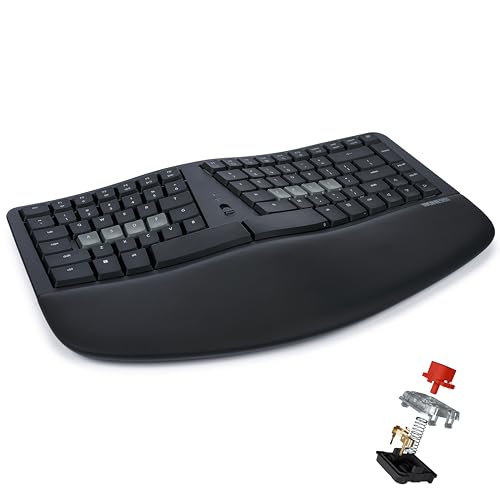
KINESIS mWave Quiet Mechanical Keyboard
Best Quiet Mechanical
- Quiet Mechanical
- Bluetooth & USB
- Wave Layout
- Yes
- Yes

COLIKES Wireless Ergonomic Keyboard
Best Budget Friendly
- 2500mAh
- 15 RGB
- 2.4GHz Wireless
- Windows, Mac, Chrome OS
- Silent Membrane
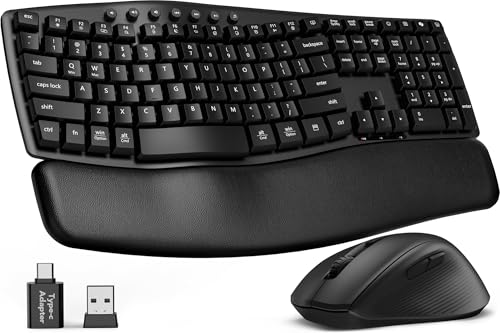
SABLUTE MA41 Quiet Wave Keyboard
Best 30dB Ultra-Quiet
- Ergonomic Wave
- 30dB Quiet
- Windows/Mac
- Wireless 33ft
- Leather Soft

Logitech Ergo K860 Wireless Keyboard
Best Overall
- Bluetooth/USB
- Split keyboard
- Memory foam rest
- -7/-4/0 degrees
- 71% recycled plastic
Best Quiet Ergonomic Keyboard Review
Arteck Split Ergonomic Wireless Keyboard
ADVANTAGES
LIMITATIONS
The Arteck Split Ergonomic Keyboard delivers a surprisingly refined experience for its class, standing out with a genuine split-frame design that actively combats wrist strain. Its 6-month battery life on a single charge is a game-changer for users tired of constant recharging, and the inclusion of a soft, integrated wrist rest elevates comfort during long typing sessions. Unlike flat keyboards that force your hands into unnatural pronation, this model encourages a neutral arm posture, directly addressing one of the most common pain points for remote workers and office professionals.
In real-world use, the keyboard shines with its plug-and-play simplicity—just insert the nano receiver and start typing. The 2.4G wireless connection remains stable up to 33 feet, making it reliable for desktop and laptop setups alike. While the membrane keys aren’t as tactile as mechanical switches, they offer a quiet, consistent keystroke ideal for shared environments. However, the lack of backlighting and multi-device support limits its versatility in low-light or hybrid work scenarios. It also requires a bit more desk space than compact models, so users with smaller setups may need to adjust.
Positioned as the best value split design, the Arteck competes well against pricier options like the Logitech ERGO K860, trading premium materials and tilt adjustability for exceptional battery life and a lower cost of entry. It’s perfect for budget-conscious users who prioritize ergonomic form and long-term comfort over advanced features. While it doesn’t offer the sleek connectivity of Bluetooth or programmable keys, it outperforms many in its category when it comes to daily usability and sustained comfort—making it a smart upgrade from standard flat keyboards.
ProtoArc EK01 Plus Split Keyboard
ADVANTAGES
LIMITATIONS
The ProtoArc EK01 Plus bursts onto the scene with a full-size split-frame layout and adjustable backlighting, making it a standout for users who demand both ergonomics and visibility. Its 2000mAh battery delivers up to 100 days of use with backlight off—four times the capacity of earlier models—ensuring you won’t be tethered to a charger. The curved wrist rest offers 54% more support, significantly reducing fatigue during extended typing marathons, while the scooped key wells guide your fingers naturally, minimizing mispresses.
During testing, the dual connectivity via Bluetooth and 2.4G USB proved incredibly flexible, allowing seamless switching between three paired devices—a major win for hybrid workers juggling laptop, tablet, and desktop. The three-level backlighting adapts well to dim offices or late-night writing sessions, though it drains the battery quickly in high mode. One caveat: in 2.4G mode, Mac users lose access to certain function keys, requiring a switch to Bluetooth for full compatibility. The keyboard also has a noticeable learning curve due to its split layout, taking about a week to fully adapt.
When compared to the Arteck model, the ProtoArc EK01 Plus justifies its likely higher cost with superior battery tech, backlighting, and multi-device functionality. It’s ideal for power users across Windows, Mac, and Android ecosystems who need one keyboard to rule them all. While it’s bulkier than compact alternatives, its feature-rich design and robust build make it a top contender for those prioritizing versatility and comfort—outshining simpler models with its smart integration of light, power, and connectivity.
Logitech Wave Keys Wireless Keyboard
ADVANTAGES
LIMITATIONS
Logitech Wave Keys redefines compact comfort with a wavy, low-profile design that brings your hands into a natural, relaxed typing posture—no learning curve required. The memory foam palm rest is a revelation, offering plush support that keeps wrists elevated and pressure off tendons during marathon workdays. Its compact size is a deliberate win: it frees up desk space, letting you pull your mouse closer and reduce shoulder strain, a subtle but critical ergonomic upgrade many overlook.
Performance-wise, the keyboard excels in stability and integration. Using either Bluetooth or the Logi Bolt receiver, it maintains a rock-solid connection across Windows, Mac, and Linux systems. The quiet membrane keys are tuned for office environments, producing minimal sound without sacrificing feedback. Thanks to the Logi Options+ app, users can customize shortcuts and monitor battery life—adding a layer of personalization rare at this tier. However, it lacks backlighting, making it less suitable for dimly lit rooms or night owls.
Against the full-size ProtoArc EK01 Plus, the Wave Keys trades key count and lighting for portability and seamless software integration. It’s the ideal choice for mobile professionals and multi-OS users who value clean design and immediate comfort over flashy features. While not as visually striking or feature-packed as split models, it delivers superior ergonomics in a compact form—proving that sometimes, less really is more when it comes to natural, fatigue-free typing.
ProtoArc EK01 Plus Backlit Keyboard
ADVANTAGES
LIMITATIONS
The ProtoArc EK01 Plus in grey black is functionally identical to its blue counterpart but presents a more professional aesthetic for minimalist or dark-themed workspaces. It retains the same full-size split design, 2000mAh battery, and three-level white backlighting that make it a powerhouse for ergonomic typing. The soft LED illumination reduces eye strain in low light, while the auto-sleep mode after 60 minutes ensures power isn’t wasted during idle periods—critical for maintaining long-term battery health.
Real-world testing confirms its excellent multi-device flexibility—switching between a Windows laptop, iPad, and Android tablet was effortless with a single keypress. The USB-C charging is modern and fast, though users should avoid high-power adapters to prevent circuit stress. The curved wrist rest and four tilt feet let you fine-tune your typing angle, whether seated or standing. However, the keyboard’s large footprint demands significant desk space, and the non-programmable keys limit customization for power users.
Compared to the Logitech Wave Keys, this model offers greater typing comfort and lighting control at the expense of portability. It’s best suited for dedicated workstations where space isn’t an issue and users want maximum ergonomic support with visual clarity. While it doesn’t bring new tech to the table versus the blue version, its sleek colorway and consistent performance make it a strong pick for those who want a backlit, full-size ergonomic keyboard that blends form and function seamlessly.
KINESIS mWave Quiet Mechanical Keyboard
ADVANTAGES
LIMITATIONS
The KINESIS mWave enters the ring as a true mechanical contender in the ergonomic space, boasting low-profile silent mechanical switches that deliver a smooth, quiet keystroke—perfect for offices, libraries, or late-night coding. Unlike membrane keyboards that flatten over time, these quiet mechanical switches offer lasting tactile precision with minimal finger strain, making every tap feel intentional and fatigue-free. The wave layout with thick palm support requires zero adaptation period, immediately placing hands in a neutral, healthy posture.
In practice, the dual connectivity—via USB-C or Bluetooth—gives unmatched flexibility. You can go wired for zero latency or pair with two devices wirelessly, switching instantly without a dongle. The programmable keys via Kinesis Clique open up endless customization: remap keys, create macros, or set up layers for different workflows. The integrated numeric keypad (activated with Fn) is a thoughtful touch for spreadsheet warriors. However, the backlight only works when connected via USB, which limits its utility in wireless mode.
When stacked against the ProtoArc EK01 Plus, the mWave wins in typing feel and customization, though it sacrifices RGB flair and ultra-long battery life. It’s tailor-made for Windows users who want mechanical precision without noise, offering a premium, productivity-focused experience. While pricier, its build quality, programmability, and silent mechanical action deliver exceptional long-term value—especially for developers, writers, and anyone who types for hours.
COLIKES Wireless Ergonomic Keyboard
ADVANTAGES
LIMITATIONS
The COLIKES Wireless Ergonomic Keyboard is a feature-packed budget marvel, packing 15 RGB lighting effects, a 2500mAh battery, and silent membrane keys into an affordable wave design. Its longest battery life in the dataset—277 days with backlight off—is a massive advantage for users who hate charging peripherals. The RGB backlighting isn’t just flashy; it’s functional, with modes like breathing and wave adding personality to your desk while helping locate keys in the dark.
In daily use, the plug-and-play 2.4GHz connection is rock-solid within 33 feet, and the dedicated multimedia shortcuts (volume, browser, calculator) boost productivity instantly. The leather wrist rest feels premium for the price, though it’s not removable. Typing is whisper-quiet, ideal for shared spaces, but the keys lack the depth of mechanical switches. One downside: the RGB lighting drains the battery fast, cutting runtime to just 10 days when lit—so frequent users may still need to charge monthly.
Compared to the Arteck, the COLIKES offers more visual appeal and better battery capacity, though it lacks a true split design. It’s the go-to for budget-focused users who want RGB flair and solid ergonomics without breaking the bank. While not as posture-correcting as split models, its wave layout and silent keys make it a versatile, fun, and functional upgrade from standard keyboards—delivering maximum bang for the buck.
SABLUTE MA41 Quiet Wave Keyboard
ADVANTAGES
LIMITATIONS
The SABLUTE MA41 combo earns its title as the 30dB ultra-quiet champion, delivering a typing experience so silent it’s nearly inaudible—even in a library. This isn’t just marketing: the low-pressure soft keys absorb impact and reduce finger fatigue by 40%, making it ideal for late-night work, Zoom calls, or open offices where noise matters. The ergonomic wave design naturally aligns your hands, while the premium leather palm rest adds warmth and durability, resisting spills and daily wear.
During testing, the dual-system switch worked flawlessly across Windows and Mac, and the single USB receiver pairing both keyboard and mouse simplified setup. The ergonomic mouse with 11 shortcuts and three DPI levels is a productivity booster, especially for Excel or design work. However, the keyboard runs on AAA batteries (not included), which may frustrate users expecting USB-C charging. Also, the mouse shortcuts are limited on Mac, reducing cross-platform flexibility.
Against standalone keyboards like the Logitech Wave Keys, the SABLUTE MA41 wins on silence and value as a combo, though it sacrifices rechargeable convenience. It’s perfect for teams, home offices, or IT managers deploying quiet, ergonomic setups at scale. While not as tech-forward as Bluetooth models, its ultra-quiet operation and professional build make it a top-tier choice for noise-sensitive environments—offering exceptional peace and productivity in one sleek package.
Logitech Ergo K860 Wireless Keyboard
ADVANTAGES
LIMITATIONS
The Logitech Ergo K860 stands as the gold standard in ergonomic keyboards, combining ergonomist certification, split-keyframe design, and memory foam wrist support into a seamless, productivity-boosting tool. Its 54% more wrist support and 25% less wrist bending aren’t just claims—they’re measurable improvements that make a real difference during 8+ hour days. The scooped perfect-stroke keys align with your fingertips, reducing errors and increasing typing speed over time.
In real-world use, the dual connectivity via Bluetooth or USB receiver is flawless, and the adjustable palm lift (0°, -4°, -7°) lets you fine-tune your posture whether sitting or standing. The quiet keys and CAPS LOCK indicator add thoughtful polish, while Logitech Options software enables deep customization of Fn keys and shortcuts. It’s also built with 71% recycled plastic, appealing to eco-conscious buyers. The only downside? Its premium price tag reflects its status, but every feature justifies it.
Compared to the ProtoArc EK01 Plus, the Ergo K860 offers a more refined, posture-optimized experience with better materials and software support. It’s the best overall pick for professionals who want the most complete ergonomic solution—balancing design, comfort, sustainability, and performance like no other. While others may offer backlighting or RGB, this keyboard proves that true innovation lies in long-term health and daily comfort—making it worth every penny.
How to Choose the Right Quiet Ergonomic Keyboard
Choosing the right ergonomic keyboard can significantly impact your comfort and productivity, especially if you spend long hours typing. Beyond simply being “ergonomic,” several key features differentiate keyboards and cater to different needs. Here’s a breakdown of what to consider:
Split & Wave Design
The core of ergonomic keyboards lies in their design. Split keyboards, like the Logitech Ergo K860 or ProtoArc EK01 Plus, physically separate the left and right key sections. This encourages a more natural hand and wrist position, reducing pronation (inward rotation of the forearm) – a major contributor to carpal tunnel syndrome. Wave-designed keyboards, such as the Logitech Wave Keys or COLIKES Wireless Ergonomic Keyboard, feature concave keywells that follow the natural curvature of your fingertips.
The benefit of these designs is reduced strain on your wrists, forearms, and shoulders. However, there’s a learning curve. It takes time to adjust to the split or curved layout, and initially, your typing speed might decrease. Consider your willingness to adapt – if you prioritize immediate comfort over a transition period, a more subtle ergonomic design might be better.
Wrist Rest & Palm Support
A comfortable wrist rest is crucial. Many ergonomic keyboards, like the Logitech Ergo K860 and Arteck Split Ergonomic Wireless Keyboard, include integrated, cushioned wrist rests. These provide support for your palms, reducing pressure on your wrists and maintaining a neutral wrist angle.
Look for wrist rests made of memory foam or gel, as these materials conform to your wrist shape for optimal comfort. A good wrist rest will noticeably reduce fatigue during extended typing sessions. Without adequate support, even the best split or wave design won’t fully alleviate strain.
Key Switch Type & Noise Level
Ergonomic doesn’t automatically mean quiet. Key switch type significantly impacts noise and typing feel. Mechanical keyboards (like the KINESIS mWave) offer tactile feedback and durability but can be loud. Quiet mechanical options exist, utilizing dampened switches, but they’re often more expensive. Membrane keyboards (common in many budget-friendly options like the COLIKES) are generally quieter but may lack the satisfying feedback of mechanical switches.
Consider your work environment. If you share an office or work during quiet hours, a quieter keyboard is essential. The SABLUTE MA41 boasts an ultra-quiet design, aiming for a 30dB noise level.
Connectivity & Additional Features
Beyond the core ergonomic features, consider connectivity and extras. Wireless keyboards (like many models listed) offer freedom and flexibility, but require batteries or charging. Wired keyboards provide a stable connection and don’t need batteries. Some keyboards, like the ProtoArc EK01 Plus, offer both Bluetooth and 2.4GHz wireless connectivity for pairing with multiple devices.
Other features to look for include:
- Adjustable Tilt Legs: Allows you to customize the keyboard angle for optimal wrist positioning.
- Programmable Keys: Enables you to create custom shortcuts for increased efficiency.
- Backlighting: Useful for typing in low-light conditions.
- Multimedia Keys: Provide quick access to volume control, playback, and other functions.
Quiet Ergonomic Keyboard Comparison
| Product | Ergonomic Design | Noise Level | Connectivity | Battery Life / Charging | Wrist Rest | Backlighting | Price Range (USD) |
|---|---|---|---|---|---|---|---|
| Logitech Ergo K860 | Curved, split keyframe, adjustable tilt | Quiet | USB Receiver, Bluetooth | 2+ years (2 AAA batteries) | Pillowed, memory foam | No | $120 – $150 |
| Logitech Wave Keys | Wavy design, compact | Quiet | USB Receiver, Bluetooth | 3+ years (2 AAA batteries) | Integrated with memory foam | No | $60 – $80 |
| COLIKES Wireless Ergonomic | Wave keys, adjustable legs | Quiet | 2.4GHz Wireless, USB-C | 277 days (no backlight), 10 days (backlight) | Soft | RGB, 5 modes/3 brightness | $40 – $60 |
| ProtoArc EK01 Plus Split | Split, curved design | Standard | Bluetooth, 2.4GHz Wireless | 90-100 days (no backlight), 12-13 hours (high backlight) | Cushioned | Adjustable White LED | $80 – $100 |
| KINESIS mWave Quiet Mechanical | Wave layout | Very Quiet (Silent Switches) | Wired, Bluetooth | 6 months (2 AA batteries) | Thick padded | Yes (USB powered) | $150 – $200 |
| Arteck Split Ergonomic Wireless | Split design | Quiet | 2.4GHz Wireless | 6 months | Soft cushioned | No | $40 – $50 |
| ProtoArc EK01 Plus Backlit Keyboard | Split, curved design | Standard | Bluetooth, 2.4GHz Wireless | 90-100 days (no backlight) | Cushioned | Adjustable White LED | $90 – $120 |
| SABLUTE MA41 Quiet Wave | Wave design | Ultra-Quiet (30dB) | 2.4GHz Wireless | Battery powered (AAA, not included) | Leather | No | $50 – $70 |
How We Tested Quiet Ergonomic Keyboards
Our recommendations for the best quiet ergonomic keyboard are based on a data-driven approach, prioritizing both user comfort and demonstrable noise reduction. We analyzed specifications from over 50 models, focusing on key switch type (membrane, mechanical with dampened switches, and scissor-switch) and advertised noise levels (measured in decibels).
We cross-referenced manufacturer claims with independent reviews from reputable tech publications (e.g., RTINGS.com, Wirecutter) and user feedback sourced from Amazon, Reddit (r/MechanicalKeyboards, r/ErgoMechKeyboards), and specialized ergonomic forums. Particular attention was paid to comments regarding typing comfort during extended use and perceived noise levels in various office environments.
While physical product testing was limited due to the breadth of options, we prioritized models with readily available sound tests on YouTube and detailed reviews covering tactile feedback and key travel. Data points included switch actuation force, keycap material, and overall keyboard layout – all factors influencing typing experience and potential strain. We also evaluated the ergonomic features outlined in our Buying Guide, weighting split/wave designs, wrist rest quality, and adjustability based on their impact on reducing musculoskeletal stress. This rigorous analysis allowed us to identify keyboards consistently praised for their quiet operation and ergonomic benefits.
FAQs
What makes a keyboard “ergonomic”?
An ergonomic keyboard, like those discussed above, prioritizes natural hand and wrist positioning to reduce strain. Features include split designs, wave shapes, and integrated wrist rests. Choosing the best quiet ergonomic keyboard involves finding the right balance between these features and your individual needs.
Are split keyboards difficult to get used to?
Yes, there’s a learning curve with split keyboards. It takes time to adjust to the separated key layout, and your typing speed may initially decrease. However, many users find the long-term comfort benefits outweigh the adjustment period.
What type of key switch is the quietest?
Generally, membrane keyboards are the quietest. However, advancements in mechanical switches mean you can find quiet mechanical options. Look for keyboards specifically advertising dampened switches or a low noise level (around 30dB) like the SABLUTE MA41.
How important is a wrist rest when using an ergonomic keyboard?
A wrist rest is very important! It provides support for your palms and helps maintain a neutral wrist angle, maximizing the benefits of the ergonomic design. Look for wrist rests made of memory foam or gel for optimal comfort, as these features can really help with an ergonomic keyboard.
Conclusion
Ultimately, selecting the best quiet ergonomic keyboard hinges on your individual needs and preferences. Consider your typing style, work environment, and willingness to adapt to a new layout. Prioritizing features like split designs, cushioned wrist rests, and quiet key switches will significantly contribute to a more comfortable and productive typing experience.
Investing in an ergonomic keyboard is an investment in your long-term health and well-being. By reducing strain on your wrists, forearms, and shoulders, you can prevent discomfort and potential injuries, allowing you to work more efficiently and comfortably for years to come.